
Teams · IT & security

Clear the queue, keep the evidence.

Agent Serve agents gather access lists, triage alerts and answer service desk tickets. Every change to an account or a device waits for a person.

Agent Serve, the AI workspace where teams build, deploy, and manage AI agents, gives IT and security teams agents for access reviews, alert triage, onboarding and offboarding and service desk tickets, connected to Okta, Microsoft Entra ID, CrowdStrike, ServiceNow and PagerDuty, with approval before any change.

At a glance

Who keeps systems safe, and what buries them.

Who it is for

IT administrators, service desk analysts, security engineers and GRC leads

The problem it removes

Quarterly access reviews mean exporting users from every system into spreadsheets. Alerts arrive faster than analysts can read them, and the same password and access tickets come in every day.
What your team still controls

People decide

  • A person approves every change to a user, group or device
  • Which systems and actions each agent may use
  • Who may approve, and how long a review stays open
Day one

What you can run first

  • Chat answers about security policy with the clause cited
  • Access lists gathered from identity systems into a table
Later

What you add once it is trusted

  • A Relay that triages new alerts and drafts the case notes
  • Offboarding checklists that run once HR marks a leaver

Agents to build

Agents an IT team runs every week.

Each agent is built in Agent Serve and works through the identity, endpoint and ticketing tools the team already has.

GRC

Quarterly access review

An Agent Serve Relay lists users and group members from Okta, Microsoft Entra ID and AWS IAM into a table and asks each manager to confirm or remove access.

  1. Review starts
  2. Access listed
  3. Managers decide
  4. Evidence saved
Security operations

Alert triage

An Agent Serve workflow reads new CrowdStrike alerts, adds host and user context, and drafts a case note with a suggested severity.

  1. Alert in
  2. Context added
  3. Severity proposed
  4. Analyst decides
Service desk

Ticket answers from policy

When a ServiceNow incident is created, an Agent Serve agent finds the matching how-to in the knowledge base and drafts the reply.

  1. Incident created
  2. Policy found
  3. Reply drafted
  4. Analyst sends
IT operations

Leaver offboarding

An Agent Serve Relay prepares the offboarding steps for a leaver across Okta and Microsoft Entra ID, and runs each one after approval.

  1. Leaver marked
  2. Steps listed
  3. Each step approved
  4. Done and logged
Endpoint management

Device compliance in Intune

An Agent Serve agent lists Microsoft Intune devices that fail a compliance policy and asks an admin before any sync, lock or retire.

  1. Devices listed
  2. Non-compliant found
  3. Owner notified
  4. Admin approves

Examples show what teams can build in Agent Serve. They describe patterns, not named customer deployments.

How it runs

From open review to signed-off evidence.

Agent Serve gathers the lists and chases the answers. Managers decide who keeps access.

  1. 1

    Access is listed

    The Relay reads users and group members from each identity system.

  2. 2

    It is organized

    Accounts land in a table by manager, with last sign-in and groups.

  3. 3

    Managers decide

    Each manager confirms or removes access, and removals wait for approval before they run.

  4. 4

    Evidence is saved

    The final table and the decisions are saved to Files for the auditor.

Integrations

Connected to identity, endpoints and the service desk.

Agent Serve connects to identity providers, endpoint and cloud security, on-call and ticketing tools.

Browse integrations

In each tool

What IT agents can read and change.

Okta and Microsoft Entra ID

Agent Serve lists and updates users and group members, and can suspend or deactivate an Okta account once a person approves.

Leaver → suspend · needs approval

CrowdStrike

Agent Serve queries alerts, hosts, indicators and vulnerabilities, and updates alerts as analysts decide.

New alert → context added

ServiceNow

Agent Serve creates, updates and resolves incidents and change requests, starting when an incident is created.

Incident created → reply drafted

Vanta

Agent Serve reads frameworks, controls and tests and uploads documents as evidence.

Access review → evidence uploaded

Microsoft Intune

Agent Serve lists devices, apps and compliance policies, and can sync, lock or retire a device after approval.

Lost laptop → remote lock · needs approval

Microsoft Sentinel

Agent Serve sends audit and run data to Microsoft Sentinel, so the security team sees agent activity beside everything else.

Audit events → Sentinel

In the workspace

The parts of Agent Serve IT teams use.

  1. 01Relays

    Run the review

    A Relay gathers access lists and chases each manager for a decision.

  2. 02Knowledge bases

    Know the policy

    Knowledge bases hold security policy and runbooks, kept in sync.

  3. 03Monitors & alerts

    Watch for change

    A monitor alerts the team when a metric crosses its line.

  4. 04Run history

    Prove it

    Logs keep a trace of every run for the auditor.

In depth

Controls an auditor can follow.

01 · Knowledge

Policy answers with the clause cited

Agent Serve Chat answers security policy questions from the knowledge base and links the passage it used.

02 · Audit

Every action, permitted or refused

The Agent Serve Relay audit view lists what each Relay did, what it was refused, and the rule that blocked it.

03 · Kill switch

Stop every Relay at once

An Agent Serve admin can pause all Relays in the organization, with a reason, and turn them back on when ready.

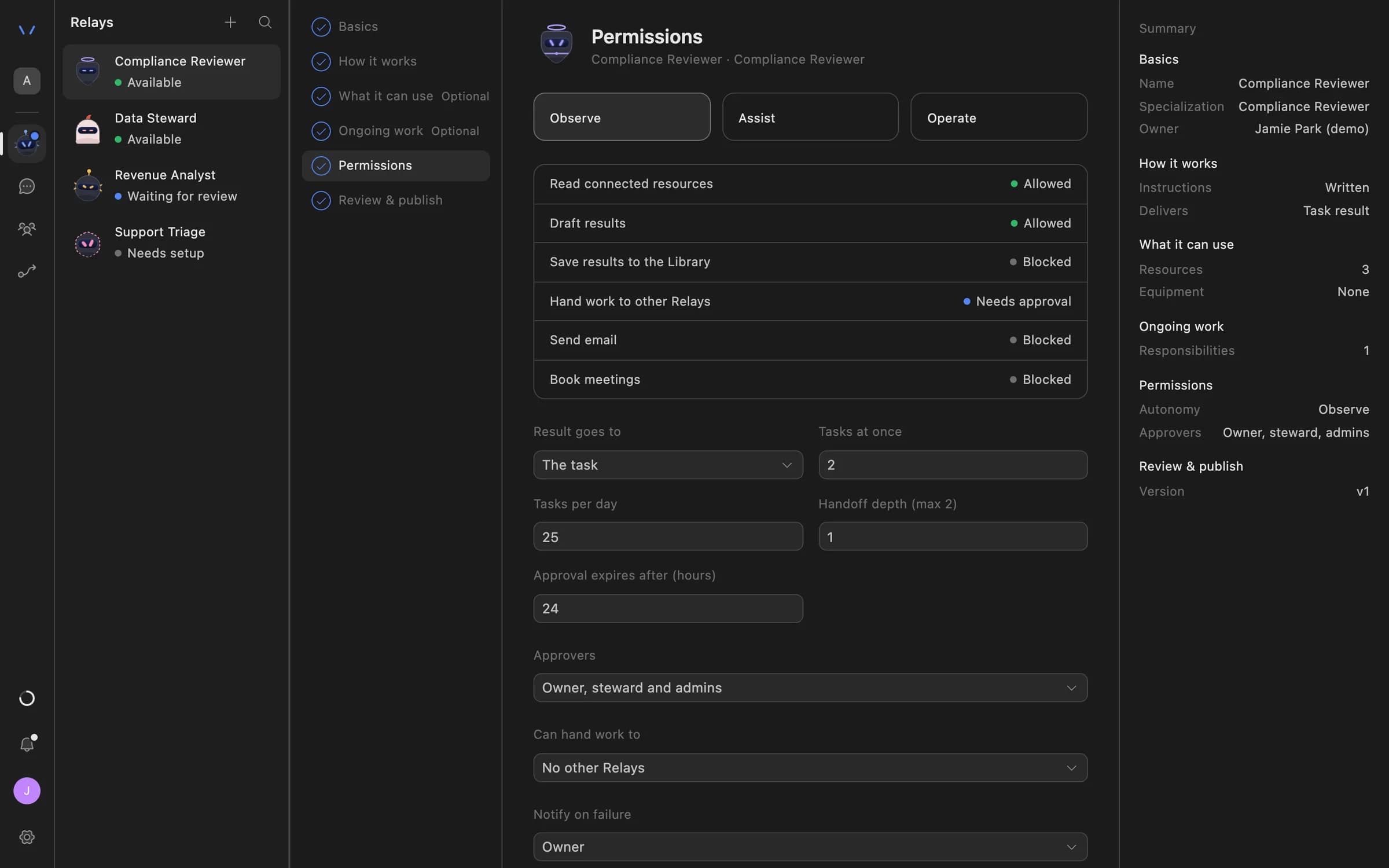
Relay setup in Agent Serve on the Permissions step: Observe, Assist and Operate autonomy levels, each action marked Allowed, Needs approval or Blocked, daily task limits, approval expiry and who can approve.

Before and after

Less spreadsheet work, better evidence.

Less spreadsheet work, better evidence.
WorkBeforeWith Agent Serve
Access reviewsBeforeExports from each system, merged by hand.With Agent ServeA table built by a Relay, with each decision recorded.
Alert triageBeforeAnalysts gather context for every alert.With Agent ServeContext and a draft note ready when the analyst opens it.
Repeat ticketsBeforeThe same how-to typed again.With Agent ServeDrafted from the runbook, with the source linked.

Governance

Changes wait for a named approver.

  • Routine guardrails

    Agent Serve can cap how often a Relay routine runs and turn it off after repeated failures, with a notice to its owner.

  • Approvals before action

    Relays never send email or book meetings without an approval, under any autonomy setting. An approval covers the exact payload the reviewer saw and expires if nobody decides.

  • Audit trail

    Proposals, approvals, declines and executed actions are written to the workspace audit log, which admins can export.

  • SSO and SCIM

    Sign in through your identity provider with SAML 2.0 or OIDC, and provision people with SCIM.

  • Roles and permission groups

    Admin, write and read roles per workspace, plus permission groups that limit which models, blocks and integrations a team can use.

  • Self-hosting

    Run Agent Serve in your own cloud or data centre, next to the systems it reads.

Questions

About Agent Serve for IT

Can an agent deactivate a user on its own?

An Agent Serve Relay treats account changes as writes, which need approval unless you delegate them. Most IT teams keep a person on every change.

Can we run Agent Serve in our own cloud?

Yes. Agent Serve can be self-hosted, and it supports SAML and OIDC single sign-on and SCIM provisioning.

Where do agent actions get recorded?

Agent Serve logs every run block by block, and the Relay audit view lists permitted, refused and failed actions with the rule behind each.

Last updated

Enterprise access

Put AI agents to work across your team

Agent Serve is available to teams by invitation. Tell us what you want to build and we will set up your workspace with you.