Use case · Ecommerce operations

Orders confirmed before they ship.

Workflows confirm COD orders on WhatsApp, follow up failed deliveries, and keep a store dashboard current, while refunds and cancellations wait for a person.

An illustrative ecommerce operations use case for Agent Serve, the AI workspace where teams build, deploy, and manage AI agents: Shopify and WhatsApp workflows, order tables, a store dashboard, monitors and an order operations Relay.

At a glance

Who runs the store, and where orders leak.

Who it is for

Ecommerce managers, operations leads and customer care teams at direct-to-consumer brands

The problem it removes

Cash-on-delivery orders ship before anyone checks the buyer meant it. Failed deliveries come back as courier reports that someone reads days later, and the store numbers live in three exports that never agree.
What your team still controls

People decide

  • A person approves every refund and order cancellation
  • The WhatsApp templates customers receive and when they are sent
  • Which stores, tables and integrations each Relay may use
Day one

What you can run first

  • A Shopify order webhook feeding an orders table
  • A WhatsApp confirmation for every new COD order
  • A store dashboard that updates as orders land
Later

What you add once it is trusted

  • Courier status checks and NDR follow-up on WhatsApp
  • An order operations Relay that drafts return and refund decisions
  • Monitors on RTO rate and unconfirmed orders

Step by step

One COD order, start to finish.

  1. 01

    The order is confirmed

    A WhatsApp message asks the buyer to confirm or cancel, and the reply tags the Shopify order.

  2. 02

    A failed delivery is caught

    A monitor flags the rise in failed deliveries, and the buyer gets a WhatsApp follow-up the same day.

  3. 03

    A person approves the refund

    The Relay drafts the refund or cancellation, and it runs only after someone approves.

How it fits together

From checkout to delivered, or returned.

  1. 01Workflows

    Confirm and follow up

    Workflows send WhatsApp confirmations and NDR follow-ups, and tag the Shopify order with the reply.

  2. 02Tables

    Keep the record

    Orders, replies and courier statuses land in workspace tables as they happen.

  3. 03Dashboards & BI

    Show the store

    The store dashboard reads those tables, so orders, confirmations and RTO update as rows land.

  4. 04Monitors & alerts

    Raise the alarm

    Monitors re-check RTO rate and unconfirmed orders as often as every 5 minutes.

  5. 05Relays

    Handle returns

    An order operations Relay reads return requests and drafts the refund for a person to approve.

How it runs

From new order to confirmed dispatch.

Agent Serve runs the messages and the checks, and anything that cancels an order or moves money waits for a person.

  1. 1

    The order arrives

    A Shopify webhook points at the workflow’s Webhook trigger, and the order is written to the orders table.

  2. 2

    The buyer is asked

    The WhatsApp block sends an approved template with Confirm and Cancel reply buttons.

  3. 3

    The reply is recorded

    The WhatsApp webhook trigger receives the reply, and the workflow tags the Shopify order and updates the table.

  4. 4

    The courier is checked

    The API block reads shipment status from the courier’s API, with its key stored as a workspace secret.

What to measure

How a store might measure the change.

Example figures for a brand shipping a few thousand orders a month, many of them cash on delivery.

Illustrative

−20%

RTO on COD orders

Unconfirmed orders are held before dispatch.

Illustrative

85%

COD orders confirmed

Buyers reply to the WhatsApp message before dispatch.

Illustrative

−40%

Time on NDR calls

Most failed deliveries are resolved on WhatsApp.

Illustrative

100%

Refunds approved

Every refund and cancellation has a reviewer.

Illustrative example. Figures show how the workflow is measured; they are not customer results.

In depth

What the operations team works with.

Agent Serve puts the order workflows, the store dashboard and the Relay that handles returns in one workspace.

01 · Workflows

Order flows you can read

Build the COD confirmation and NDR follow-up in the Agent Serve workflow builder, with Shopify, WhatsApp and API blocks.

  • Shopify orders: get, list, update tags and notes, cancel
  • WhatsApp templates, media and reply buttons
  • Couriers and payment gateways through the API block
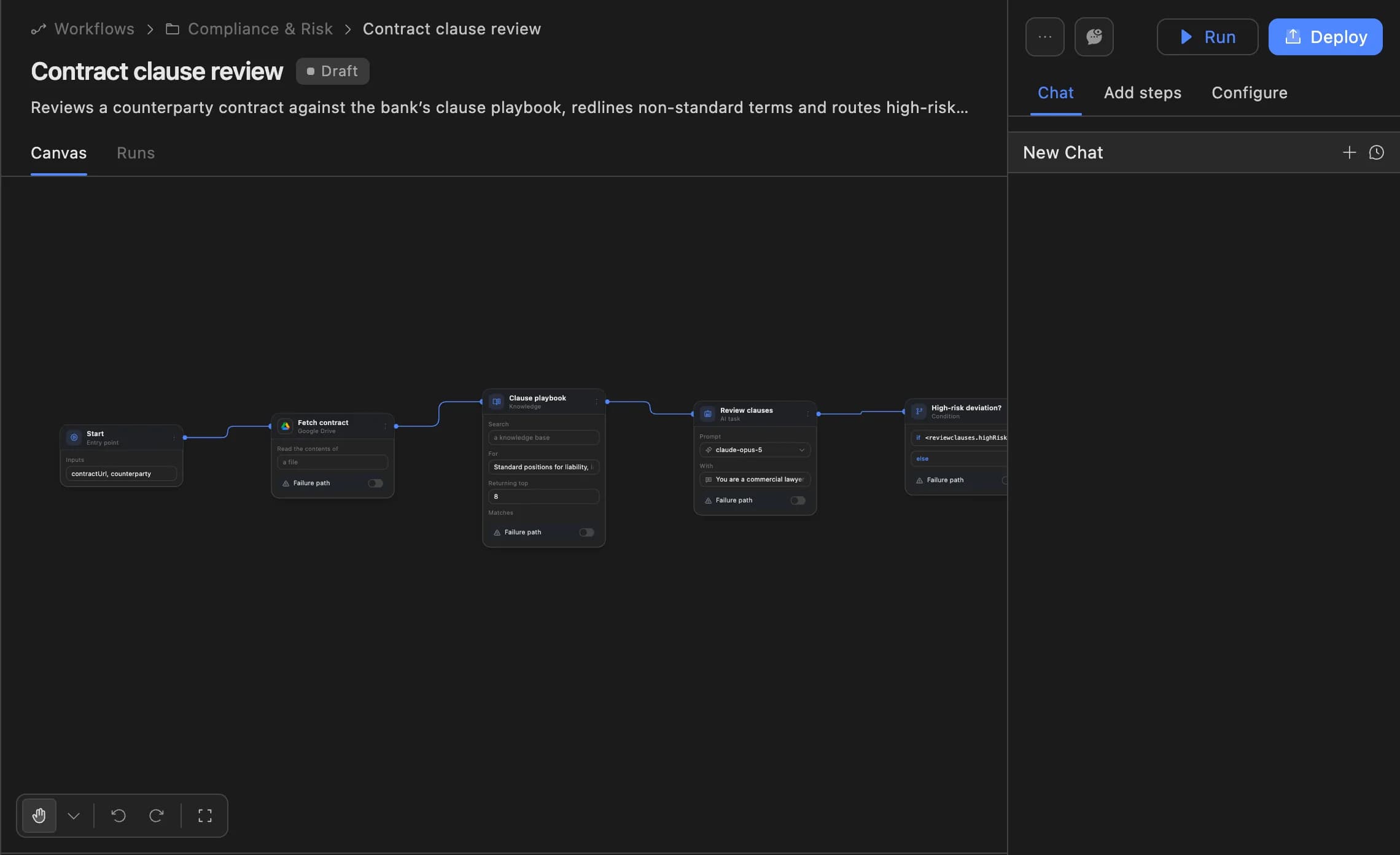
The Agent Serve workflow builder showing a contract clause review agent: start, fetch contract, clause playbook, review clauses and a high-risk deviation branch, with Run and Deploy buttons.
02 · Dashboards

The store, near real time

Agent Serve dashboard panels read the tables workflows write to, and data sources refresh every 15 minutes or query live.

  • Orders, confirmations, RTO and returns in one view
  • Scheduled PDF or link to the founders each morning
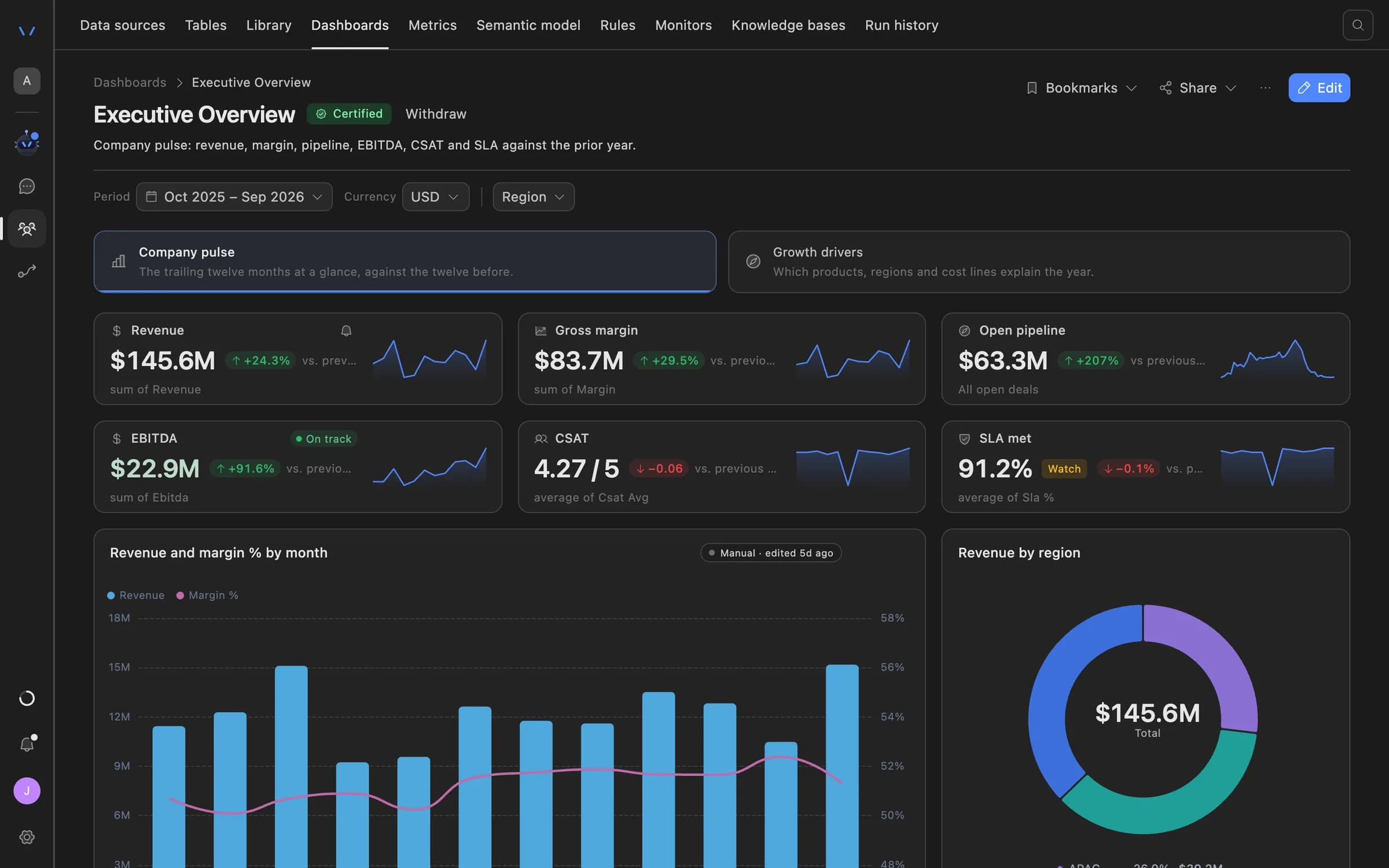
Agent Serve dashboard showing an executive overview: revenue, gross margin, open pipeline, EBITDA, CSAT and SLA tiles with trend lines, a monthly revenue and margin chart, and revenue by region.
03 · Relays

Refunds always ask first

An Agent Serve Relay classes each call as a read, write, destructive or spend. Refunds and cancellations wait for approval.

  • Calls only the integrations on its allowlist
  • Delegated limits per action, per day and per week
  • A kill switch pauses the Relay at once
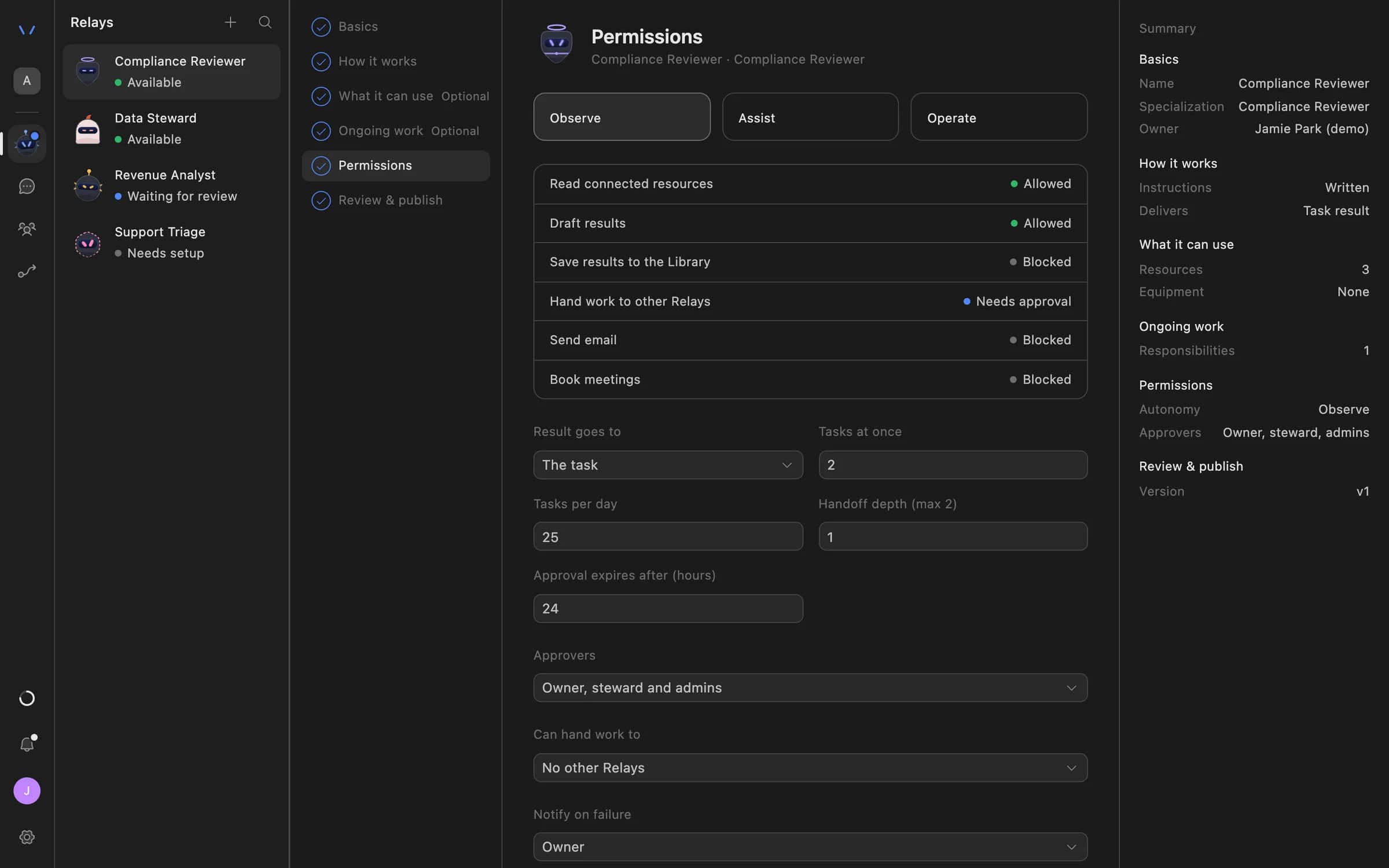
Relay setup in Agent Serve on the Permissions step: Observe, Assist and Operate autonomy levels, each action marked Allowed, Needs approval or Blocked, daily task limits, approval expiry and who can approve.
04 · Approvals

The exact refund, before it runs

The approver sees the order, the amount and the reason the Agent Serve Relay drafted, then approves or declines.

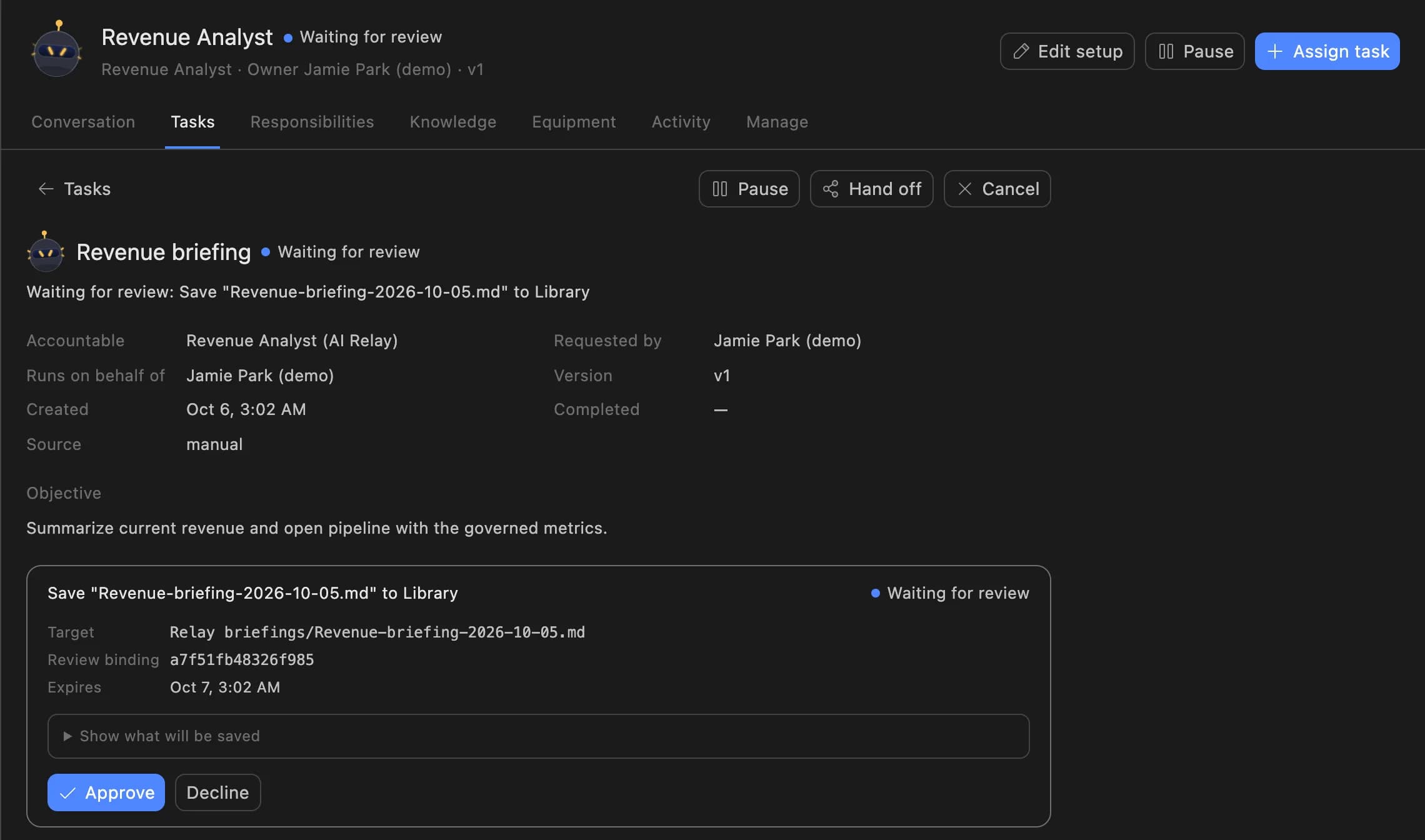
A Relay task in Agent Serve waiting for review: the Revenue Analyst asks to save a revenue briefing to the Library, with Approve and Decline buttons.

Examples

Store operations across three kinds of brand.

Three ecommerce teams running order operations on Agent Serve, each with a person approving refunds and cancellations.

Fashion · Direct to consumer

COD confirmation on WhatsApp

An Agent Serve workflow asks every cash-on-delivery buyer to confirm, and holds orders with no reply for the team to call.

  1. Order webhook
  2. WhatsApp template
  3. Reply tagged
  4. Dispatch or hold
Beauty · Marketplace and site

NDR follow-up the same day

An Agent Serve workflow reads courier statuses through the API block and messages buyers whose delivery failed.

  1. Courier status
  2. NDR found
  3. WhatsApp follow-up
  4. Reattempt booked
Home goods · Returns desk

Returns with a reviewer

An Agent Serve Relay reads each return request against the returns policy and drafts the refund for approval.

  1. Return request
  2. Policy checked
  3. Refund drafted
  4. Lead approves

Examples show what teams can build in Agent Serve. They describe patterns, not named customer deployments.

Before and after

Fewer wasted shipments, fewer phone calls.

Fewer wasted shipments, fewer phone calls.
WorkBeforeWith Agent Serve
COD ordersBeforeShipped on trust, or confirmed by calling each buyer.With Agent ServeConfirmed on WhatsApp, with the reply tagged on the order.
Failed deliveriesBeforeRead from a courier report days later.With Agent ServeCaught from the courier status and followed up the same day.
Store numbersBeforeExports from the store, the courier and the payment gateway.With Agent ServeOne dashboard over tables that update as rows land.
RefundsBeforeApproved in a chat thread with no record.With Agent ServeDrafted by a Relay, approved by a person and audited.

Governance

Every refund has a named approver.

Agent Serve keeps buyer data where it belongs, and anything that cancels an order or moves money waits for a person.

Security and governance
  • Money-moving calls wait

    Agent Serve Relays hold refunds and cancellations for approval unless they fit inside delegated limits you set.

  • Courier keys kept as secrets

    Agent Serve stores courier and gateway API keys as workspace secrets, out of workflow text and logs.

  • Approvals before action

    Relays never send email or book meetings without an approval, under any autonomy setting. An approval covers the exact payload the reviewer saw and expires if nobody decides.

  • Audit trail

    Proposals, approvals, declines and executed actions are written to the workspace audit log, which admins can export.

  • Run logs

    Every workflow run records each block’s inputs, outputs and errors, so a reviewer can trace how a result was reached.

  • PII detection

    A Guardrails block detects personal data and blocks or masks it before text reaches the next step.

  • Roles and permission groups

    Admin, write and read roles per workspace, plus permission groups that limit which models, blocks and integrations a team can use.

Further reading

Solutions built for ecommerce teams.

Questions

About this use case

How do Shopify orders reach Agent Serve?

Point a Shopify webhook at an Agent Serve workflow’s Webhook trigger. The Shopify block then reads, tags, updates or cancels orders, and manages products, customers, inventory and fulfillments.

Does Agent Serve integrate with my courier or payment gateway?

Not natively. Agent Serve connects to couriers, payment gateways and WhatsApp providers through the API block, with the key stored as a workspace secret, or through Tool connections where the provider offers a server for AI tools.

How current is the store dashboard?

Near real time. Agent Serve panels over workflow-written tables update as rows land, and data sources refresh as often as every 15 minutes or query live on each view.

Can a Relay refund or cancel an order on its own?

Not by default. An Agent Serve Relay holds refunds and cancellations for approval unless you give it delegated limits and the call fits inside them.

Are the figures on this page real results?

No. The figures are illustrative examples of what an ecommerce team might measure with Agent Serve, not customer results.

Last updated

Enterprise access

Put AI agents to work across your team

Agent Serve is available to teams by invitation. Tell us what you want to build and we will set up your workspace with you.