
Teams · Finance & operations

Close faster, with every number traced.

Agent Serve agents pull balances, match transactions, flag spend outside policy and draft the commentary. Your team reviews and posts.

Agent Serve, the AI workspace where teams build, deploy, and manage AI agents, gives finance and operations teams agents for close preparation, spend review, vendor checks and reporting, connected to NetSuite, QuickBooks, SAP, Brex and SAP Concur, with people approving every posting.

At a glance

Who closes the books, and what slows them.

Who it is for

Controllers, accountants, FP&A analysts and operations managers

The problem it removes

Each month the team exports from the ledger, the bank and the spend tools into spreadsheets, matches lines by hand, and writes the variance commentary from scratch.
What your team still controls

People decide

  • A person approves every journal entry and payment-related change
  • Which ledgers, entities and accounts each agent may read
  • The policy rules spend is checked against
Day one

What you can run first

  • Chat answers about balances and transactions with the records behind them
  • A spend review that flags expenses outside policy
Later

What you add once it is trusted

  • Close checklists run by a Relay on a schedule
  • A management dashboard on governed metrics

Agents to build

Agents a finance team runs every month.

Each agent is built in Agent Serve and reads the systems the team already keeps its numbers in.

Accounting

Close preparation

An Agent Serve Relay pulls trial balances from NetSuite or QuickBooks into a table, reconciles them against bank activity, and lists what does not match.

  1. Close starts
  2. Balances pulled
  3. Lines matched
  4. Breaks listed
Spend management

Expense policy review

An Agent Serve workflow reads new Brex expenses or SAP Concur reports, checks them against your policy rules, and sends exceptions to an approver.

  1. Expense in
  2. Policy checked
  3. Exception flagged
  4. Approver decides
FP&A

Variance commentary

An Agent Serve agent compares actuals with budget in a dashboard and drafts the commentary for each line that moved.

  1. Month closed
  2. Variance found
  3. Drivers read
  4. Commentary drafted
Operations

Contracts out for signature

An Agent Serve workflow fills a DocuSign template from a table row and sends it once a person approves.

  1. Row approved
  2. Template filled
  3. Envelope sent
  4. Status tracked
Spend management

Ramp transactions review

An Agent Serve agent reads Ramp card transactions and reimbursements and flags the ones missing a receipt or outside policy.

  1. Transactions read
  2. Receipts checked
  3. Policy checked
  4. Owner asked
FP&A

Answers from Power BI

An Agent Serve agent runs a DAX query against a Power BI semantic model and answers the question in Chat with the figures.

  1. Question asked
  2. DAX query run
  3. Answer with figures
  4. Shared to Slack

Examples show what teams can build in Agent Serve. They describe patterns, not named customer deployments.

How it runs

From new expense to a decided exception.

Agent Serve checks every line against the rules. People decide the exceptions.

  1. 1

    Expenses arrive

    The workflow reads new expenses from Brex or SAP Concur on a schedule.

  2. 2

    Rules are checked

    Each expense is tested against your policy rules: limits, categories and receipts.

  3. 3

    Exceptions are logged

    Lines that break a rule go into a table with the rule they broke.

  4. 4

    An approver decides

    Each exception waits for an approver, who accepts it or sends it back.

Integrations

Connected to your ledgers and spend tools.

Agent Serve connects to accounting systems, ERPs, spend platforms, payments and spreadsheets.

Browse integrations

In each tool

What finance agents can read and change.

NetSuite and QuickBooks

Agent Serve reads and creates records such as customers, vendors, invoices and estimates, and starts on QuickBooks invoice or payment events.

Payment received → matched

Brex and SAP Concur

Agent Serve reads expenses, card transactions and expense reports, and can approve or send back a Concur report when a person says so.

Report over limit → sent back

DocuSign

Agent Serve sends envelopes from templates, tracks their status and downloads signed documents.

Envelope completed → filed

Excel and Google Sheets

Agent Serve reads and writes the workbooks and sheets the team already keeps, so schedules stay where people expect them.

Accruals schedule → updated

Ramp

Agent Serve reads Ramp transactions, reimbursements and cards for spend review.

Missing receipt → owner asked

Oracle Database

Agent Serve connects directly to an Oracle Database to query the tables finance systems keep there.

Ledger table → reconciliation

Oracle Fusion Financials

Agent Serve works with Oracle Fusion Financials, and a Relay treats changes there as spend that needs approval.

Invoice change → needs approval

In the workspace

The parts of Agent Serve finance teams use.

  1. 01Tables

    Hold the working data

    Tables hold balances, matches and exceptions while the close runs.

  2. 02Rules

    Encode policy

    Rules state the spend and approval policy once, for every agent.

  3. 03Relays

    Run the checklist

    A Relay works through the close checklist on a schedule.

  4. 04Dashboards & BI

    Report

    Dashboards show results on governed metrics, with drill-through.

In depth

Numbers you can trace to the source.

01 · Rules

Policy written once

Agent Serve rules hold limits and approval thresholds that every agent and workflow checks against.

02 · Tables

A working sheet agents fill in

An Agent Serve table holds each line, the match it found and the rule it broke, ready for review.

03 · Dashboards

The month at a glance

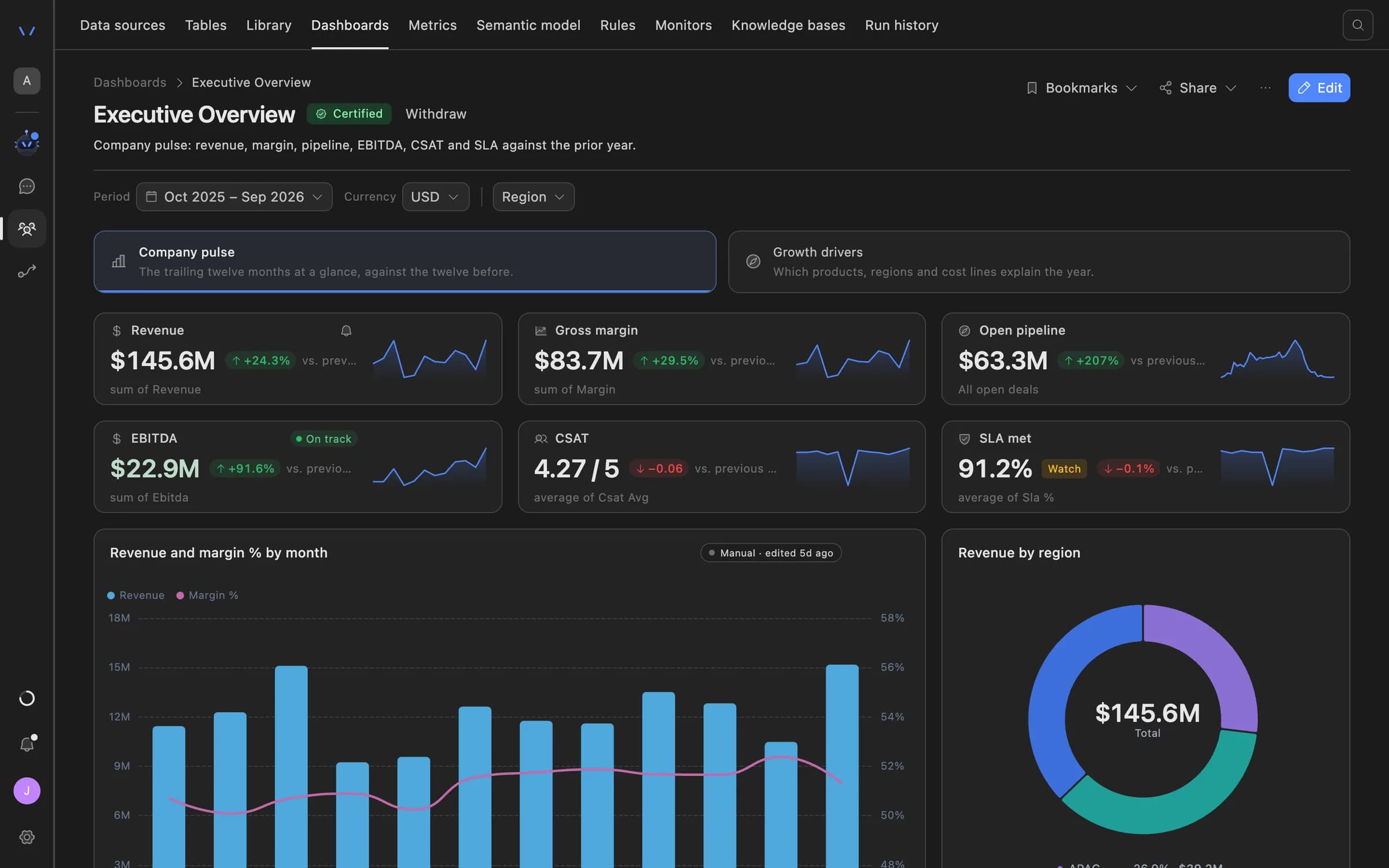
Agent Serve dashboards read governed metrics, with fiscal calendars and drill-through to the rows behind a figure.

Agent Serve dashboard showing an executive overview: revenue, gross margin, open pipeline, EBITDA, CSAT and SLA tiles with trend lines, a monthly revenue and margin chart, and revenue by region.

Before and after

Fewer exports, fewer surprises.

Fewer exports, fewer surprises.
WorkBeforeWith Agent Serve
ReconciliationBeforeExports matched line by line in a spreadsheet.With Agent ServeLines matched in a table, with breaks listed for review.
Spend policyBeforeSampled after the fact.With Agent ServeEvery expense checked against the rules as it arrives.
CommentaryBeforeWritten from scratch each month.With Agent ServeDrafted from the variance and edited by the analyst.

Governance

Money moves only with a person’s yes.

  • Approval before money moves

    Agent Serve Relays treat anything that moves money as an action that needs approval, unless a delegated limit you set allows it.

  • Approvals before action

    Relays never send email or book meetings without an approval, under any autonomy setting. An approval covers the exact payload the reviewer saw and expires if nobody decides.

  • Audit trail

    Proposals, approvals, declines and executed actions are written to the workspace audit log, which admins can export.

  • Row-level access

    Row-level policies narrow what each person sees in tables, dashboards, exports and scheduled reports.

  • Roles and permission groups

    Admin, write and read roles per workspace, plus permission groups that limit which models, blocks and integrations a team can use.

Questions

About Agent Serve for finance

Can an agent post journal entries?

Agent Serve can create records in NetSuite or QuickBooks through a workflow you build. Put an approval step before any write you want a person to check.

Which accounting systems does Agent Serve connect to?

Agent Serve has integrations for Oracle NetSuite, QuickBooks, SAP S/4HANA, SAP Concur, Brex, Stripe and Square, among others in the integrations catalog.

Who can see financial data in the workspace?

Agent Serve workspace roles and access policies decide who sees each table, dashboard and knowledge base, and row-level security can limit rows by person.

Last updated

Enterprise access

Put AI agents to work across your team

Agent Serve is available to teams by invitation. Tell us what you want to build and we will set up your workspace with you.