
Agent Serve · Enterprise

One AI workspace. Your organization in control.

Agent Serve is invite-only. Your teams build and run AI agents behind your SSO, in your own cloud if you choose.

Agent Serve is the AI workspace where enterprise teams build, deploy, and manage AI agents. Accounts are created by invitation. Organizations sign in with SAML or OIDC single sign-on, can self-host in their own cloud, run models with zero data retention through supported providers, set roles and access policies per team space, and trace every agent run.

The foundation

Three answers enterprise teams need first.

Agent Serve gives security and IT teams single sign-on, self-hosting and zero data retention before the first agent runs.

Single sign-on

Sign in through your identity provider

Agent Serve supports SAML and OIDC single sign-on, with SCIM 2.0 to provision people and groups automatically.

  • SAML 2.0 and OIDC, including Okta and Microsoft Entra
  • SCIM users and groups, mapped to access
  • Verified domains and invite-only sign-up
Self-hosting

Run it in your own cloud

Deploy Agent Serve inside your own cloud account or VPC, next to your data, with the same product your team sees here.

  • Helm chart for Kubernetes
  • Docker images with a production compose file
  • Reference Terraform for AWS, eu-central-1 by default
Zero data retention

Zero data retention with supported model providers

Run models under your organization’s zero data retention terms, or keep inference inside your network, and decide how long Agent Serve keeps logs.

  • Bring your own provider keys and agreements
  • Self-hosted models through Ollama, vLLM or LiteLLM
  • Configurable log retention and PII redaction

Zero data retention applies with supported model providers. Some provider features keep data by design, such as Gemini Deep Research, so they are outside zero data retention.

Getting started

From request to your first agent.

Agent Serve accounts are created by invitation, so every organization starts with a conversation, not a sign-up form.

  1. 1

    Request access

    Tell us what you want to build. A person reads every request and replies.

  2. 2

    Scope it together

    We talk through the agents you want and the data they need.

  3. 3

    Set up the organization

    We create your organization and invite your first admins.

  4. 4

    Bring in the team

    Your admins connect SSO and invite the rest of the team from inside Agent Serve.

In depth

Governed at every step of an agent’s life.

Agent Serve puts controls where agents are built, deployed and run, so governance is part of the work rather than a review at the end.

01 · Access

Roles and policies per team space

Agent Serve gives each team space admin, write and read roles, and access policies limit which blocks, models and integrations a group can use.

  • Permission groups for each team
  • Row-level security on tables and dashboards
  • Admins can turn off personal API keys
02 · Approvals

People decide the actions that matter

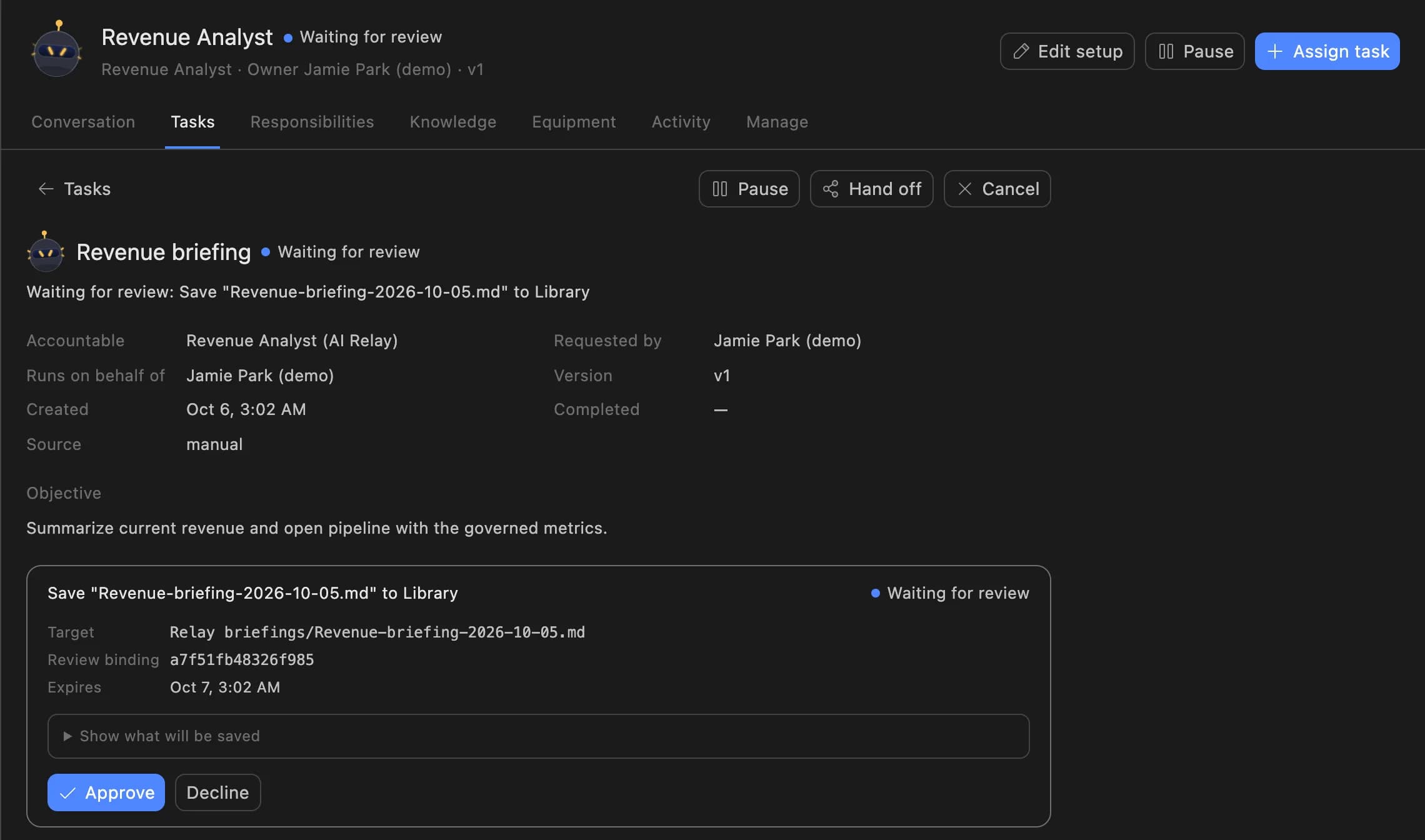
Agent Serve Relays ask before they send email or book meetings, and a workflow can pause for a person at any step.

  • Observe, Assist and Operate autonomy levels
  • The reviewer sees the exact action
  • Every decision lands in the audit log
A Relay task in Agent Serve waiting for review: the Revenue Analyst asks to save a revenue briefing to the Library, with Approve and Decline buttons.
03 · Run history

Every run on the record

Agent Serve traces each workflow run block by block, with inputs, outputs, tokens, cost and errors.

  • A snapshot of the workflow as it ran
  • Export runs as CSV
  • Send logs to your storage on a schedule
04 · Hosting

Run it where your data lives

Agent Serve ships a Helm chart, Docker images and reference Terraform for AWS, so you can run it in your own cloud.

  • Self-hosted models through Ollama, vLLM or LiteLLM
  • Your own model provider keys
  • eu-central-1 by default in the reference deployment

For the whole organization

One workspace, many teams.

Organization and team spaces

An Agent Serve organization holds many team spaces, each with its own members, data and agents.

Credit risk · Claims · IT

Usage limits

Organization admins manage the usage limits of each Agent Serve team space as more people build agents.

Settings → Usage

Your own model keys

Agent Serve uses your organization’s own model provider keys, set at organization or team space level.

Settings → Model API keys

Retention you set

Agent Serve keeps data from one day to five years, or forever, per organization or team space.

Log retention · 1 year

PII redaction

Agent Serve redacts personal data in logs, workflow input and block outputs before it is stored.

Logs · Workflow input · Block outputs

Activity audit

The Agent Serve Activity audit lists organization and workspace changes and exports them as CSV.

audit-log.csv

Before and after

AI your security team can sign off.

AI your security team can sign off.
WorkBeforeWith Agent Serve
Who uses AIBeforePersonal accounts on consumer AI tools, outside IT’s view.With Agent ServeInvited people, signed in through your SSO, in one Agent Serve organization.
Where data goesBeforePrompts sent to whatever model a person picked.With Agent ServeYour provider keys, zero data retention with supported providers, or models in your network.
What agents may doBeforeAn assistant acts with whatever access its key has.With Agent ServeAccess policies, row-level security and approvals before external actions.
Evidence for auditBeforeScreenshots collected by hand before each review.With Agent ServeAn exportable activity audit and a trace of every run.

Under the hood

Agent Serve Enterprise, in detail.

Agent Serve Enterprise, in detail.
AccessBy invitation. Request access, then admins invite the team.
Single sign-onSAML 2.0 and OIDC with verified domains. SCIM 2.0 provisioning.
SessionsMaximum session lifetime, idle timeout, and Sign out all members.
RolesAdmin, write and read per team space, plus permission groups.
HostingAgent Serve cloud, or self-hosted with Helm, Docker or Terraform.
ModelsYour own provider keys, or self-hosted models through Ollama, vLLM or LiteLLM.
Data retention1 day to 5 years, or forever, per organization or team space.
ComplianceSOC 2 ready and GDPR ready. Not a certification.

Governance

The controls auditors ask about.

Each Agent Serve control below is a setting in the product today, worded the same way on every page.

Security and governance
  • SSO and SCIM

    Sign in through your identity provider with SAML 2.0 or OIDC, and provision people with SCIM.

  • Roles and permission groups

    Admin, write and read roles per workspace, plus permission groups that limit which models, blocks and integrations a team can use.

  • Approvals before action

    Relays never send email or book meetings without an approval, under any autonomy setting. An approval covers the exact payload the reviewer saw and expires if nobody decides.

  • Audit trail

    Proposals, approvals, declines and executed actions are written to the workspace audit log, which admins can export.

  • Zero data retention

    Zero data retention with supported model providers, backed by your own provider keys and agreements or self-hosted models. Some provider features keep data by design, such as Gemini Deep Research, so they are outside zero data retention.

  • Self-hosting

    Run Agent Serve in your own cloud or data centre, next to the systems it reads.

  • SOC 2 ready

    The controls SOC 2 looks for are in place. Agent Serve does not claim a SOC 2 report or certification.

  • GDPR ready

    Retention from one day to five years, deletion and access controls support GDPR obligations. Ready means the controls are in place, not a certification.

What teams build

Everything your teams need in one workspace.

Further reading

Governed solutions teams run today.

Questions

About Agent Serve Enterprise

How do we get Agent Serve?

Agent Serve accounts are created by invitation. Request access, and we set up your organization and invite your first admins, who invite the rest of the team.

Can we self-host Agent Serve?

Yes. Agent Serve ships a Helm chart, Docker images with a production compose file, and reference Terraform for AWS.

Is Agent Serve SOC 2 certified?

No. Agent Serve is SOC 2 ready and GDPR ready: the controls are in place, but Agent Serve does not hold a certification.

Does Agent Serve keep our prompts?

Agent Serve offers zero data retention with supported model providers, backed by your own keys and agreements or self-hosted models. Some provider features, such as Gemini Deep Research, keep data by design.

Last updated

Enterprise access

Put AI agents to work across your team

Agent Serve is available to teams by invitation. Tell us what you want to build and we will set up your workspace with you.