
Use case · Complaints handling

Answer complaints on time, then fix the cause.

Agent Serve logs every complaint with its deadline, drafts a reply from your policies for a handler to approve, and shows the causes behind them.

A complaints handling use case for Agent Serve, the AI workspace where teams build, deploy, and manage AI agents: a workflow classifies each complaint, logs it in a table with its deadline and drafts a reply from the knowledge base for a handler to approve, while rules and dashboards show root causes.

At a glance

For complaints handlers and their managers.

Who it is for

Complaints handlers, team leads and customer outcomes managers at banks and insurers

The problem it removes

Complaints come in by email, web form and phone, and some are never logged. Handlers retype each one into a case log, look up the policy, and write the reply from scratch. Deadlines are tracked in a spreadsheet, and the monthly root cause report is a manual count.
What your team still controls

People decide

  • A handler approves every reply before the customer receives it
  • How complaints are classified, through rules you can read and edit
  • The response deadlines and who is reminded when one is close
  • Who sees complaint records, by team and by row
Day one

What you can run first

  • A workflow that classifies new complaints and logs each one with its deadline
  • A complaints table that replaces the spreadsheet log
  • Draft replies from your policies, approved by a handler
Later

What you add once it is trusted

  • A root cause dashboard by product, cause and channel
  • A morning run that lists complaints close to their deadline
  • Call transcripts checked on the Call Compliance dashboard

How it runs

From an angry email to a reviewed reply.

Agent Serve logs, classifies and drafts. A handler reads the draft and decides what the customer receives.

  1. 1

    The complaint arrives

    A new email in the complaints inbox starts the workflow. Web forms can start it too, through a webhook.

  2. 2

    It is classified and logged

    An agent tags the product, cause and severity, and the Table block logs the case with the date its response is due.

  3. 3

    A reply is drafted

    The Knowledge block finds the policy passage that applies, and the agent drafts a reply that cites it.

  4. 4

    A handler approves

    A Human step sends the draft to the handler, who edits it, approves it, or takes the case over.

Before and after

Fewer missed deadlines, clearer causes.

Fewer missed deadlines, clearer causes.
WorkBeforeWith Agent Serve
LoggingBeforeHandlers retype each complaint into a spreadsheet log.With Agent ServeAgent Serve logs each complaint with its product, cause and deadline.
DeadlinesBeforeSomeone filters the log each week to find what is due.With Agent ServeA morning run lists cases close to their deadline for the team.
RepliesBeforeWritten from scratch, with policy wording copied by hand.With Agent ServeDrafted from the current policy and approved by a handler.
Root causeBeforeA monthly manual count of categories in a pivot table.With Agent ServeA dashboard and Chat show causes by product and channel.

In depth

From each complaint to the pattern behind it.

Agent Serve gives handlers the draft and the deadline, and gives managers the causes.

01 · Chat

Ask which causes drive the volume

A manager mentions the complaints table in Agent Serve Chat, asks which causes grew this month, and gets a chart built from the rows.

  • Mention a table with @
  • Save the answer as a chart or a document
02 · Rules

One way to classify every complaint

An Agent Serve classification sorts complaints into labels such as Regulatory, Service and Billing, with General as the fallback.

  • Edit the rule and every view follows
  • Filter dashboard tables by the label
03 · Approvals

A person approves every reply

When an Agent Serve Relay drafts a reply, it shows the exact message and waits for a handler to approve or decline it.

  • The approved version is the one sent
  • Reviews expire if nobody decides
04 · Calls

Complaints made on calls, too

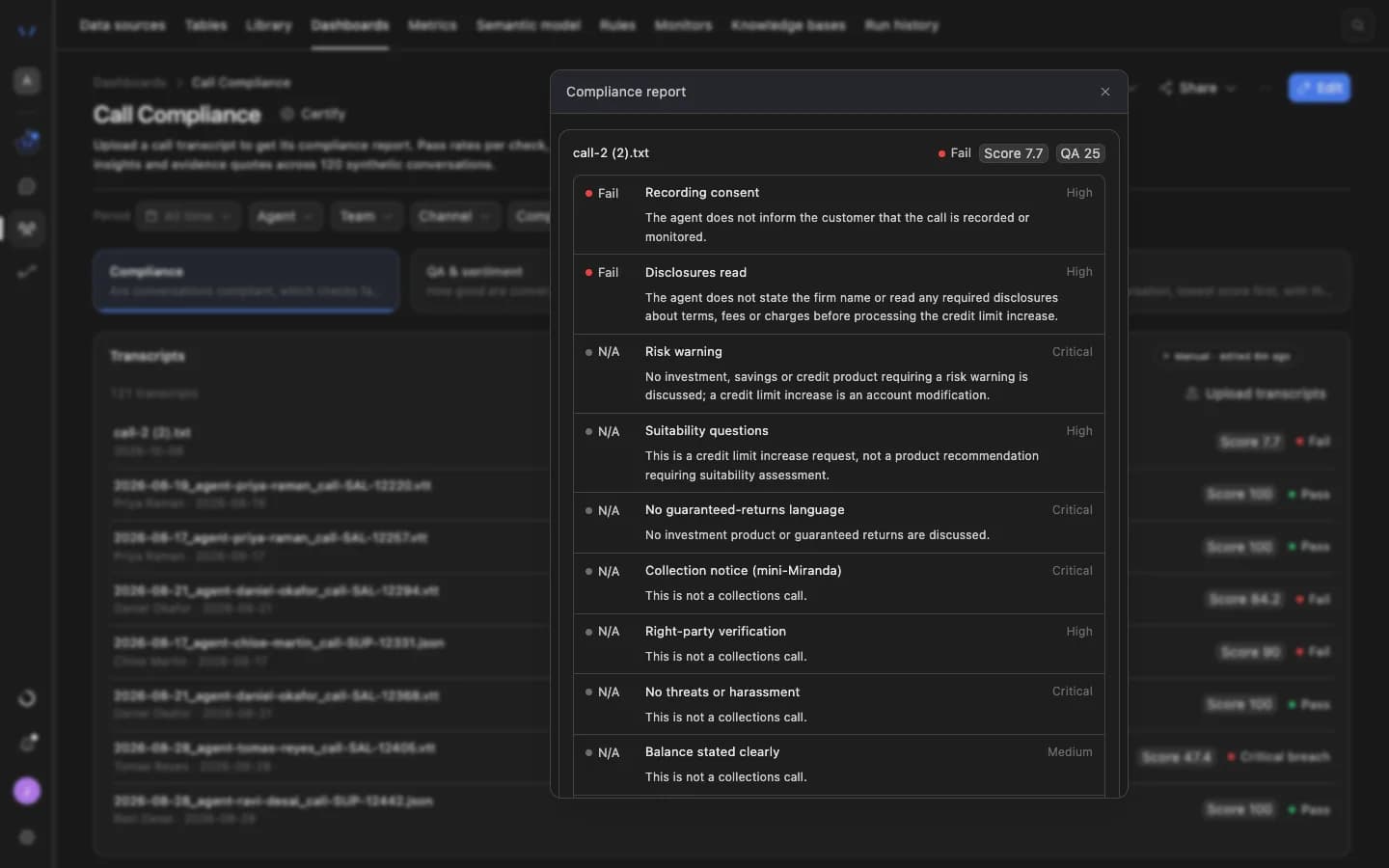
One step of the process: the Agent Serve Call Compliance dashboard scores uploaded call transcripts against your checks, and a check can flag calls where a customer complained.

An Agent Serve compliance report for one call transcript: each check, such as recording consent, disclosures read and risk warning, marked Fail or N/A with its severity and the reason in plain language.

What does the work

The parts of Agent Serve behind each complaint.

  1. 01Workflows

    Log and draft

    A workflow classifies each complaint, logs it and drafts the reply.

  2. 02Tables

    Keep the case log

    A complaints table holds every case with its deadline and owner.

  3. 03Knowledge bases

    Cite the policy

    Policies and procedures sit in a knowledge base the reply cites.

  4. 04Rules

    Classify the cause

    A classification rule sorts complaints the same way everywhere.

  5. 05Dashboards & BI

    Show root causes

    A dashboard shows volume and causes by product and channel.

Examples

Complaints teams in banking and insurance.

Three complaints processes financial services teams run on Agent Serve, each with a person approving the reply.

Retail banking · Complaints

Email and web form intake

An Agent Serve workflow classifies each complaint, logs it with its deadline and drafts a reply for a handler.

  1. Complaint in
  2. Classified
  3. Logged with deadline
  4. Handler approves
Insurance · Customer outcomes

Root cause review

An Agent Serve dashboard shows complaints by product, cause and channel, and arrives as a PDF before the monthly review.

  1. Cases logged
  2. Rule classifies
  3. Dashboard updates
  4. PDF sent
Cards · Complaints

Deadline watch

An Agent Serve schedule runs every morning, lists open complaints close to their deadline and posts them to the team’s channel.

  1. Schedule
  2. Cases filtered
  3. List posted
  4. Lead assigns

Examples show what teams can build in Agent Serve. They describe patterns, not named customer deployments.

Governance

Replies reviewed, records kept.

Agent Serve keeps a handler on every reply and keeps complaint records to the people who need them.

Security and governance
  • Recipient policy

    An Agent Serve Relay can be limited to internal recipients, an allowlist or anyone, and never sends email without approval.

  • Personal data masked

    The Agent Serve Guardrails block masks personal data in a draft before it moves to the next step.

  • Approvals before action

    Relays never send email or book meetings without an approval, under any autonomy setting. An approval covers the exact payload the reviewer saw and expires if nobody decides.

  • Audit trail

    Proposals, approvals, declines and executed actions are written to the workspace audit log, which admins can export.

  • Row-level access

    Row-level policies narrow what each person sees in tables, dashboards, exports and scheduled reports.

  • Roles and permission groups

    Admin, write and read roles per workspace, plus permission groups that limit which models, blocks and integrations a team can use.

  • SSO and SCIM

    Sign in through your identity provider with SAML 2.0 or OIDC, and provision people with SCIM.

  • Self-hosting

    Run Agent Serve in your own cloud or data centre, next to the systems it reads.

  • Zero data retention

    Zero data retention with supported model providers, backed by your own provider keys and agreements or self-hosted models. Some provider features keep data by design, such as Gemini Deep Research, so they are outside zero data retention.

  • Run logs

    Every workflow run records each block’s inputs, outputs and errors, so a reviewer can trace how a result was reached.

Further reading

Complaints work, in detail.

The deep dive models the cost of missed complaint deadlines and what changes, with every figure labelled.

Read the blog

Questions

About complaints handling

Does Agent Serve reply to customers on its own?

No. In this Agent Serve process a handler approves every reply. A Relay never sends email without approval of the exact message.

Where do complaints come from?

Agent Serve workflows start from a new email in Gmail or Outlook, a web form through a webhook, a new row in a table, or events from tools such as Zendesk.

How are deadlines tracked?

Each complaint is a row in an Agent Serve table with its due date, and a scheduled workflow lists the cases close to their deadline every morning.

Is call compliance part of this?

Only as one step. Call checks live in Agent Serve Dashboards, where the Call Compliance template scores uploaded transcripts against your checks.

What can we run first?

A team can start with the Agent Serve intake workflow and complaints table, then add reply drafting, the root cause dashboard and the morning deadline run.

Last updated

Enterprise access

Put AI agents to work across your team

Agent Serve is available to teams by invitation. Tell us what you want to build and we will set up your workspace with you.