Agent Serve · Chat

Ask anything. Check every answer.

Chat works with your tables, files, knowledge bases and connected tools. Answers come with their sources, and charts with the data behind them.

Agent Serve Chat is the conversational surface of Agent Serve, the AI workspace where teams build, deploy, and manage AI agents. Teams ask questions in natural language, see the sources behind answers, generate charts and documents from workspace data, and build, run and deploy workflows and tables by describing them.

How it works

From a question to something you can use.

Agent Serve Chat keeps the work close to the conversation: the context it used, the result it made, and the next step.

  1. 1

    Ask in plain language

    Type or paste the question the way you would ask a colleague, or start from a Playbook.

  2. 2

    Point it at the context

    Type @ to add a table, a file, a folder or a knowledge base, or attach files to the message.

  3. 3

    Chat does the work

    Chat queries the table, searches the documents and calls connected tools to build the answer.

  4. 4

    Keep the result

    Save the answer as a chart, a table or a document in the Library, and share it by link.

In depth

One conversation, the whole workspace.

Agent Serve Chat reads and changes the same workflows, tables, files and knowledge bases your team works in.

01 · Workflows

Build a workflow by describing it

Describe the process and Agent Serve Chat proposes the blocks in the workflow builder. You choose Accept or Reject for each change.

  • Edit, run and deploy a workflow from the conversation
  • Roll back with Load deployment or Promote to live
  • Ask about run history when a run fails
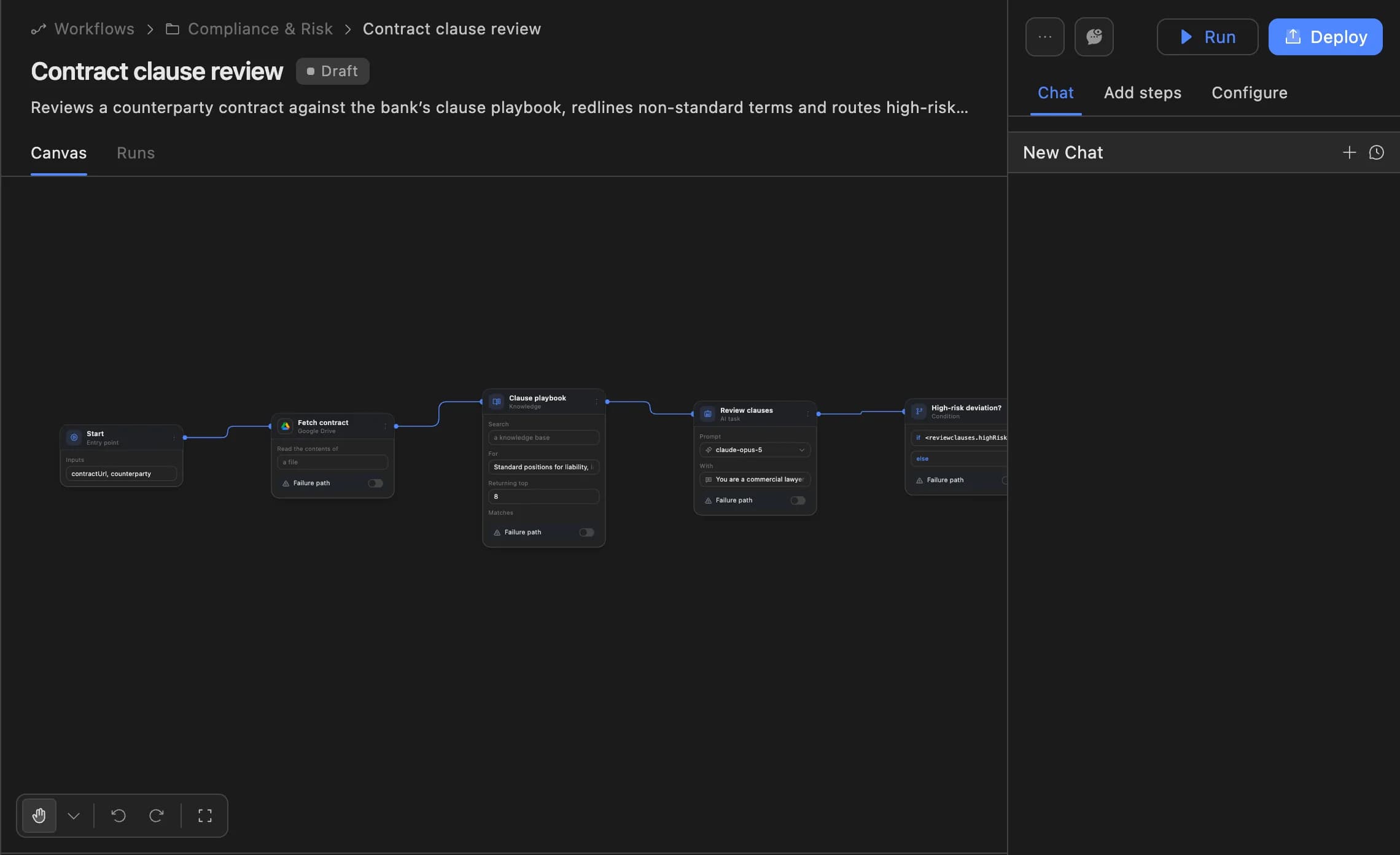
The Agent Serve workflow builder showing a contract clause review agent: start, fetch contract, clause playbook, review clauses and a high-risk deviation branch, with Run and Deploy buttons.
02 · Knowledge

See where the answer came from

When Agent Serve Chat answers from a document or knowledge base, source chips under the reply link back to the document it used.

  • Search one knowledge base or several
  • Ask about this knowledge base from its own page
  • Search and read the web when the question needs it
03 · Tables

Query a table, get a chart

Agent Serve Chat creates tables, imports data, adds rows and columns, and turns a question about the data into a chart.

  • Mention a whole table or just a selection
  • Create views and columns by asking
  • Start from “Analyze data with a chart”
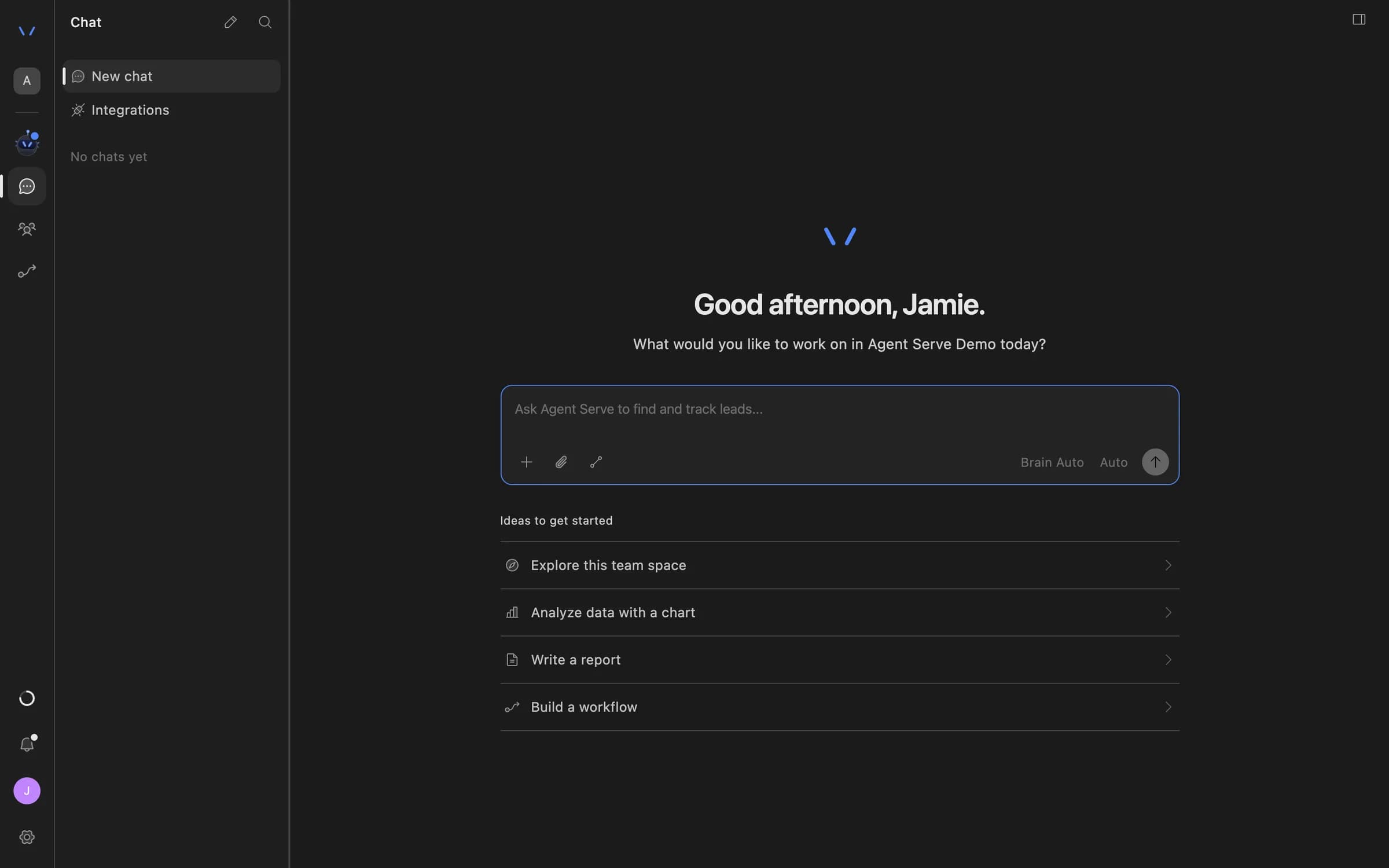
Agent Serve Chat home with a message composer and suggestions to explore the team space, analyze data with a chart, write a report, or build a workflow.
04 · Documents

Write the document, not just the reply

Agent Serve Chat saves Word, PDF, PowerPoint, Markdown, HTML and CSV files to the Library, where the team can open and share them.

  • Attach files and whole folders as context
  • Turn a table into a board-ready .pptx
  • Share a generated file through a link

Capabilities

More than answers, real work done.

Charts from your data

Ask Agent Serve Chat for a breakdown and get a chart built from the table or source you named.

“Show renewal exposure by region.”

Answers with sources

Agent Serve Chat shows the documents it used as source chips, so anyone can check the answer.

Answer → Renewal policy

Connected tools

Agent Serve Chat calls the integrations your workspace has connected, and can connect new apps and MCP servers, a standard way to plug tools into AI.

Salesforce · Slack · Google Drive

Web research and code

Agent Serve Chat searches and reads the web, and runs code when a question needs a calculation.

“Compare these two rate sheets.”

Playbooks

Agent Serve Playbooks start common jobs the same way each time, such as connecting an integration or deploying a workflow.

Research · Create a table · Deploy a workflow

Images, audio and video

Agent Serve Chat generates images, audio and video, and reads attached recordings as a transcript and sampled frames.

Call recording.mp4 → transcript

Examples

What financial services teams ask Chat.

Three requests analysts at banks, insurers and payment companies bring to Agent Serve Chat, each ending in something they keep.

Payments · Disputes

Dispute trends by merchant

An analyst mentions the disputes table in Agent Serve Chat, asks for the top merchants by chargeback rate, and shares the chart.

  1. @Disputes table
  2. Query by merchant
  3. Chart saved
  4. Shared by link
Insurance · Underwriting

Underwriting brief

An underwriter attaches the submission folder in Agent Serve Chat and asks for a brief checked against the underwriting guidelines knowledge base.

  1. Folder attached
  2. Guidelines searched
  3. Brief as .docx
  4. Underwriter reviews
Retail banking · Operations

A KYC refresh workflow

An operations lead describes the KYC refresh process, and Agent Serve Chat proposes the workflow, which the lead accepts and deploys.

  1. Process described
  2. Blocks proposed
  3. Accepted in builder
  4. Deployed

Examples show what teams can build in Agent Serve. They describe patterns, not named customer deployments.

Under the hood

Agent Serve Chat, in detail.

Agent Serve Chat, in detail.
ModelsBrain Auto picks for you, or choose Brain Fuji (most capable), Brain Hikari (deepest reasoning), Brain Sora (balanced) or Brain Hayate (fastest).
EffortQuick, Balanced, Deep, Deeper and Max.
@mentionsWorkflows, blocks, tables and table selections, files and folders, knowledge bases, integrations, MCP servers, past chats, run history, Playbooks and docs.
AttachmentsDocuments, code, images, zip archives, audio and video. Audio and video are read as a transcript and sampled frames.
Files it creates.docx, .pdf, .pptx, .md, .html, .csv and chart files, saved to the Library.
Built-in PlaybooksConnect an integration, research, create a table and deploy a workflow.
Message actionsCopy message, Good response, Bad response and Fork in new chat.
HistoryGrouped by Pinned, Today, Yesterday, This week and Earlier.

Before and after

Fewer hand-offs, answers you can check.

Fewer hand-offs, answers you can check.
WorkBeforeWith Agent Serve
A question about the dataBeforeA ticket to the data team and a wait for a spreadsheet.With Agent ServeMention the table in Chat and get the figure and the chart.
Trusting an AI answerBeforeA confident paragraph with nothing to check it against.With Agent ServeSource chips that link to the documents behind the answer.
Turning an answer into a deliverableBeforeCopy the reply into a document and format it by hand.With Agent ServeChat saves the .docx, .pdf or .pptx to the Library.
Automating the next requestBeforeExplain the process again to whoever builds the automation.With Agent ServeDescribe it once and accept the workflow Chat proposes.

Governance

Chat inside your workspace rules.

Agent Serve Chat works under the same roles, access policies and data limits as the rest of the workspace.

Security and governance
  • Works within your access

    Agent Serve Chat uses the resources and tools available to the person asking. People with a limited data view are kept to tables and dashboards that apply their limit.

  • Admins decide where Chat appears

    Agent Serve access policies let admins hide Chat for a group, along with the models, blocks and integrations that group can use.

  • Roles and permission groups

    Admin, write and read roles per workspace, plus permission groups that limit which models, blocks and integrations a team can use.

  • SSO and SCIM

    Sign in through your identity provider with SAML 2.0 or OIDC, and provision people with SCIM.

  • Self-hosting

    Run Agent Serve in your own cloud or data centre, next to the systems it reads.

Works with

Chat reaches every module.

Further reading

Solutions built on Agent Serve Chat.

Questions

About Chat

What is Agent Serve Chat?

Agent Serve Chat is the conversational surface of Agent Serve. Teams ask questions in plain language and build, run and deploy workflows, tables and documents by describing them.

What gives Chat its company context?

Agent Serve Chat works with connected tools and workspace resources such as files, tables, workflows and knowledge bases. The resources and permissions available to the person asking decide what it can use.

Can I check where an answer came from?

Yes. When Agent Serve Chat uses a document or knowledge base, the answer shows source chips that link to the document it used.

Can Chat change my workflows without asking?

In the workflow builder, Agent Serve Chat proposes changes and shows Accept and Reject, so a person decides what goes into the workflow.

Which models does Chat use?

Agent Serve Chat offers Brain Auto, which picks a model for each request, or a fixed choice of Brain Fuji, Brain Hikari, Brain Sora or Brain Hayate, with an effort level from Quick to Max.

What files can Chat create?

Agent Serve Chat saves Word, PDF, PowerPoint, Markdown, HTML and CSV files and charts to the Library. Spreadsheets in .xlsx format are not generated today.

Last updated

Enterprise access

Put AI agents to work across your team

Agent Serve is available to teams by invitation. Tell us what you want to build and we will set up your workspace with you.