Valnora & Elric · Agent Live

The right answer, while the call is live.

Agent Live follows sales and support calls, shows guidance from your playbooks in the moment, and drafts the follow-up for the rep to approve.

Agent Live is a real-time assistant for sales and support calls from Valnora & Elric, the company behind Agent Serve, the AI workspace for AI agents. Reps get a live transcript, guidance cards from the team’s playbooks and call checks; managers get an admin portal for playbooks, review and metrics. Agent Live stores no call audio.

The rep app

What a rep sees during the call.

The Agent Live desktop app on a demo call with made-up names: guidance on top, the live transcript below, call checks on the side.

01 · Live call

Guidance next to the transcript

Agent Live transcribes the call, marks what the customer says that matters, and shows a card with what to ask or say next from the team’s playbook.

  • Live transcript with key phrases highlighted
  • Guidance cards from the published playbook
  • Call checks tick off as the conversation covers them
  • Details the customer mentions are captured as the call goes
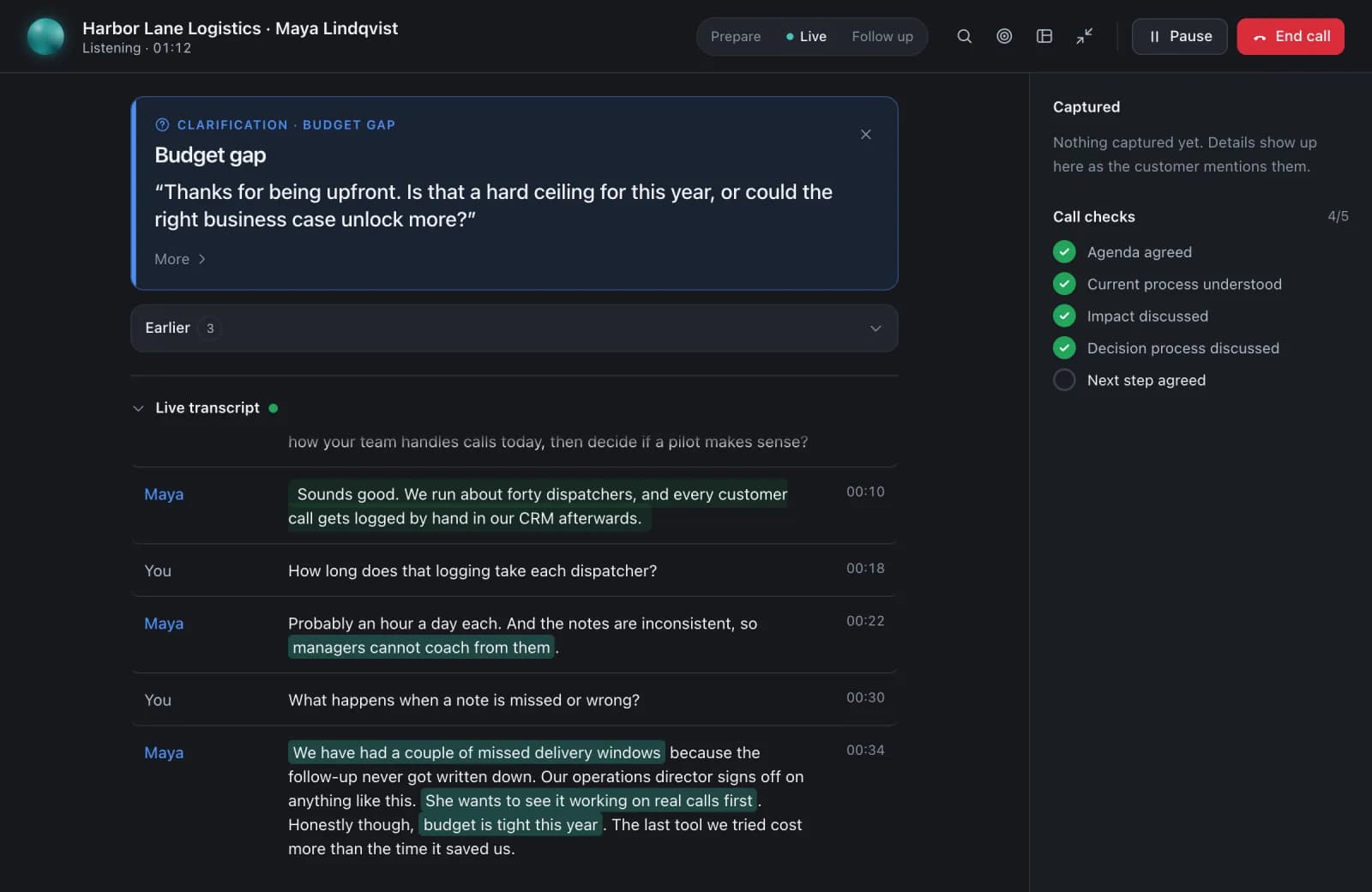
Agent Live during a demo discovery call: a clarification card on a budget gap suggesting what the rep could ask next, the live transcript with key customer phrases highlighted, and call checks ticking off (four of five) as the conversation covers them.

How it works

From playbook to reviewed call.

Managers publish the playbook, Agent Live guides the rep on the call, and reviewers see what it found afterwards.

  1. 1

    Publish a playbook

    A manager tests a playbook on a sample transcript in the admin portal, then publishes it to a team.

  2. 2

    Transcribe the call

    When the call starts, Agent Live transcribes both sides of the conversation in the desktop app.

  3. 3

    Guide in the moment

    When a need, a risk or a question comes up, Agent Live shows the matching guidance card.

  4. 4

    Review and coach

    After the call, the rep approves the follow-ups and reviewers confirm or dismiss what Agent Live found.

Guidance cards

A card for each moment in the call.

Agent Live picks the card that fits what was just said, from the playbook your team published.

Need

Agent Live flags a need the customer just described, so the rep can explore it.

Manual logging · An hour a day

Opportunity

Agent Live points out an opening to suggest something more.

Another team · More seats

Comparison

Agent Live shows a comparison card when the customer weighs your offer against another option.

Earlier tool · Building in-house

Risk

Agent Live warns about a risk, such as a price concern, with how the playbook handles it.

Price concern · Timing

Clarification

Agent Live suggests a question when something important is still unclear.

Economic buyer · Decision process

Commitment

Agent Live notes a commitment the customer or the rep made, so it is not lost.

Send a proposal · Book a follow-up

The admin portal

Where managers set up and coach.

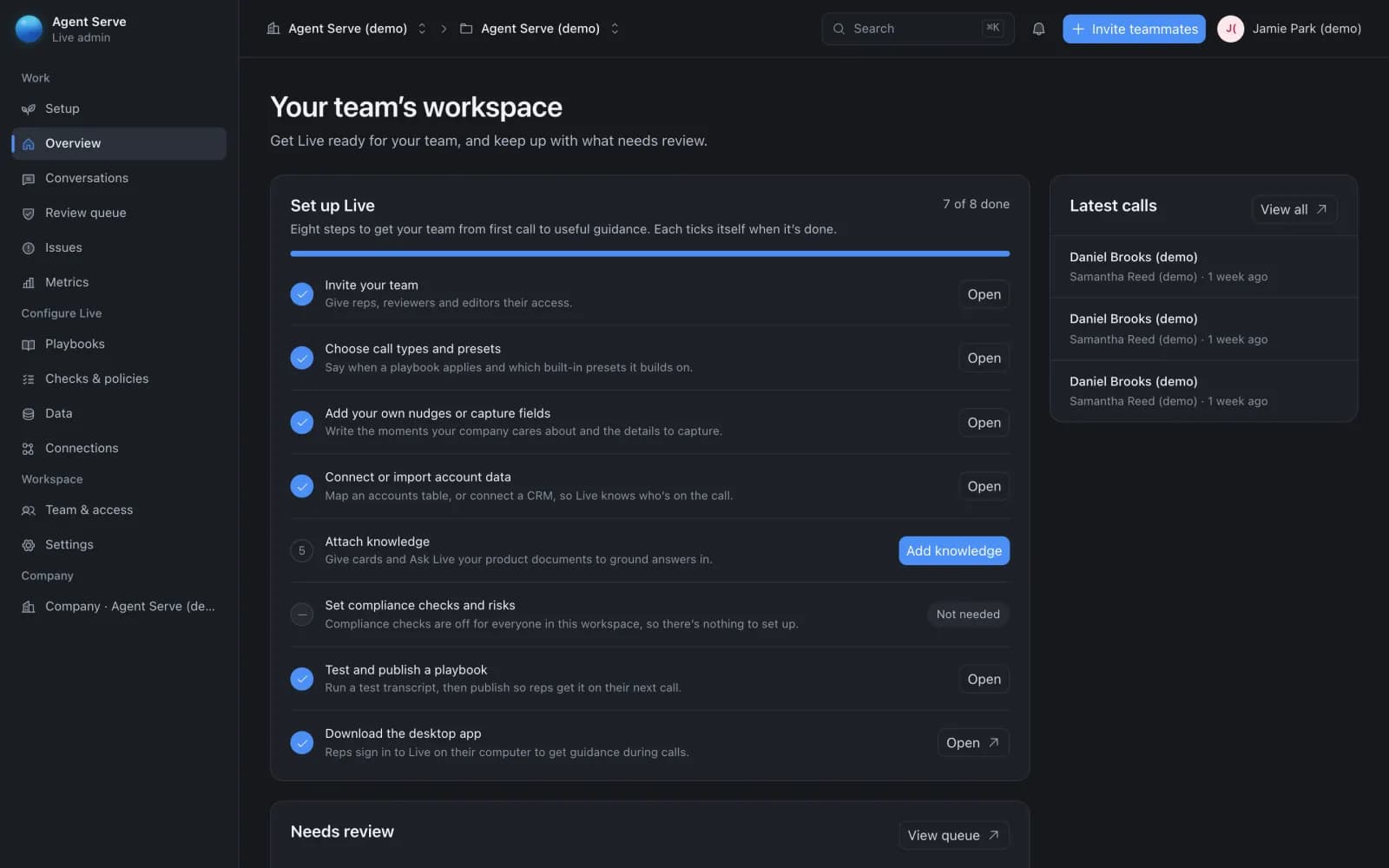
In the Agent Live admin portal, managers configure Agent Live for their team and see how calls go. Shown on a demo workspace.

01 · Setup

From first call to useful guidance

An eight-step setup takes a team from inviting reps to publishing a tested playbook, and each step ticks itself when it is done.

  • Invite reps, reviewers and editors
  • Connect or import account data
  • Attach knowledge and set compliance checks
  • Latest calls and a review queue on the same page
The Agent Live admin portal overview for a demo team: an eight-step setup checklist, from inviting the team to publishing a playbook, beside the latest calls.
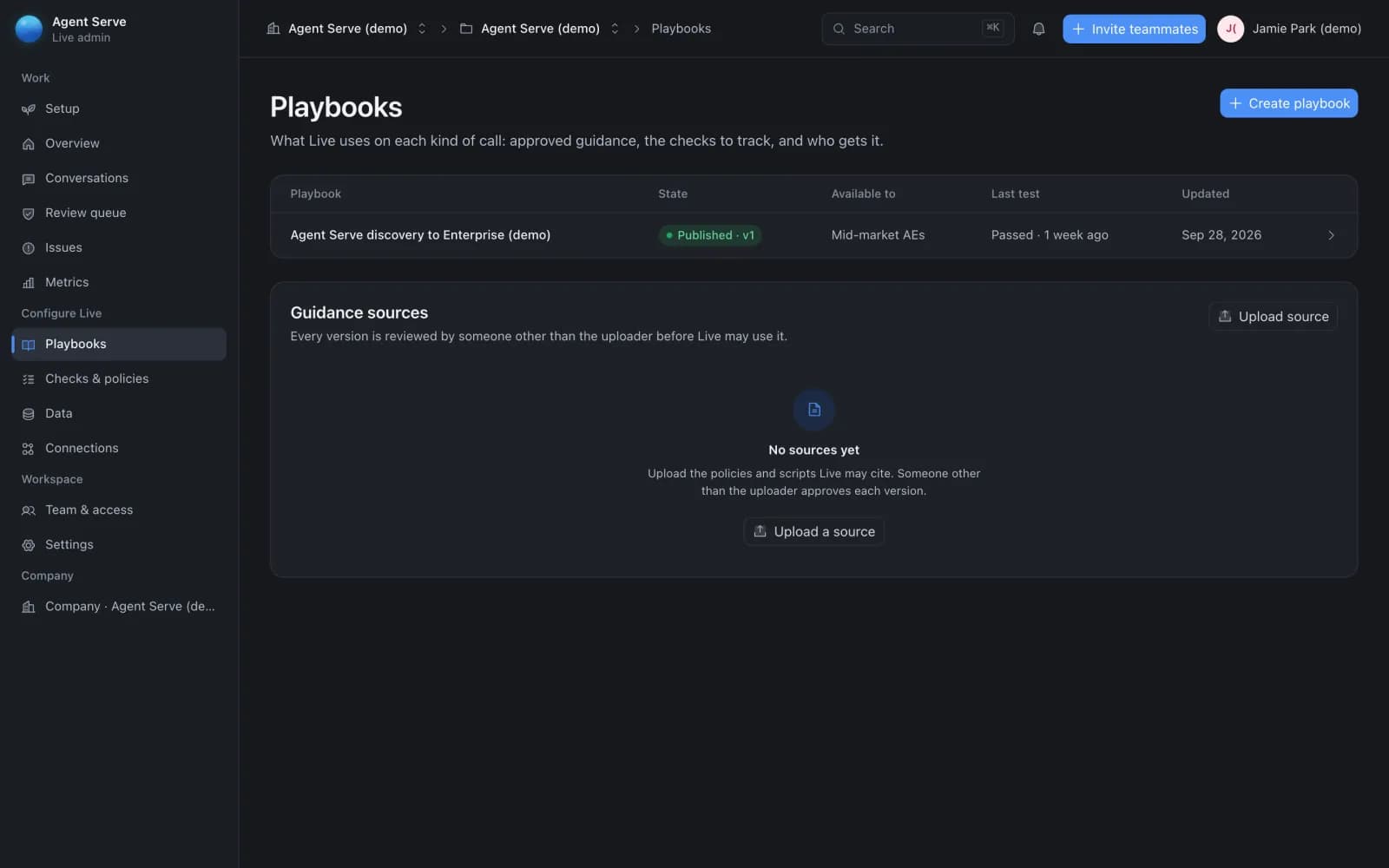
02 · Playbooks

Approved guidance, tested before it ships

Playbooks say what Agent Live uses on each kind of call and who gets it. A playbook is tested on a sample transcript, then published.

  • Published versions with the team each is available to
  • Guidance sources approved by someone other than the uploader
  • Checklists and personas alongside playbooks
Agent Live admin portal Playbooks: a published, tested playbook with the team it is available to, and guidance sources that someone other than the uploader approves.
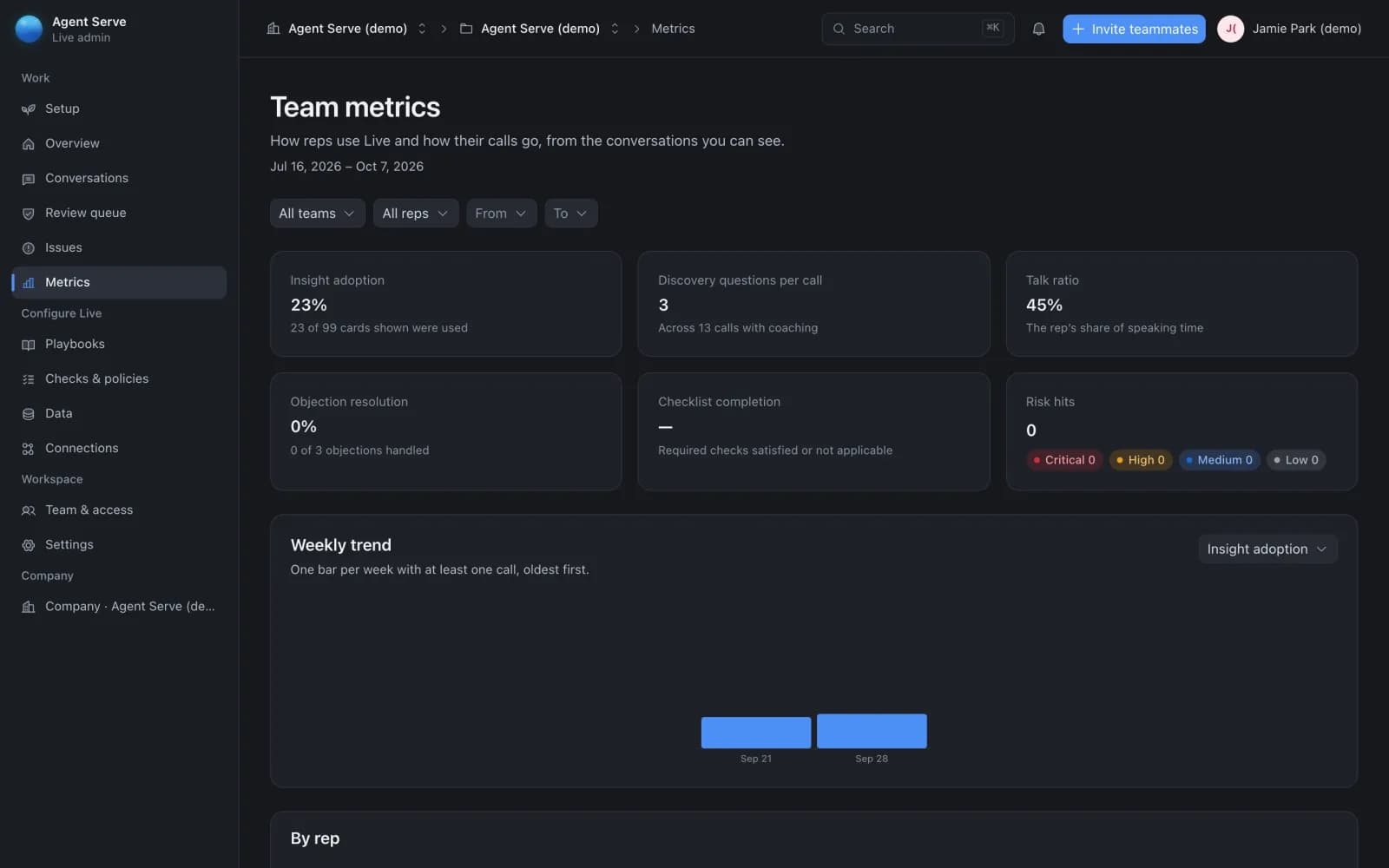
03 · Metrics

How reps use Agent Live, call by call

Team metrics show insight adoption, discovery questions per call, talk ratio, objection resolution, checklist completion and risk hits, filtered by team, rep and dates.

  • Weekly trend for each metric
  • Conversations and a review queue for reviewers
  • Roles decide who sees which calls
Agent Live admin portal Team metrics for a demo team: insight adoption, discovery questions per call, talk ratio, objection resolution, checklist completion and risk hits, with a weekly trend.

Before and after

Less guessing on every call.

What changes for a rep and their manager once Agent Live is on the call.

Less guessing on every call.
WorkBeforeWith Agent Live
During the callBeforeThe rep searches notes or a wiki while the customer waits.With Agent LiveThe guidance card for the moment appears next to the transcript.
Required stepsBeforeDiscovery questions and disclosures depend on memory.With Agent LiveCall checks tick off as the conversation covers them.
After the callBeforeNotes, CRM updates and the follow-up email are written from scratch.With Agent LiveAgent Live drafts them and the rep approves before anything is sent.
CoachingBeforeManagers coach from the few calls they hear.With Agent LiveManagers see findings and team metrics across the calls they can view.

Examples

Calls Agent Live helps with.

Three example calls with made-up details, from sales, support and account management.

Sales

First discovery call

Agent Live guides a rep through discovery questions from the team’s playbook and drafts the follow-up email for the rep to approve.

  1. Call starts
  2. Need flagged
  3. Checks ticked
  4. Rep approves follow-up
Support

Customer support call

The rep asks Agent Live a question mid-call and gets a short answer from the team’s knowledge, then approves the drafted CRM note afterwards.

  1. Problem described
  2. Rep asks Live
  3. Note drafted
  4. Rep approves
Account management

Renewal review

Agent Live shows the renewal playbook’s guidance when a price concern comes up, and reviewers see any finding in the review queue.

  1. Renewal call
  2. Risk card shown
  3. Summary drafted
  4. Reviewer confirms

Examples show what teams can build in Agent Serve. They describe patterns, not named customer deployments.

At a glance

What Agent Live includes.

What Agent Live includes.
ForSales and support reps, account managers and their managers.
PlatformsDesktop app for macOS 13 or later and Windows 10 or later.
Before the callA Today view of meetings from Google Calendar or Microsoft Outlook, with account context.
Rep appA desktop app with a live transcript, guidance cards, call checks, captured details and a review before anything is sent.
Admin portalSetup, conversations, review queue, metrics, playbooks, checks and policies, data, connections, and team and access.
Guidance sourceYour team’s published playbooks and approved knowledge.
Follow-upSummary, next step, CRM note, email and tasks drafted; nothing is sent until the rep approves.
AudioAgent Live transcribes calls and stores no call audio.
AccessBy invitation. Request access and we set it up with your team.

Works with Agent Serve

Agent Serve modules Agent Live builds on.

Questions

About Agent Live

What is Agent Live?

Agent Live is a real-time assistant for sales and support calls from Valnora & Elric. It transcribes the call, shows guidance from your playbooks, ticks off call checks and drafts the follow-up for the rep to approve.

Is Agent Live available today?

Yes, by invitation. Request access with Agent Live selected and we will set it up with your team.

Does Agent Live record calls?

No. Agent Live transcribes the conversation to guide the rep and stores no call audio.

Will Agent Live send anything without my approval?

No. The follow-up email and CRM note wait for the rep to review and approve them.

How does Agent Live relate to Agent Serve?

Agent Live uses Agent Serve’s connections, knowledge and workflows, so teams on Agent Serve set those up once.

Last updated

Enterprise access

Put AI agents to work across your team

Agent Serve is available to teams by invitation. Tell us what you want to build and we will set up your workspace with you.