
Agent Serve · Data sources

Your warehouse, ready for analysis.

Connect the warehouses and databases you already trust. Agent Serve turns read-only queries into datasets that dashboards, metrics and monitors read.

Agent Serve Data sources connects Databricks, Snowflake, BigQuery, PostgreSQL, MySQL, SQL Server, Salesforce, Qlik and Excel workbooks to Agent Serve, the AI workspace where teams build, deploy, and manage AI agents. Each read-only query becomes a dataset, saved into a workspace table on a schedule or queried live, which dashboards, metrics, rules and monitors use.

How it works

From a connection to a dataset on schedule.

Agent Serve keeps the source where it is and brings in only the rows a query returns.

  1. 1

    Store the credentials

    Save host, user and token as secrets. The connection names the secrets, never the values.

  2. 2

    Connect and test

    Pick a source from Available sources and run Test connection.

  3. 3

    Write the query

    Write a SELECT or WITH query. Agent Serve blocks anything that writes.

  4. 4

    Choose how it refreshes

    Save the result into a table on a schedule, or query it live on each request.

By the numbers

Agent Serve Data sources in figures.

Source types you can connect

9

Source types you can connect

Rows per dataset, at most

50,000

Rows per dataset, at most

Shortest scheduled refresh

15 min

Shortest scheduled refresh

Refresh versions kept per dataset

10

Refresh versions kept per dataset

Figures are read from the product code.

In depth

What happens after you connect.

Agent Serve turns a source into datasets, and datasets into the tables every analysis module reads.

01 · Datasets

Materialized or live

An Agent Serve dataset is either saved into a workspace table on a schedule, or queried live each time someone asks.

  • Manual, every 15 minutes, hourly, every 6 hours or daily
  • Excel datasets refresh when the file changes
  • Version history shows the rows and columns that changed
02 · Dashboards

Every number shows its source

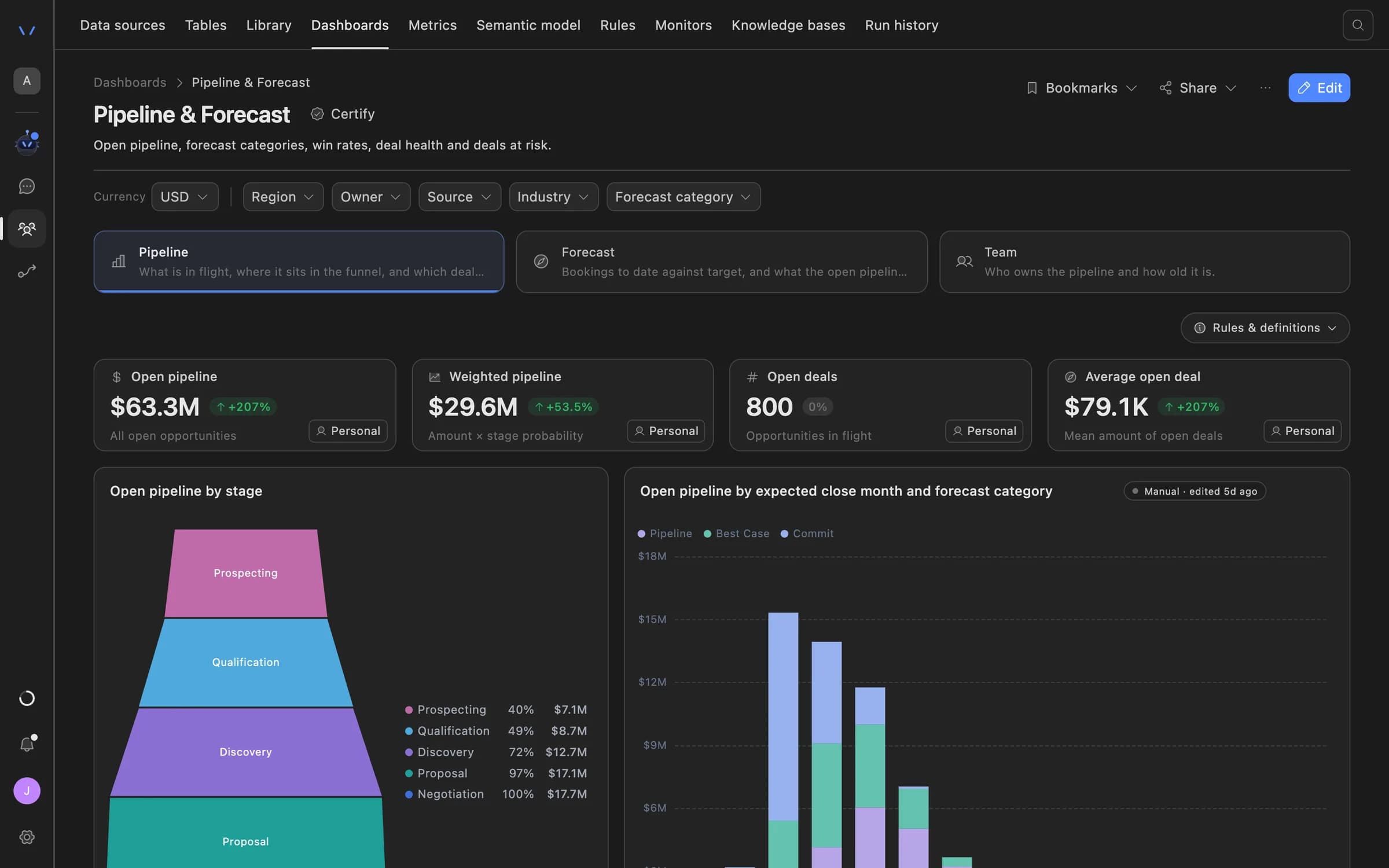
Agent Serve dashboards show which source a number came from and when it last synced.

  • Lineage from panel back to dataset
  • Freshness on every panel
  • Metrics, rules and monitors read the same tables
Agent Serve Pipeline and Forecast dashboard with open and weighted pipeline tiles, a funnel by stage, and pipeline by expected close month and forecast category.
03 · Access

Read-only by design

Agent Serve accepts one SELECT or WITH statement per query and blocks write keywords. The source login’s own permissions remain the final limit.

  • Viewing needs read access to the team space
  • Creating and testing need write access
  • Each source has its own access level

Connectors

Warehouses, databases, apps and files.

Warehouses

Agent Serve connects Databricks, Snowflake and BigQuery, and runs your SQL where the data lives.

Databricks · Snowflake · BigQuery

Databases

Agent Serve connects PostgreSQL, MySQL and SQL Server, with SSL set per connection.

PostgreSQL · SSL require

Apps and BI

Agent Serve queries Salesforce with SOQL and reads Qlik Cloud or Qlik Sense Enterprise apps and sheets.

Salesforce · Qlik

Workbooks

Agent Serve reads Excel workbooks and CSV files from the Library, with a sheet and range picker.

Loan tape.xlsx · Sheet1!A1:K

Examples

Data banks and insurers bring in first.

Three datasets financial services teams build in Agent Serve.

Retail lending

Daily loan book

An Agent Serve dataset pulls the loan book from Snowflake each morning into a table that the arrears dashboard reads.

  1. Snowflake
  2. Read-only query
  3. Daily refresh
  4. Arrears dashboard
Insurance · Claims

Open claims, hourly

An Agent Serve dataset reads open claims from PostgreSQL every hour, and a monitor watches the backlog.

  1. PostgreSQL
  2. Hourly refresh
  3. Claims table
  4. Backlog monitor
Finance

Budget workbook

Finance uploads the budget workbook to the Library, and the Agent Serve dataset refreshes whenever the file changes.

  1. Excel in Library
  2. Sheet and range
  3. Dataset
  4. Budget vs actual

Examples show what teams can build in Agent Serve. They describe patterns, not named customer deployments.

Before and after

Fresh data, without the exports.

Fresh data, without the exports.
WorkBeforeWith Agent Serve
Getting data inBeforeSomeone exports a CSV each Monday and emails it round.With Agent ServeAn Agent Serve dataset refreshes on a schedule from the source.
Database passwordsBeforePasted into each report’s connection settings.With Agent ServeKept once as secrets, named by the connection, decrypted only at query time.
Knowing what changedBeforeCompare two spreadsheets by eye.With Agent ServeVersion history lists the rows and columns each refresh changed.

Under the hood

Agent Serve Data sources, in detail.

Agent Serve Data sources, in detail.
SourcesDatabricks, Snowflake, BigQuery, PostgreSQL, MySQL, SQL Server, Salesforce, Qlik and Excel or CSV.
Where it livesThe Data sources tab in Team spaces.
CredentialsNamed secrets in Settings, decrypted only when a query runs.
QueriesOne SELECT or WITH statement, up to 20,000 characters, with write keywords blocked.
DatasetsMaterialized into a workspace table on a schedule, or live per request.
RefreshManual, every 15 minutes, hourly, every 6 hours or daily.
SizeUp to 50,000 rows per dataset, or a lower cap you set.
UsageRefreshes and live queries are recorded in Settings › Usage.

Governance

Your data stays under your rules.

Agent Serve reads from sources with the permissions you give it, and keeps the keys out of the connection itself.

Security and governance
  • Secrets, not settings

    Agent Serve stores source credentials as encrypted workspace secrets, and a connection only names them.

  • Access per source

    Each Agent Serve data source has its own access level on top of the team space roles.

  • Roles and permission groups

    Admin, write and read roles per workspace, plus permission groups that limit which models, blocks and integrations a team can use.

  • Row-level access

    Row-level policies narrow what each person sees in tables, dashboards, exports and scheduled reports.

  • Self-hosting

    Run Agent Serve in your own cloud or data centre, next to the systems it reads.

Works with

Where your data goes next.

Further reading

Solutions that start from your data.

Questions

About Data sources

Which data sources does Agent Serve connect to?

Agent Serve connects Databricks, Snowflake, BigQuery, PostgreSQL, MySQL, SQL Server, Salesforce, Qlik, and Excel or CSV files from the Library.

Can Agent Serve change data in my warehouse?

No. Agent Serve accepts one SELECT or WITH statement per query and blocks write keywords. Give the source login read-only permissions as well.

How do data sources differ from integrations?

Agent Serve Data sources bring rows in for analysis as datasets. Integrations give agents and workflows actions and triggers in business apps.

Can agents query a data source directly?

Not today. Agent Serve datasets fill workspace tables, and dashboards, metrics and monitors read those tables.

Last updated

Enterprise access

Put AI agents to work across your team

Agent Serve is available to teams by invitation. Tell us what you want to build and we will set up your workspace with you.