
Use case · Insurance claims intake

Every new claim read, sorted and ready.

Agent Serve reads each claim notice, pulls out the policy and loss details, lists missing evidence and routes the claim to the right handler.

An insurance claims intake use case for Agent Serve, the AI workspace where teams build, deploy, and manage AI agents: a workflow reads each first notice of loss, extracts policy and loss details, checks the file against claims procedures in a knowledge base, logs it in a table by severity and waits for a claims handler, who decides cover.

At a glance

For claims handlers and claims operations leads.

Who it is for

Claims handlers, triage teams and claims operations leads at property, motor and specialty insurers

The problem it removes

Claim notices arrive by email with photos, invoices and forms attached. A handler opens each one, retypes the policy number and loss details, works out what is missing, and writes to the customer. Simple claims wait behind complex ones, and nobody can see the queue by severity.
What your team still controls

People decide

  • A handler decides cover on every claim; Agent Serve never accepts or declines one
  • Your claims procedures decide what evidence each type of loss needs
  • Which claims go to fast track, through conditions you can read
  • Who sees claimant data, with row limits and hidden columns
Day one

What you can run first

  • A workflow that reads each new claim email and logs it in a claims table
  • Your policy wordings and claims procedures in a knowledge base
  • A list of missing evidence on every new claim
Later

What you add once it is trusted

  • Severity routing to fast track or a senior handler
  • A claims dashboard by severity, age and handler
  • Requests for missing evidence drafted for a handler to approve

How it runs

From a claim email to a handler’s desk.

Agent Serve does the reading and the sorting. A claims handler checks the file and decides cover.

  1. 1

    The claim arrives

    A new email in the claims inbox starts the workflow, and its photos, invoices and forms are saved to the claim’s folder in the Library.

  2. 2

    The details are pulled out

    An agent reads the notice and attachments and pulls out the policy number, date and type of loss, and the estimate if there is one.

  3. 3

    The file is checked

    The Knowledge block finds what the claims procedures need for this type of loss, and a Condition step checks the file is complete.

  4. 4

    A handler takes it

    The claim is logged by severity in the claims table, and a Human step hands the file and a draft evidence request to a handler.

In depth

What claims handlers get from Agent Serve.

Agent Serve gives handlers a complete file, the policy wording and a queue they can sort.

01 · Knowledge

Policy wording, quoted

A handler asks Agent Serve Chat whether a loss is covered, and the answer quotes the policy wording with a link to the document.

  • Search several knowledge bases in one question
  • Source chips open the wording behind the answer
02 · Tables

A claims queue that sorts itself

New claims land as rows in an Agent Serve table, and a workflow column classifies the severity of each one before a handler picks it up.

  • Run one cell, the empty cells or the whole column
  • Views save filters and sort for each team
03 · Workflow builder

Routing rules your team can read

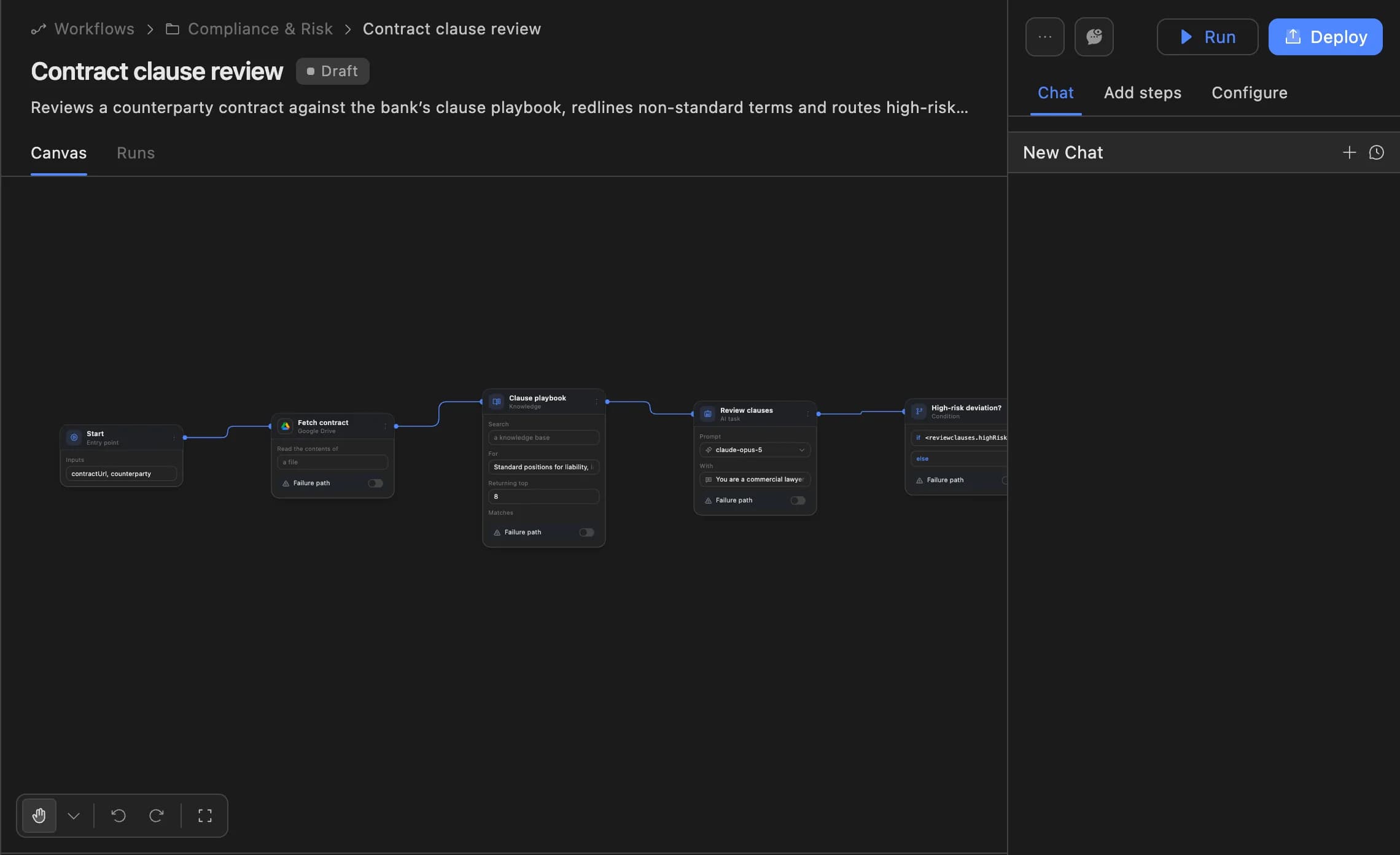
In the Agent Serve workflow builder each step says what it does, so a claims lead can see why a claim went to fast track and change the condition.

  • Deployed versions you can roll back
  • Each run traced block by block
The Agent Serve workflow builder showing a contract clause review agent: start, fetch contract, clause playbook, review clauses and a high-risk deviation branch, with Run and Deploy buttons.
04 · Audit

A record of every claim’s path

Agent Serve Logs keep each block’s inputs and outputs for every run, and the workspace audit log records changes to tables and workflows.

Before and after

Less retyping, fewer claims waiting.

Less retyping, fewer claims waiting.
WorkBeforeWith Agent Serve
Reading the noticeBeforeA handler opens each email and retypes the details.With Agent ServeAgent Serve pulls out the policy and loss details on arrival.
Missing evidenceBeforeFound on the first look, often days after the claim came in.With Agent ServeListed against the procedures as soon as the claim arrives.
Simple claimsBeforeWait in the same queue as complex ones.With Agent ServeGo to fast track by a condition the team can read.
Seeing the queueBeforeCounted by hand from the inbox and a spreadsheet.With Agent ServeA dashboard shows claims by severity, age and handler.

What does the work

The parts of Agent Serve behind each claim.

  1. 01Workflows

    Read and route

    A workflow reads each claim, checks it and routes it by severity.

  2. 02Files

    Keep the evidence

    Photos, invoices and forms are saved to the claim’s Library folder.

  3. 03Knowledge bases

    Know the procedures

    Policy wordings and claims procedures sit in a knowledge base.

  4. 04Tables

    Hold the queue

    A claims table holds every claim with its severity and handler.

  5. 05Dashboards & BI

    Show the workload

    A dashboard shows open claims by severity, age and handler.

Examples

Claims intake in property, motor and specialty.

Three claims processes insurers run on Agent Serve, each with a handler deciding cover.

Home insurance

First notice of loss

A new claim starts an Agent Serve workflow that extracts the policy and loss details, checks the procedures and routes simple claims to fast track.

  1. Email in
  2. Details extracted
  3. File checked
  4. Handler decides
Motor insurance

Evidence folders

Handlers drop photos, invoices and adjuster notes into one Agent Serve folder, and an agent lists what is still missing.

  1. Files added
  2. Folder read
  3. Gaps listed
  4. Request approved
Specialty · Claims quality

Decision checks

An Agent Serve workflow compares each claim decision with the claims procedures and flags notes the procedure does not support.

  1. Decision logged
  2. Procedure searched
  3. Gaps flagged
  4. Lead reviews

Examples show what teams can build in Agent Serve. They describe patterns, not named customer deployments.

Governance

Handlers decide cover, every run is traced.

Agent Serve keeps the cover decision with a handler and keeps claimant data to the people who need it.

Security and governance
  • A handler on every claim

    The Agent Serve Human block pauses each claim until a handler responds, and can alert them in Slack or by email.

  • Claimant data limited

    Agent Serve row limits and restricted columns keep claimant details to the handlers and teams you name.

  • PII detection

    A Guardrails block detects personal data and blocks or masks it before text reaches the next step.

  • Run logs

    Every workflow run records each block’s inputs, outputs and errors, so a reviewer can trace how a result was reached.

  • Audit trail

    Proposals, approvals, declines and executed actions are written to the workspace audit log, which admins can export.

  • Roles and permission groups

    Admin, write and read roles per workspace, plus permission groups that limit which models, blocks and integrations a team can use.

  • SSO and SCIM

    Sign in through your identity provider with SAML 2.0 or OIDC, and provision people with SCIM.

  • Self-hosting

    Run Agent Serve in your own cloud or data centre, next to the systems it reads.

  • Zero data retention

    Zero data retention with supported model providers, backed by your own provider keys and agreements or self-hosted models. Some provider features keep data by design, such as Gemini Deep Research, so they are outside zero data retention.

  • Deployed versions

    Workflows run from a deployed version, so a change is reviewed before it reaches production runs.

Further reading

Claims and underwriting, in detail.

Questions

About claims intake

Does Agent Serve decide whether a claim is covered?

No. Agent Serve reads, checks and routes claims. A claims handler decides cover on every claim at a Human step.

Where do claims come from?

An Agent Serve workflow can start from a new email in Gmail or Outlook, a web form through a webhook, a new row in a table, or an event from a connected app.

Can Agent Serve read scanned forms and photos?

Agent Serve workflows can read documents with blocks such as AWS Textract or Mistral Parser, and Agent blocks can take image files as input.

Who can see claimant data?

Agent Serve row limits and restricted columns decide who sees each claim and which fields, in tables, dashboards and exports.

What can we run first?

A team can start with the Agent Serve intake workflow, a claims table and a knowledge base of procedures, then add severity routing and the claims dashboard.

Last updated

Enterprise access

Put AI agents to work across your team

Agent Serve is available to teams by invitation. Tell us what you want to build and we will set up your workspace with you.