Agent Serve · Relays

AI coworkers that ask before they act.

Relays are AI coworkers in Agent Serve. Give one a role, tools and approval rules, then hand it real work.

Relays are AI coworkers in Agent Serve, the AI workspace where teams build, deploy, and manage AI agents. Each Relay has a specialization, instructions, resources and per-action permissions, and takes on tasks and ongoing work, pausing for approval before external actions such as sending an email.

How it works

Six setup steps, then a new teammate.

Agent Serve walks you through Basics, How it works, What it can use, Ongoing work, Permissions, and Review & publish.

  1. 1

    Basics and how it works

    Start from a specialization such as Compliance Reviewer, then write the instructions and the deliverable you expect.

  2. 2

    What it can use

    Give the Relay up to 30 resources: knowledge bases, tables, dashboards, metrics, the semantic model and rules.

  3. 3

    Ongoing work

    Run on a schedule, when a monitor alerts, or when a connected inbox, calendar or table changes.

  4. 4

    Permissions

    Choose Observe, Assist or Operate, set limits and name who approves.

  5. 5

    Review & publish

    Check the whole setup on one page, then publish. The Relay moves from draft to active.

In depth

A team you can see, limit and review.

Agent Serve shows every Relay, what it may do alone, and each action waiting on a person.

01 · Roster

Build a team of Relays

Agent Serve starts each Relay from a specialization, such as Revenue Analyst, Compliance Reviewer, Support Triage or Data Steward, or from your own role.

  • Each Relay is draft, active, paused or retired
  • Each one has its own conversation and task list
  • Its activity trail records what it did
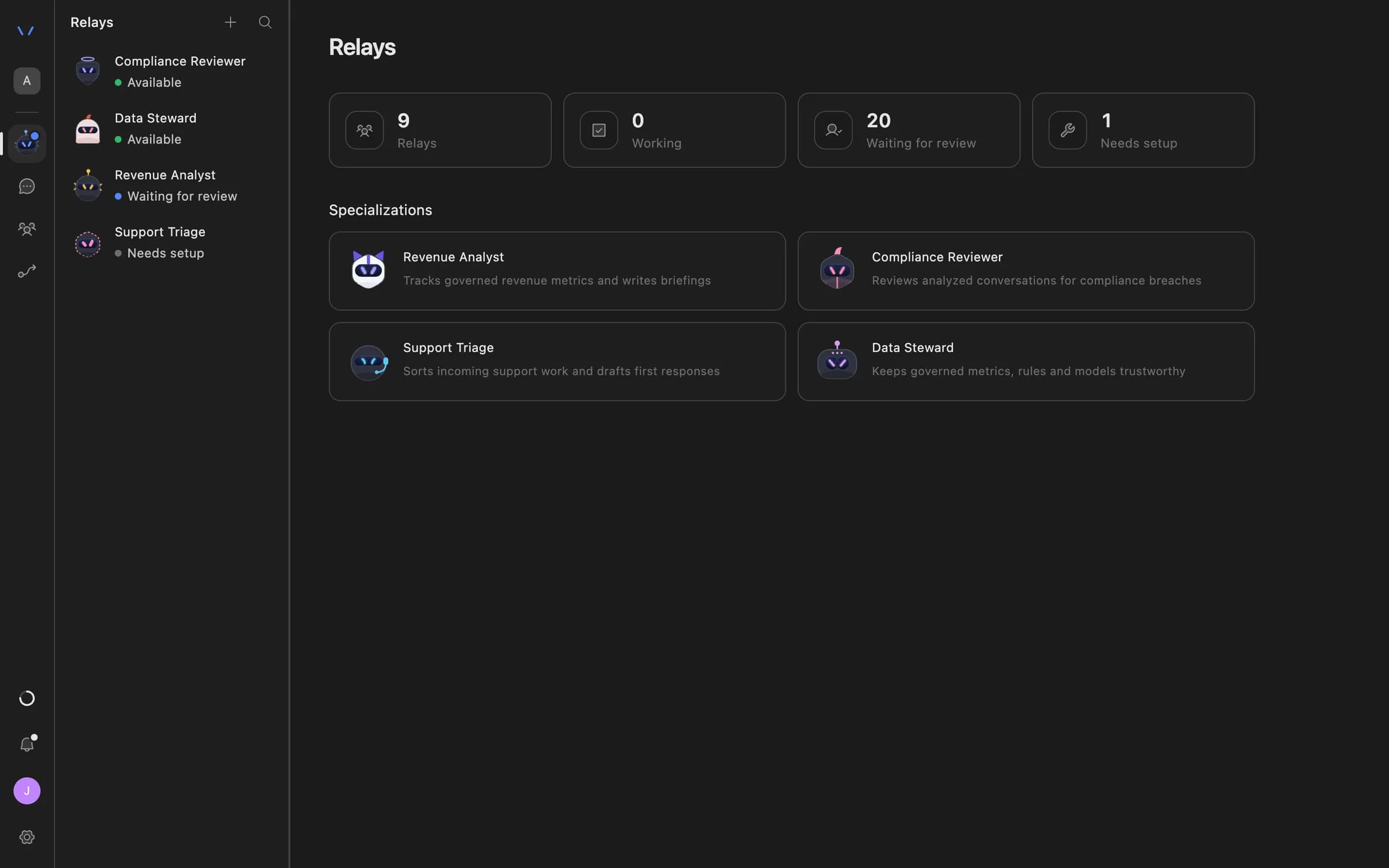
The Relays page in Agent Serve listing AI coworkers — Compliance Reviewer, Data Steward, Revenue Analyst and Support Triage — with their status and specializations.
02 · Permissions

Set what a Relay does alone

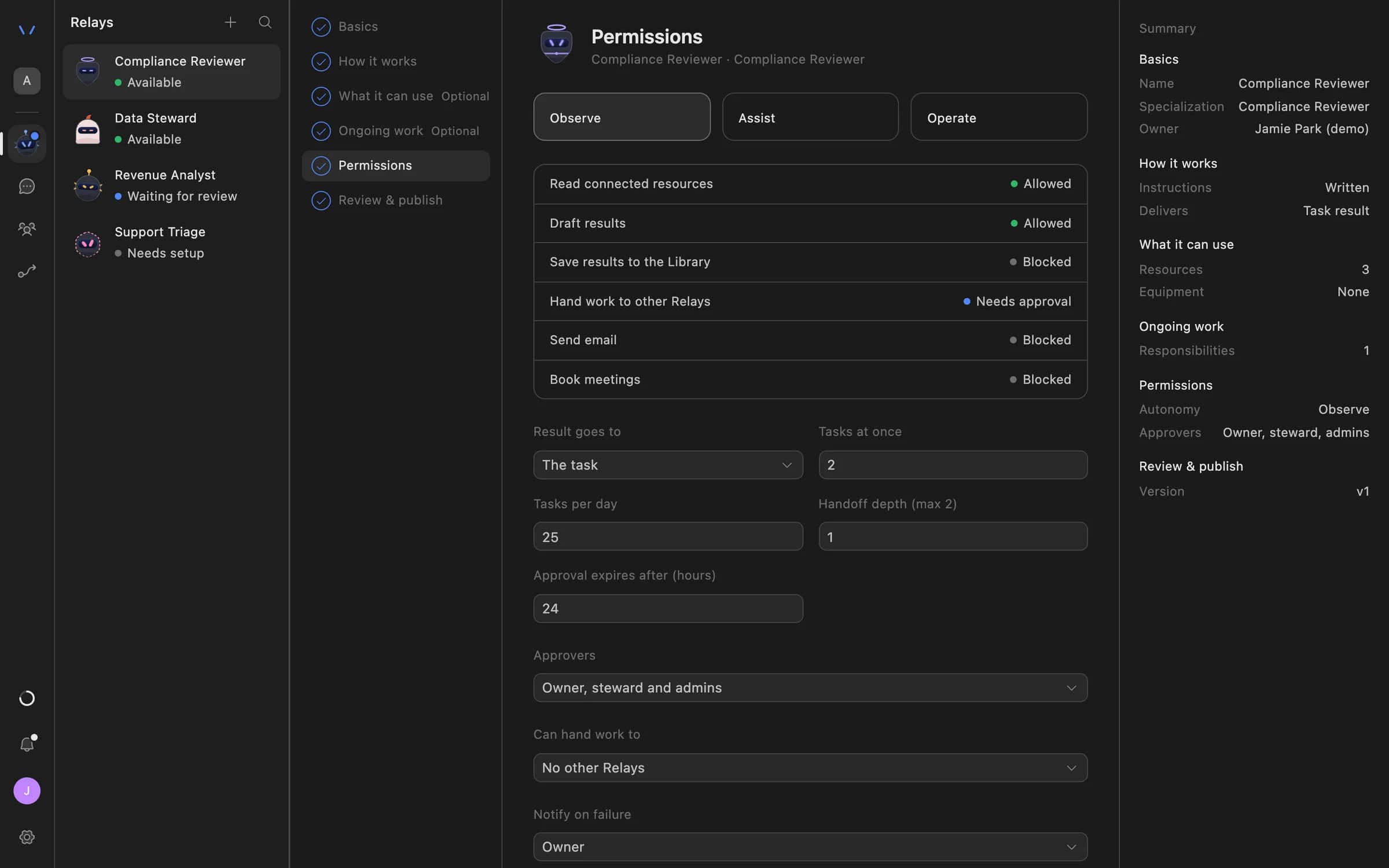
The Agent Serve Permissions step sets autonomy, per-action rules, task limits, approval expiry and who can approve, before a Relay starts work.

  • Observe, Assist or Operate
  • Each action allowed, needs approval or blocked
  • Reviews expire after 1 to 168 hours
Relay setup in Agent Serve on the Permissions step: Observe, Assist and Operate autonomy levels, each action marked Allowed, Needs approval or Blocked, daily task limits, approval expiry and who can approve.
03 · Approvals

Approve the action, not the idea

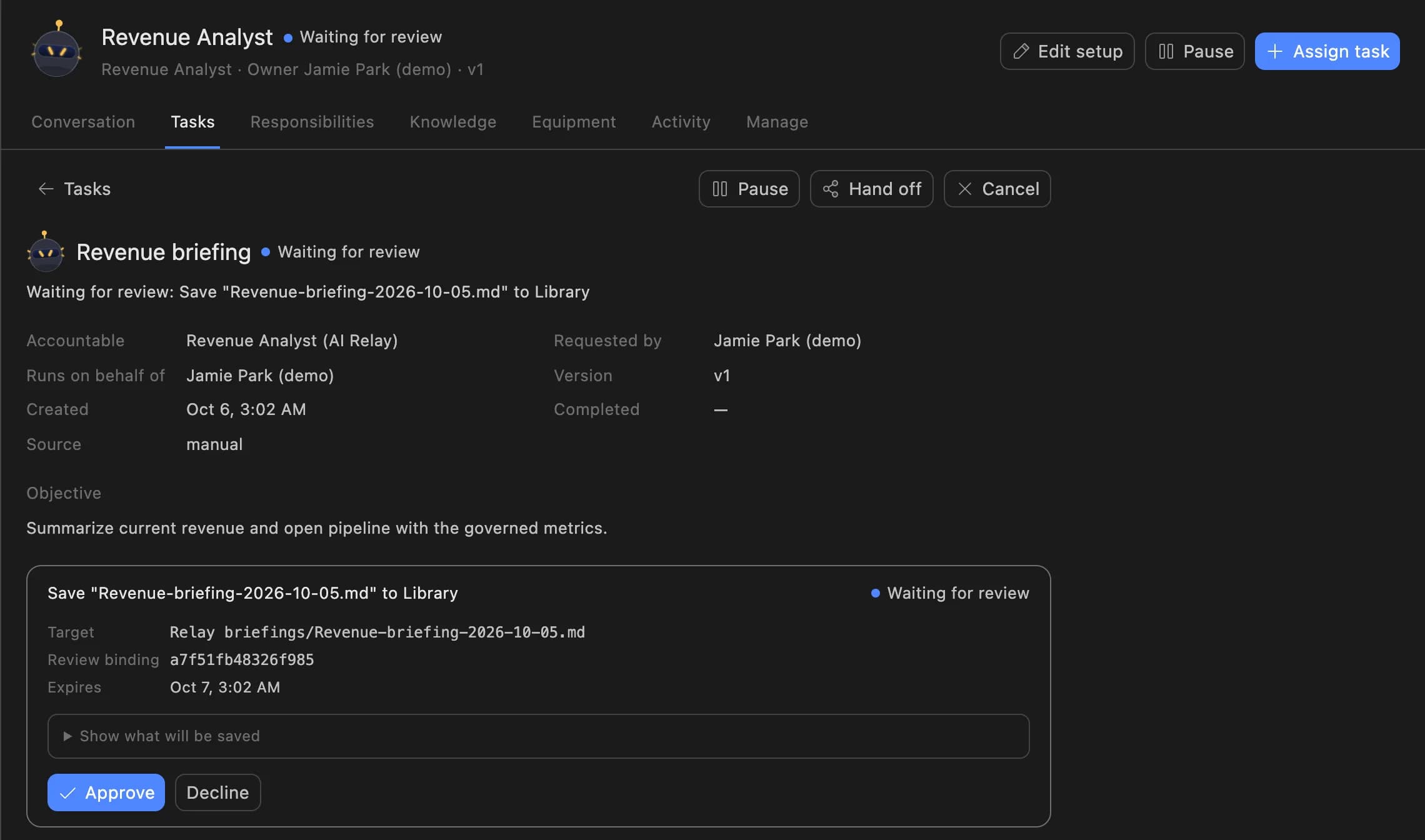
When an Agent Serve Relay needs approval, it stops and shows the exact action, such as saving a briefing to the Library, with Approve and Decline.

  • The approved action is the one that runs
  • The first decision wins
  • Declined actions never run
A Relay task in Agent Serve waiting for review: the Revenue Analyst asks to save a revenue briefing to the Library, with Approve and Decline buttons.
04 · Ongoing work

Work that starts itself

Agent Serve Relays run ongoing work on a schedule, When a monitor alerts, or by watching Gmail, Outlook, Google Calendar or a workspace table.

  • Presets such as Weekdays at 9:00 or Every hour
  • Or any schedule you write
  • Each run becomes a task you can review

Autonomy

Observe, Assist or Operate, action by action.

Observe, Assist or Operate, action by action.
Read and draftAllowed in Observe, Assist and Operate.
Save to the LibraryObserve: blocked · Assist: needs approval · Operate: allowed.
Hand off to another RelayObserve: needs approval · Assist: allowed · Operate: allowed.
Send email or book a meetingObserve: blocked · Assist and Operate: needs approval of the exact message, every time.
ApproversUp to 20 named people, or else the owner, a steward or a workspace admin. The first decision wins.
Review window1 to 168 hours before a review expires, 24 by default.
Task limits1 to 10 tasks at once (2 by default) and 1 to 200 tasks per day (25 by default).
Hand-offsChains up to 2 deep, to as many as 5 Relays at once.

Controls

Clear roles, firm limits, human approval.

Every Relay has a purpose, the resources it may use, the actions it may take alone, and an approver for the rest.

Autonomy per action

Pick Observe, Assist or Operate in Agent Serve, and each action follows that level: allowed, needs approval or blocked.

Read data: allowed · Send email: needs approval

Limits that hold

Agent Serve caps how many tasks a Relay runs at once and per day, so ongoing work never runs away.

3 tasks at once · 40 per day

Handoffs between Relays

An Agent Serve triage Relay can pass a case to an analyst Relay, with a limit on how deep a chain can go.

Support Triage → Revenue Analyst

A browser for pages without an API

Give an Agent Serve Relay a browser. It saves screenshots and downloads to the Library as evidence.

Portal export → Library → Review

Email with a recipient policy

Agent Serve Relays send from Gmail, Outlook or the workspace inbox, to internal people only, an allowlist or anyone you allow.

Recipients: internal only

Calendar with working hours

Agent Serve Relays propose meetings in Google Calendar or Outlook inside the working hours you set, and a person approves each booking.

Mon–Fri · 09:00–17:00

Examples

What banks and insurers hand to a Relay.

Three Relays financial services teams run on Agent Serve, each starting from one of the built-in specializations.

Compliance

Breach alert review

An Agent Serve Compliance Reviewer runs when a monitor alerts, reads the breach register and drafts a finding for a person to approve.

  1. Monitor alerts
  2. Register read
  3. Finding drafted
  4. Approved
Wealth management

Weekly revenue briefing

An Agent Serve Revenue Analyst reads the revenue dashboard every Monday at 8:00 and saves a briefing to the Library after approval.

  1. Mondays at 8:00
  2. Dashboard read
  3. Briefing drafted
  4. Saved after approval
Cards · Disputes

Morning dispute triage

An Agent Serve Support Triage Relay runs every weekday at 9:00, sorts new disputes from the tickets table, and hands complex ones to an analyst Relay.

  1. Weekdays at 9:00
  2. Disputes sorted
  3. Hand-off
  4. Analyst Relay

Examples show what teams can build in Agent Serve. They describe patterns, not named customer deployments.

By the numbers

Limits you set, not limits you hope for.

Built-in specializations

4

Built-in specializations

Resources a Relay can use

30

Resources a Relay can use

Named approvers per Relay

20

Named approvers per Relay

Longest review window

168 h

Longest review window

Before and after

Delegation without losing the final say.

Delegation without losing the final say.
WorkBeforeWith Agent Serve
Recurring analysisBeforeAn analyst rebuilds the same briefing every week.With Agent ServeAn Agent Serve Relay drafts it on schedule and waits for review.
Outbound emailBeforeAn assistant tool sends whatever it wrote.With Agent ServeA Relay shows the exact message, and only the approved one is sent.
Responding to alertsBeforeAlerts sit unread until someone has time.With Agent ServeA Relay starts work When a monitor alerts.
Knowing what the AI didBeforeOutputs pasted into chat with no record behind them.With Agent ServeA Relay activity trail plus the organization audit log.

Governance

Every action has an owner and a record.

Agent Serve records what each Relay proposed, who decided, and what ran, in the Relay’s activity and the audit log.

Security and governance
  • Named approvers

    Agent Serve sends a Relay’s approvals to up to 20 named people, or else to the owner, a steward or a workspace admin.

  • Reviews that expire

    An Agent Serve review expires after the window you set, from 1 to 168 hours, so stale actions never run.

  • Approvals before action

    Relays never send email or book meetings without an approval, under any autonomy setting. An approval covers the exact payload the reviewer saw and expires if nobody decides.

  • Audit trail

    Proposals, approvals, declines and executed actions are written to the workspace audit log, which admins can export.

  • Roles and permission groups

    Admin, write and read roles per workspace, plus permission groups that limit which models, blocks and integrations a team can use.

  • SSO and SCIM

    Sign in through your identity provider with SAML 2.0 or OIDC, and provision people with SCIM.

Works with

Relays use the whole workspace.

Further reading

Solutions built with Relays.

Questions

About Relays

What is a Relay in Agent Serve?

A Relay is an AI coworker in Agent Serve. It has a specialization, written instructions, the resources it may use and per-action permissions. Teams assign it one-off tasks or ongoing work.

Can a Relay send an email without approval?

No. An Agent Serve Relay never sends email or books a meeting without approval, under any autonomy level. It shows the exact message, and only the approved version runs.

What starts a Relay’s ongoing work?

Agent Serve runs ongoing work on a schedule, When a monitor alerts, or by watching Gmail, Outlook, Google Calendar or a workspace table.

Who approves a Relay’s actions?

Up to 20 people you name in Agent Serve, or else the Relay’s owner, a steward or a workspace admin. The first decision wins, and a review expires after the window you set.

Can I talk to a Relay by voice?

Not today. You work with an Agent Serve Relay in its conversation and task list. Workflows can use speech-to-text and text-to-speech blocks for audio files.

Last updated

Enterprise access

Put AI agents to work across your team

Agent Serve is available to teams by invitation. Tell us what you want to build and we will set up your workspace with you.