
Use case · KYC onboarding

Every onboarding file complete before review.

Agent Serve reads each new KYC pack, checks it against your onboarding policy and lists what is missing, so analysts spend time deciding.

A KYC onboarding review use case for Agent Serve, the AI workspace where teams build, deploy, and manage AI agents: a workflow reads identity and address documents, checks them against the onboarding policy in a knowledge base, records the result in a table and waits for a KYC analyst to decide.

At a glance

For KYC analysts and onboarding managers.

Who it is for

KYC analysts and onboarding managers at banks, payment firms and wealth managers

The problem it removes

A new business customer emails a passport, a utility bill and a company extract. An analyst copies the details into the case system, checks each document against the policy by hand, and asks for what is missing days later. Queues grow, and file reviews find the same gaps again.
What your team still controls

People decide

  • An analyst approves or returns every file at a Human step in the workflow
  • Your onboarding policy decides what counts as acceptable evidence
  • Which documents, tables and policies each workflow may read
  • Who sees personal data, through row limits and hidden columns
Day one

What you can run first

  • A workflow that reads each new pack and lists what is missing
  • Your onboarding policy in a knowledge base, with cited answers in Chat
  • An onboarding table that tracks every case and its status
Later

What you add once it is trusted

  • Rules that score risk factors such as country and ownership structure
  • A dashboard of overdue files by analyst and stage
  • A scheduled run that prepares customers due for periodic review

How it runs

From a new application to an analyst’s decision.

What arrives, what Agent Serve does with it, and where a KYC analyst makes the call.

  1. 1

    The pack arrives

    A new application lands as a row in the onboarding table, with the passport, utility bill and company extract attached.

  2. 2

    The documents are read

    AWS Textract reads the identity document, and an agent pulls the name, date of birth and address out of each file.

  3. 3

    The policy is checked

    The agent compares the pack with the onboarding policy in the knowledge base and lists each missing or out-of-date item, with its clause.

  4. 4

    An analyst decides

    The run pauses at a Human step. The analyst reads the note and the documents, then records a decision and a comment in the resume form.

Before and after

Less copying, fewer files sent back.

Less copying, fewer files sent back.
WorkBeforeWith Agent Serve
Reading the packBeforeAn analyst retypes names, dates and addresses from each PDF.With Agent ServeAgent Serve reads the documents and fills the case record.
Checking the policyBeforeThe analyst checks a printed checklist from memory.With Agent ServeEach gap is listed with the policy clause it comes from.
Chasing what is missingBeforeThe request goes out days later, after the first look.With Agent ServeThe missing items are known as soon as the pack arrives.
Knowing where files areBeforeStatus lives in a spreadsheet someone updates on Fridays.With Agent ServeA table and a dashboard show every file and its stage.

What does the work

The parts of Agent Serve behind each file.

  1. 01Tables

    Hold the cases

    An onboarding table holds one row per application, and a new row starts the review.

  2. 02Workflows

    Read and check

    A workflow reads the documents, checks them and stops for the analyst.

  3. 03Knowledge bases

    Know the policy

    The onboarding policy and procedures sit in a knowledge base the agent cites.

  4. 04Rules

    Flag the risk

    Rules mark higher-risk files, such as complex ownership, for a senior analyst.

  5. 05Dashboards & BI

    Show the queue

    A dashboard shows open files by stage, analyst and age.

In depth

What the onboarding team sees and uses.

Agent Serve puts the documents, the policy answer and the case record where the analyst already works.

01 · Library

Documents and policy in one place

Agent Serve keeps each KYC pack in the Library next to the onboarding policy, and a workflow writes its review note beside the documents it read.

  • PDF, Word and image files preview in place
  • Files up to 5 GB each
  • Share with an email allowlist or through SSO
02 · Knowledge

Policy questions, answered with the clause

An analyst asks Agent Serve Chat what counts as proof of address, and the answer links to the passage in the onboarding policy.

  • Sync the policy from SharePoint or Confluence
  • Source chips open the document behind the answer
03 · Workflow builder

A review your team can read

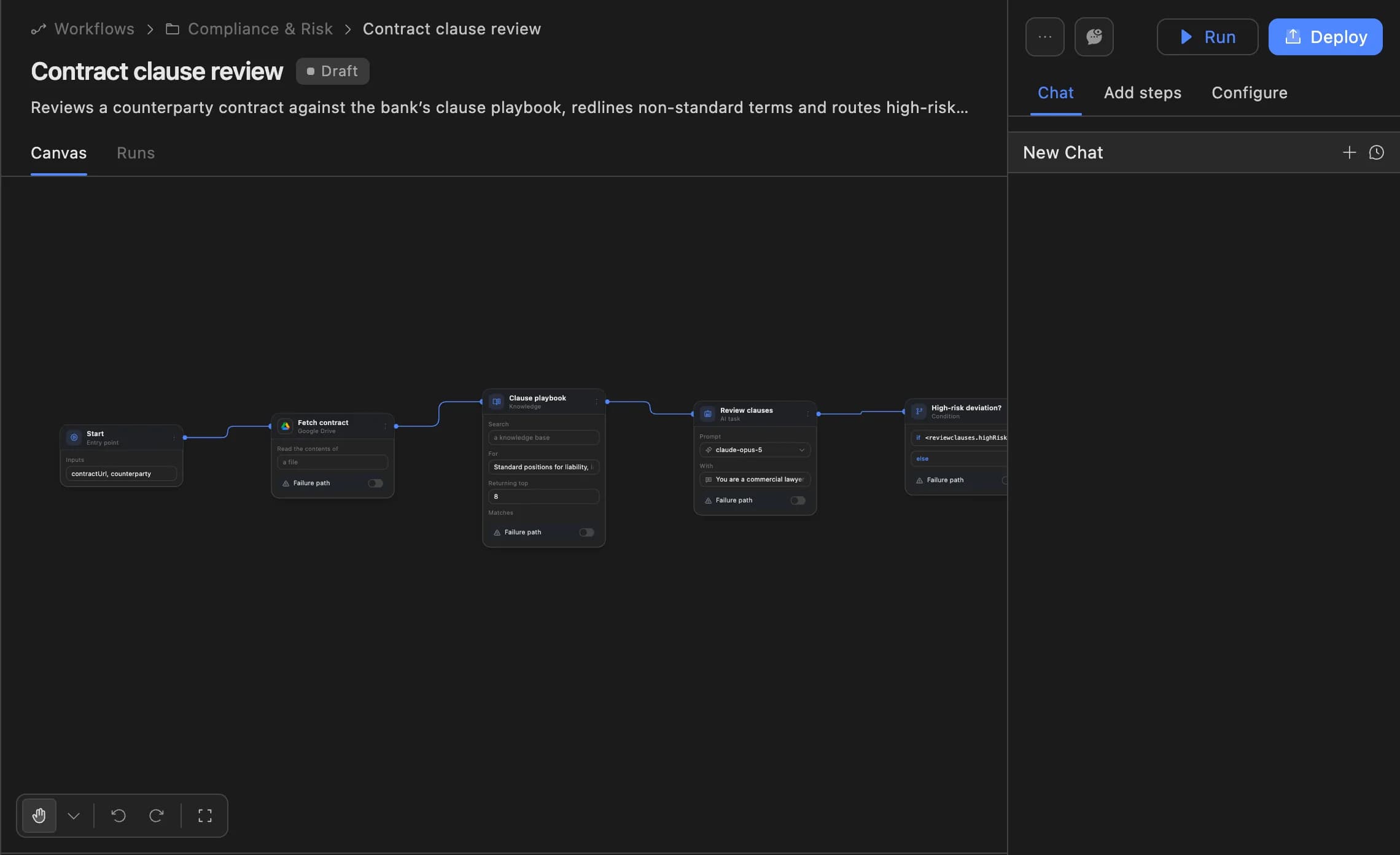
Each step of the Agent Serve review is a block that says what it does, so a compliance lead can follow the logic and change it before it is deployed.

  • Every deployment is a version you can roll back
  • Logs trace each block of every run
The Agent Serve workflow builder showing a contract clause review agent: start, fetch contract, clause playbook, review clauses and a high-risk deviation branch, with Run and Deploy buttons.
04 · Rules

Higher-risk files go to a senior analyst

An Agent Serve score adds points for risk factors such as a high-risk country or layered ownership, and the queue filters by the result.

Examples

Onboarding reviews in banking, payments and wealth.

Three onboarding queues financial services teams run on Agent Serve, each ending with a person’s decision.

Business banking

New company accounts

An Agent Serve workflow reads the company extract and director IDs, lists missing items with the policy clause, and stops for a KYC analyst.

  1. Application row
  2. Documents read
  3. Gaps listed
  4. Analyst decides
Payments · Merchant onboarding

Merchant applications

An Agent Serve workflow checks each merchant’s documents against the onboarding policy and routes higher-risk scores to a senior reviewer.

  1. Form submitted
  2. Pack checked
  3. Risk scored
  4. Reviewer approves
Wealth · Periodic review

Refresh files that are due

An Agent Serve schedule picks clients due for review, gathers their records and drafts the refresh note for an analyst to sign off.

  1. Schedule
  2. Records gathered
  3. Note drafted
  4. Analyst signs off

Examples show what teams can build in Agent Serve. They describe patterns, not named customer deployments.

Governance

Personal data stays where it belongs.

Agent Serve keeps a person on every onboarding decision and limits who sees customer documents.

Security and governance
  • Hidden columns for identity data

    Agent Serve restricted columns hide fields such as passport numbers from everyone you do not name, in the table and in exports.

  • A person decides every file

    The Agent Serve Human block pauses each review until the analyst responds, and the response is kept in the run’s log.

  • PII detection

    A Guardrails block detects personal data and blocks or masks it before text reaches the next step.

  • Audit trail

    Proposals, approvals, declines and executed actions are written to the workspace audit log, which admins can export.

  • Roles and permission groups

    Admin, write and read roles per workspace, plus permission groups that limit which models, blocks and integrations a team can use.

  • SSO and SCIM

    Sign in through your identity provider with SAML 2.0 or OIDC, and provision people with SCIM.

  • Self-hosting

    Run Agent Serve in your own cloud or data centre, next to the systems it reads.

  • Zero data retention

    Zero data retention with supported model providers, backed by your own provider keys and agreements or self-hosted models. Some provider features keep data by design, such as Gemini Deep Research, so they are outside zero data retention.

Further reading

KYC reviews, worked through in detail.

The deep dive models what a periodic review backlog costs and what changes, with every figure labelled.

Read the blog

Questions

About KYC onboarding

Does Agent Serve approve customers on its own?

No. In this Agent Serve workflow the Human block pauses every review until a KYC analyst responds, and the analyst’s decision is recorded with the run.

How does Agent Serve read passports and utility bills?

An Agent Serve workflow can use the AWS Textract block, which reads text, tables, forms and identity documents, and an Agent block that pulls out the fields the policy needs.

Where does the onboarding policy come from?

Upload it to an Agent Serve knowledge base or sync it from a source such as SharePoint, Confluence or Google Drive, hourly, daily, weekly or on demand.

Who can see customer documents?

Agent Serve applies team space roles to the Library, and row limits and restricted columns to tables, so each person sees only what their role allows.

What can we run on day one?

A team can start with the Agent Serve review workflow, the policy knowledge base and the onboarding table, then add risk rules and a queue dashboard once the first part is trusted.

Last updated

Enterprise access

Put AI agents to work across your team

Agent Serve is available to teams by invitation. Tell us what you want to build and we will set up your workspace with you.