Agent Serve · Knowledge bases

Answers with something behind them.

Upload documents and sync sources such as Confluence or Google Drive. Agents find the passage that answers the question and show where it came from.

Knowledge bases in Agent Serve, the AI workspace where teams build, deploy, and manage AI agents, index uploaded documents and synced sources for search, so agents retrieve the relevant passage for a question and cite the source document.

How it works

From a document to a checked answer.

An Agent Serve knowledge base splits documents into passages, searches them by meaning and keyword, and hands agents the passage with its source.

  1. 1

    Upload or sync

    Upload documents, add them from the Library, or connect a source that syncs on a schedule.

  2. 2

    Split into passages

    Each document is split into chunks with the strategy and sizes chosen when the knowledge base was created.

  3. 3

    Search by meaning and keyword

    Hybrid search finds passages that match the question, and reranking puts the best ones first.

  4. 4

    Answer with the source

    The agent answers from the passages it found and shows the document each one came from.

By the numbers

Knowledge bases in four figures.

Sources you can sync from

66

Sources you can sync from

Chunking strategies

6

Chunking strategies

Tag slots per knowledge base

17

Tag slots per knowledge base

Per uploaded document

100 MB

Per uploaded document

Read from the Agent Serve connector registry and knowledge base settings.

In depth

Where knowledge meets your agents.

Agent Serve knowledge bases fill from your sources and the Library, and answer in Chat, in workflows and for Relays.

01 · Connectors

Sync the sources you already keep

An Agent Serve connector keeps a knowledge base in step with a source such as Confluence, SharePoint or Google Drive, on the schedule you choose.

  • Every hour, every 6 hours, daily, weekly or manual only
  • Status shows Active, Syncing, Paused or Error
  • Trigger a sync from a workflow when you need it now
02 · Library

Upload once, use everywhere

Upload documents to an Agent Serve knowledge base, or ask Chat to add files already in the Library, so one copy serves the team and the agents.

  • Up to 20 files at once, 100 MB each
  • PDF, Word, Excel, PowerPoint, CSV, HTML, Markdown, JSON and YAML
  • Enable or disable a document without deleting it
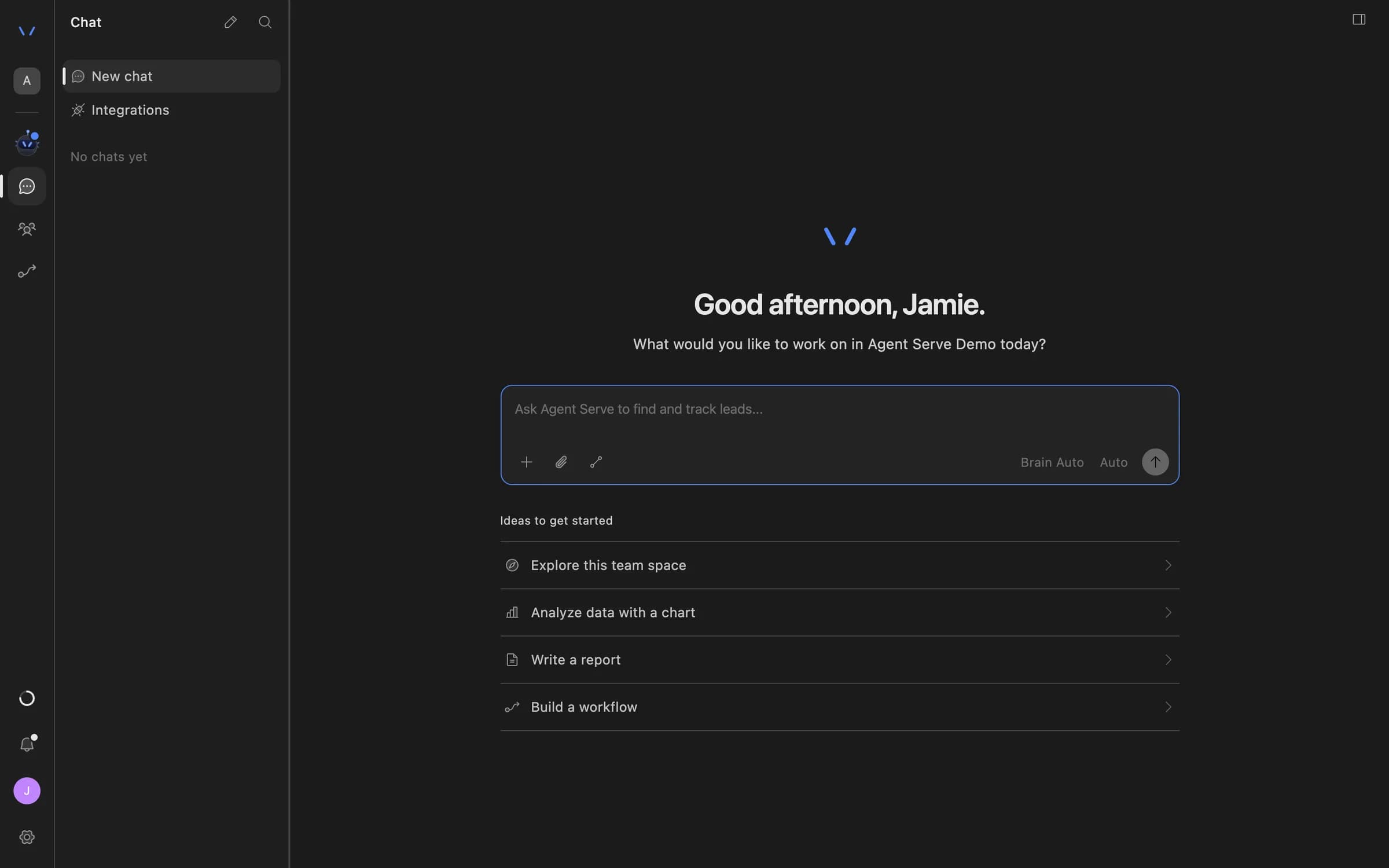
03 · Chat

Ask a knowledge base in Chat

Mention a knowledge base in Agent Serve Chat, or choose Ask about knowledge, and the answer links to the documents it used.

  • Search several knowledge bases in one question
  • Chat can add files, tags and connectors for you
  • Source chips open the document behind the answer
Agent Serve Chat home with a message composer and suggestions to explore the team space, analyze data with a chart, write a report, or build a workflow.
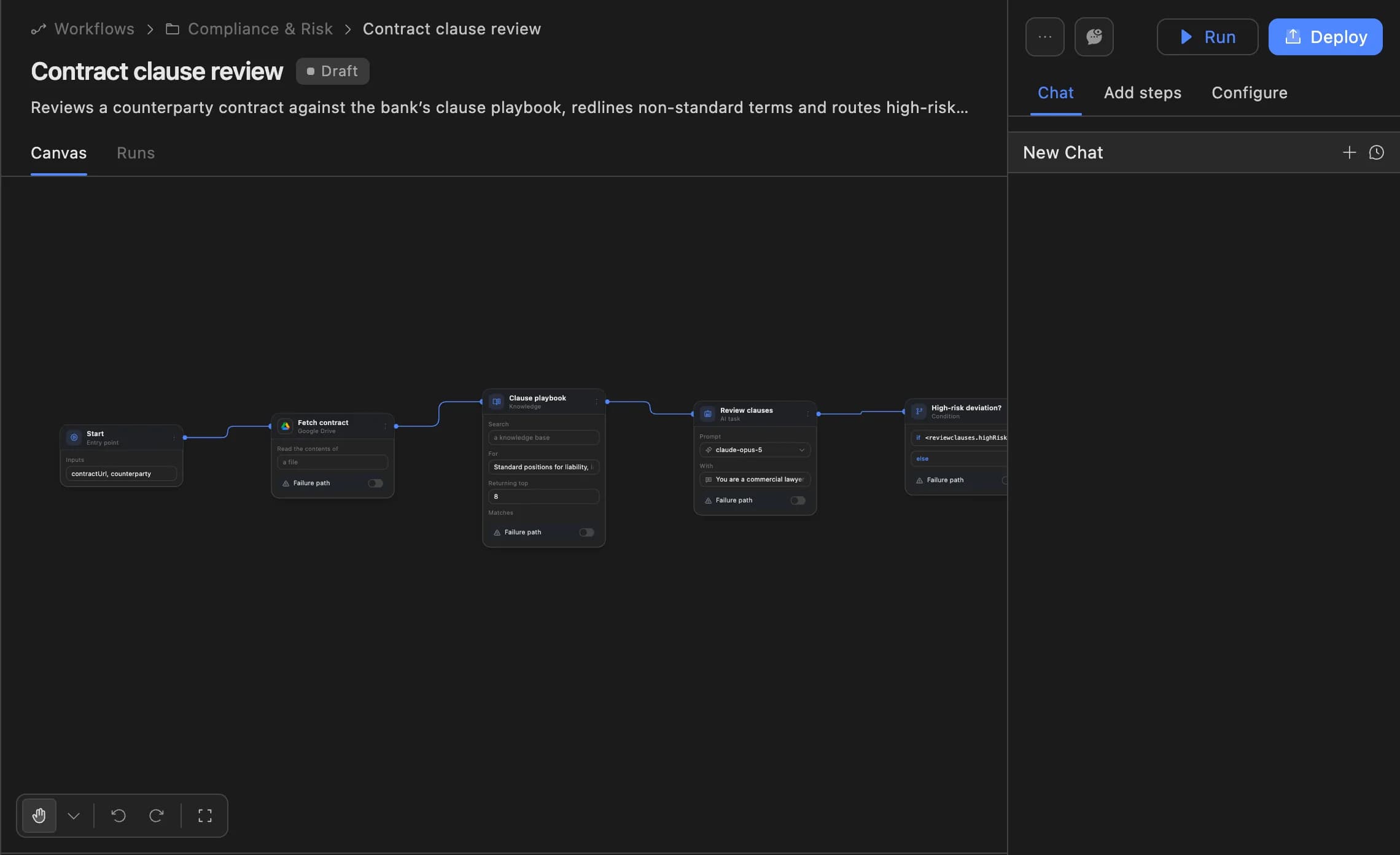
04 · Workflows

Hold workflows to the source

The Agent Serve Knowledge block searches from a workflow, and the Guardrails Hallucination Check tests an answer against a knowledge base.

  • 14 operations, from Search to Upsert Document
  • Filter results by tag in the same step
  • Stop or flag answers the sources do not support
The Agent Serve workflow builder showing a contract clause review agent: start, fetch contract, clause playbook, review clauses and a high-risk deviation branch, with Run and Deploy buttons.

Connectors

Sync from the tools where policies already live.

Capabilities

Bring sources together, find the right passage.

Chunking you choose

Agent Serve splits documents with Auto, Text, Recursive, Sentence, Token or Regex chunking, with sizes and overlap you set.

Recursive · 1,024 tokens · 200 overlap

Search by meaning and keyword

Agent Serve hybrid search combines meaning-based search with keyword search, and can rerank results so the best passage comes first.

Hybrid · Rerank Results · 10 results

Tags and filters

Agent Serve tags documents with text, number, date and true-or-false values, so a search can be narrowed to the right ones.

Region = EMEA · Effective after 2026-01-01

See and edit every chunk

Open a document in Agent Serve to search its chunks, edit their content, add a new chunk or turn one off.

Chunk 14 · 212 tokens · Enabled

Sync on a schedule

Agent Serve connectors sync every hour, every 6 hours, daily or weekly, or only when you ask.

SharePoint · Daily · Active

Ask about knowledge

Agent Serve sends a knowledge base to Chat from its own page, so anyone can ask it a question in plain language.

Ask about knowledge → Chat

Examples

What regulated teams keep in knowledge bases.

Three ways banks and insurers put Agent Serve knowledge bases to work, each answer traceable to the source document.

Retail banking · Branches

Policy questions answered

Branch staff ask Agent Serve Chat about fees, limits and exceptions, and the answer cites the product policy synced from SharePoint.

  1. SharePoint synced
  2. Question asked
  3. Passage found
  4. Policy cited
Insurance · Claims QA

Procedure checks on claim notes

An Agent Serve workflow compares each claim decision with the claims procedures knowledge base and flags notes the procedure does not support.

  1. Claim closed
  2. Procedure searched
  3. Hallucination Check
  4. QA flag
Compliance

Regulator request packs

A compliance analyst asks Agent Serve Chat for every passage on outsourcing across current policies, tagged by effective date, and saves the pack.

  1. Tag filter applied
  2. Passages gathered
  3. Sources listed
  4. Pack saved

Examples show what teams can build in Agent Serve. They describe patterns, not named customer deployments.

Under the hood

Agent Serve knowledge bases, in detail.

Agent Serve knowledge bases, in detail.
UploadsUp to 20 files at once, 100 MB each and 500 MB in total, or add files from the Library.
File typesPDF, CSV, DOC, DOCX, TXT, Markdown, XLSX, XLS, PPTX, HTML, JSON, JSONL and YAML.
ChunkingAuto, Text, Recursive, Sentence, Token or Regex. Max chunk size 100 to 4,000 tokens, overlap up to 500. Fixed once the knowledge base is created.
Document sizeUp to 5,000 chunks per document.
SearchAutomatic, Hybrid (keyword and meaning-based) or meaning-based only, with optional reranking. 10 results by default.
Tags17 slots per knowledge base: 7 text, 5 number, 2 date and 3 true-or-false.
Connectors66 sources, including Confluence, SharePoint, Google Drive, Notion, ServiceNow and Amazon S3. Sync hourly, every 6 hours, daily, weekly or manually.
Workflow accessThe Knowledge block, with 14 operations including Search, Upsert Document, List Tags and Trigger Sync.
EmbeddingsSet once for the deployment, including self-hosted models through Ollama.

Before and after

Less searching, answers you can trace.

Less searching, answers you can trace.
WorkBeforeWith Agent Serve
Finding the ruleBeforeSearch three intranets and read the whole policy.With Agent ServeAsk once and get the passage that answers it.
Trusting the answerBeforeAn AI reply with no way to see where it came from.With Agent ServeEvery answer links to the document behind it.
Keeping it currentBeforeRe-upload documents whenever someone remembers.With Agent ServeConnectors sync on a schedule and show their status.
Checking agent outputBeforeRead every draft against the procedure by hand.With Agent ServeA Hallucination Check tests the draft against the knowledge base.

Governance

Decide what agents can read and export.

Agent Serve applies the team space’s roles to knowledge bases, and access policies let admins limit how knowledge leaves the workspace.

Security and governance
  • Export you allow

    Agent Serve access policies can turn off knowledge base export and hide the Knowledge tab for a group.

  • Restore what was deleted

    A deleted Agent Serve knowledge base waits in Recently deleted in settings, where it can be restored.

  • Failing syncs stop

    An Agent Serve connector turns itself off after 10 failed syncs in a row, and its status shows the error.

  • Roles and permission groups

    Admin, write and read roles per workspace, plus permission groups that limit which models, blocks and integrations a team can use.

  • SSO and SCIM

    Sign in through your identity provider with SAML 2.0 or OIDC, and provision people with SCIM.

  • Self-hosting

    Run Agent Serve in your own cloud or data centre, next to the systems it reads.

  • GDPR ready

    Retention from one day to five years, deletion and access controls support GDPR obligations. Ready means the controls are in place, not a certification.

Works with

Knowledge feeds every agent you build.

Further reading

Solutions built on Agent Serve knowledge bases.

Questions

About knowledge bases

What is a knowledge base used for?

An Agent Serve knowledge base organizes and indexes documents and connected source content so agents can find the relevant passage for a question or task, and show the source.

Which sources can I sync?

Agent Serve has 66 connectors, including Confluence, SharePoint, Google Drive, OneDrive, Notion, Slack, Salesforce, ServiceNow, Zendesk, Box and Amazon S3.

What does hybrid search mean?

Agent Serve hybrid search combines keyword search, which matches the words, with meaning-based search, which finds passages that say the same thing in other words.

Can I change chunking after creating a knowledge base?

No. Agent Serve fixes the chunking strategy and sizes when a knowledge base is created. To change them, create a new knowledge base and add the documents again.

How large can a document be?

Each document uploaded to an Agent Serve knowledge base can be up to 100 MB, with up to 20 files and 500 MB in one upload, and up to 5,000 chunks per document.

Can a workflow check an answer against a knowledge base?

Yes. The Agent Serve Guardrails block runs a Hallucination Check that tests an answer against a knowledge base before the workflow moves on.

Last updated

Enterprise access

Put AI agents to work across your team

Agent Serve is available to teams by invitation. Tell us what you want to build and we will set up your workspace with you.