Agent Serve · Developers

Build apps inside your AI workspace.

Write the screens your team needs. Agent Serve gives them sign-in, data, AI agents, security and audit, so you ship domain code only.

Agent Serve, the AI workspace where teams build, deploy, and manage AI agents, lets engineers build small web apps that run inside a workspace. Developers use the agentserve CLI and the app SDK to read tables, query the semantic model, run workflows, hand tasks to Relays and open Chat. Apps run in a sandboxed frame as the person using them, narrowed to their manifest, and deploy from the CLI or from GitHub and GitLab.

How it works

From an empty folder to an installed app.

Agent Serve apps follow one path: write the code, upload a draft, and an admin installs it in a workspace.

  1. 1

    Start from a template

    agentserve app init copies a starter app, its manifest and the app SDK into a new folder.

  2. 2

    Run it against your workspace

    agentserve app dev serves the app in the same sandboxed frame people see, with your own access.

  3. 3

    Deploy a draft

    agentserve app deploy builds and uploads a draft version, or a push to a connected repository builds one.

  4. 4

    An admin installs it

    A workspace admin reviews the permissions the version asks for, makes it installable and installs it.

In depth

The tools you build with.

Agent Serve gives engineers a CLI, a typed SDK, code tools and Git deploys, so an app is ordinary front-end code.

01 · CLI

One CLI for the whole lifecycle

The agentserve CLI creates, runs, deploys and manages Agent Serve apps, from your machine or from CI.

  • init, dev and deploy from one command set
  • Usage, logs and secrets per install
  • Sign in once with agentserve login
02 · SDK

The workspace as a typed client

The Agent Serve app SDK reads and adds table rows, queries the semantic model, runs workflows, assigns Relay tasks and opens Chat.

  • React hooks and a plain client
  • Typed results and errors
  • Who is viewing, with their role
03 · Code tools

Logic that gives the same answer

Ship code tools with an Agent Serve app: TypeScript, JavaScript or Python functions that run on the server, in a sandbox.

  • Callable by the app, Chat, Relays and workflows
  • An agent cannot talk a tool into a different answer
  • Secrets reach tools, never the browser
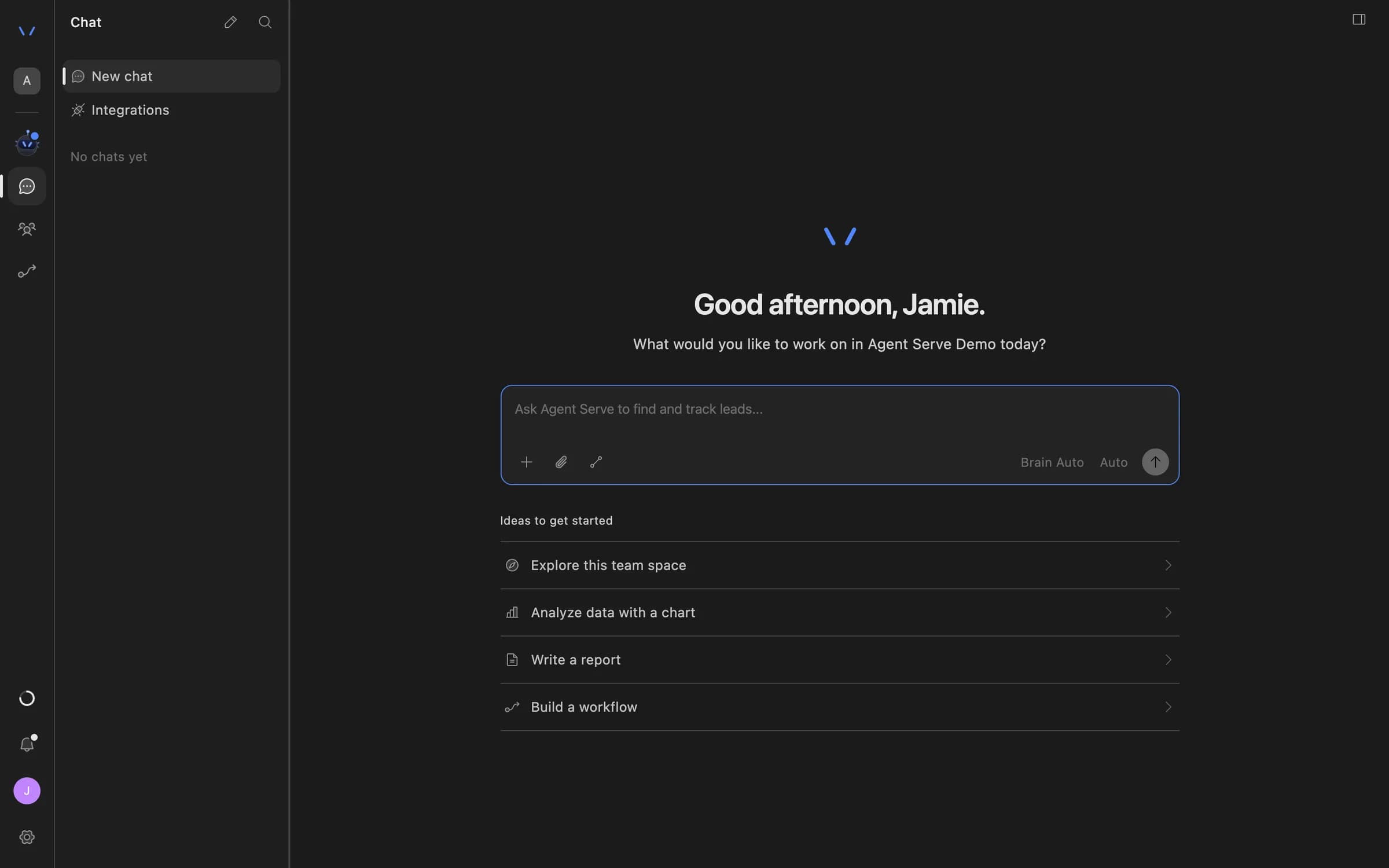
Agent Serve Chat home with a message composer and suggestions to explore the team space, analyze data with a chart, write a report, or build a workflow.
04 · Git

Deploy on every push

Connect a GitHub or GitLab repository, and each push to a chosen branch builds a draft Agent Serve app version.

  • Lockfile install, dependency audit and tests
  • Build status reported on the commit
  • Branch rules and admin approvals

Security model

An app holds no authority of its own.

Sandboxed frame

No network, no cookies

An Agent Serve app runs in a sandboxed frame with an opaque origin. Its only way out is the SDK.

  • Network requests are refused
  • Files load only from its own bundle
  • Camera, microphone and location are off
Viewer and manifest

What the person can reach, and the manifest names

Every SDK call runs as the person using the app, authorized again at the time of the call, then narrowed to the manifest.

  • Their role and permission group apply
  • Row security and hidden columns apply
  • A manifest never adds access
Frame tokens and budgets

Short-lived access, capped spend

Agent Serve serves app files under a signed frame token that expires in an hour, and checks the install budget before paid work.

  • Token binds person, install and version
  • Monthly budget per install
  • Every write and tool run is audited

What apps reach

Everything the workspace already has.

Tables

An Agent Serve app lists tables, queries rows and adds rows, with the person’s row security applied.

useTableRows("deals")

The semantic model

An Agent Serve app reads the semantic model and queries measures through it, so numbers match dashboards.

Revenue by region

Workflows

An Agent Serve app runs deployed workflows, which use the models and integrations already set up in the workspace.

Run "Price check"

Relays

An Agent Serve app hands tasks to Relays, the AI coworkers that ask before they act.

Assign to Deal desk Relay

Chat

An Agent Serve app opens Chat with a question. The person decides whether to send it.

Ask about this deal

Panels and Chat cards

An Agent Serve app can also render dashboard panels and Chat cards, in the same sandboxed frame.

Deal summary card

By the numbers

Agent Serve apps in figures.

Starter templates in agentserve app init

6

Starter templates in agentserve app init

Largest app bundle

25 MB

Largest app bundle

Longest Git build

10 min

Longest Git build

Life of a frame token

1 hour

Life of a frame token

Figures are read from the product code.

Before and after

Ship the screen, not the plumbing.

Ship the screen, not the plumbing.
WorkBeforeWith Agent Serve
Sign-in and rolesBeforeBuild a login, sync users and map roles for every internal tool.With Agent ServePeople open the app already signed in, with their workspace role.
Data accessBeforeProvision a database and rewrite access rules by hand.With Agent ServeThe app reads tables and the semantic model as the person, with row security.
AI agentsBeforeWire model keys and prompts into each app.With Agent ServeRun workflows, assign Relay tasks and open Chat from the SDK.
ReleaseBeforeHosting, secrets and an approval process to set up first.With Agent ServeDeploy from the CLI or a push. An admin installs the version.

Under the hood

Agent Serve apps, in detail.

Agent Serve apps, in detail.
Manifestagentserve.app.yaml: pages, permissions, budget and what to create on install.
BundleStatic files only: HTML, JavaScript, CSS, images, fonts and media.
Framesandbox="allow-scripts", connect-src none, no inline scripts.
PermissionsTables, workflows, Relays, files, the semantic model and Chat, named per resource.
Code toolsTypeScript, JavaScript or Python, run on the server in a sandbox.
GitGitHub App or GitLab token; Bun, npm, pnpm or Yarn lockfiles.
RolesWrite uploads drafts. Admin makes a version installable and installs it.
BudgetMonthly per install; paid calls stop when it is spent.

Works with

Apps on the modules your team already uses.

Questions

About building on Agent Serve

What is an Agent Serve app?

An Agent Serve app is a small web front end that runs inside a workspace. It uses the workspace’s people, tables, semantic model, workflows, Relays and Chat through the app SDK.

Do I need to run a server or a database?

No. Agent Serve serves the app’s static files and provides sign-in and data. Logic that must run on the server ships as code tools, which Agent Serve runs in a sandbox.

Can an app see more than the person using it?

No. Every call runs as the person using the app and is narrowed to what the manifest names. A manifest never grants access the person does not already have.

How do I deploy an app?

Run agentserve app deploy from your machine or CI, or connect a GitHub or GitLab repository so each push builds a draft version. A workspace admin then installs it.

Where is the reference documentation?

The Agent Serve documentation covers the quickstart, the manifest, the app SDK, the security model, the CLI, code tools and Git deploys, under Build on Agent Serve.

Last updated

Enterprise access

Put AI agents to work across your team

Agent Serve is available to teams by invitation. Tell us what you want to build and we will set up your workspace with you.