Agent Serve · Models

The right model for each step.

Pick a model per block, or let Agent Serve route each task by difficulty. Bring your own keys, or keep inference in your cloud.

Agent Serve, the AI workspace where teams build, deploy, and manage AI agents, supports models from providers including OpenAI, Anthropic, Google, Mistral, xAI, DeepSeek, Groq, Cerebras, AWS Bedrock, Azure and Vertex AI, self-hosted models through Ollama and vLLM, and speech-to-text and text-to-speech blocks.

How it works

From model choice to cost per run.

Agent Serve sets the model where the work happens, in each Agent block, and records what every call used.

  1. 1

    Pick a model, or Auto

    Choose a provider and model in each Agent block, or pick Auto and let Agent Serve choose by task difficulty.

  2. 2

    Use your keys

    Add your own provider keys in Settings → Model API keys, for one team space or the whole organization.

  3. 3

    Apply access policies

    Access policies decide which providers each group may use and which models are denied.

  4. 4

    See tokens and cost

    Run history shows the model, input and output tokens, and cost for every step of every run.

Providers

Every provider in one picker.

Agent Serve reads these providers from its model definitions: first-party labs, cloud platforms and self-hosted runtimes.

Directory

Compare AI models across providers.

Browse 155 AI models across 25 providers. Compare pricing, context windows, and capabilities.

Compare models

Side-by-side comparison of top models across key metrics.

All models

OpenAI

GPT-6 Astra

GPT-4.1

GPT-4.1 Mini

GPT-4.1 Nano

GPT-5.6 Sol

GPT-5.6 Terra

GPT-5.6 Luna

GPT-5.5 Pro

GPT-5.5

GPT-5.4 Pro

GPT-5.4

GPT-5.4 Mini

GPT-5.4 Nano

GPT-5.3 Codex

GPT-5.2 Pro

GPT-5.2

GPT-5.1

GPT-5 Pro

GPT-5

GPT-5 Mini

GPT-5 Nano

Chat Latest

GPT-5 Chat Latest

o4 Mini

o3 Pro

o3

o3 Mini

o1

GPT-4o

Anthropic

Claude Fable 5.1

Claude Fable 5

Claude Sonnet 5

Claude Opus 5

Claude Opus 4.8

Claude Opus 4.7

Claude Opus 4.6

Claude Sonnet 4.6

Claude Opus 4.5

Claude Opus 4.1

Claude Opus 4.0

Claude Sonnet 4.5

Claude Sonnet 4.0

Claude Haiku 4.5

Claude 3 Haiku

Google

Gemini 3.8 Flash

Gemini 3.7 Flash

Gemini 3.6 Flash

Gemini 3.5 Flash Lite

Gemini 3.5 Flash

Gemini 3.1 Pro Preview

Gemini 3.1 Flash Lite

Gemini 3 Flash Preview

Gemini 2.5 Pro

Gemini 2.5 Flash

Gemini 2.5 Flash Lite

Gemini 2.0 Flash

Gemini 2.0 Flash Lite

Deep Research Pro Preview 12 2025

DeepSeek

DeepSeek V4 Pro

DeepSeek Flash

DeepSeek V4 Flash

DeepSeek Chat

DeepSeek V3

DeepSeek R1

DeepSeek Reasoner

xAI

Grok 4.6

Grok 4.5

Grok 4.3

Grok 4 Latest

Grok 4 0709

Grok 4.1 Fast Reasoning

Grok 4.1 Fast Non Reasoning

Grok 4 Fast Reasoning

Grok 4 Fast Non Reasoning

Grok Code Fast 1

Grok 4.20 0309 Reasoning

Grok 4.20 0309 Non Reasoning

Grok 4.20 Multi Agent 0309

Grok 3 Latest

Grok 3 Fast Latest

Cerebras

Qwen 3.8 27B

GPT OSS 120B

Llama 3 1 8B

Qwen 3 235B A22B Instruct 2507

Zai GLM 4.7

Gemma 4 31B

Groq

OpenAI GPT OSS 120B

OpenAI GPT OSS 20B

OpenAI GPT OSS Safeguard 20B

Qwen 3 32B

Qwen 3 8 27B

Qwen 3 6 27B

Llama 3.1 8B Instant

Llama 3.3 70B Versatile

Meta Llama 4 Scout 17B 16E Instruct

Moonshot AI Kimi K2 Instruct 0905

Sakana AI

Fugu Ultra V2 0

Fugu Max

Fugu Max V1 0

Sakana Namazu

Sakana Namazu V1 0

Fugu

Fugu Ultra

Meta

Muse Spark 1.3

Muse Spark 1.1

Kimi

Kimi K3

Kimi K2 7 Code

Kimi K2 7 Code Highspeed

Kimi K2 6

Z.ai

GLM 5.3

GLM 5.3 Flash

GLM 5.2

GLM 5.1

GLM 5

GLM 5 Turbo

GLM 4.7

GLM 4.7 Flashx

GLM 4.6

GLM 4.5

GLM 4.5 Air

GLM 4.5 X

GLM 4.5 Airx

GLM 4 32B 0414 128k

Mistral AI

Mistral Medium 3.5

Mistral Medium 3

Zai GLM 5.2

Labs Leanstral 1.5

Mistral Large Latest

Mistral Large 2512

Mistral Small 2603

Devstral 2512

Mistral Large 2411

Magistral Medium Latest

Magistral Medium 2509

Magistral Small Latest

Magistral Small 2509

Mistral Medium Latest

Mistral Medium 2604

Mistral Medium 2508

Mistral Medium 2505

Mistral Small Latest

Mistral Small 2506

Open Mistral Nemo

Codestral Latest

Codestral 2508

Devstral Latest

Devstral Small Latest

Devstral Small 2507

Devstral Medium 2507

Ministral 14B Latest

Ministral 14B 2512

Ministral 8B Latest

Ministral 8B 2512

Ministral 3B Latest

Ministral 3B 2512

Dynamic model catalogs

These providers load their model lists dynamically at runtime.

In depth

Routing, keys and hosting, explained.

How Agent Serve decides which model runs, whose key pays for it, and where inference happens.

01 · Auto routing

Let Auto pick the model

Choose Auto in the model picker on Agent Serve Cloud. A classifier rates the task’s difficulty, then picks a model that fits it and anything attached.

  • Three difficulty tiers, from quick extraction to hard reasoning
  • Separate model pools for text, images and files
  • Access policy model rules still apply
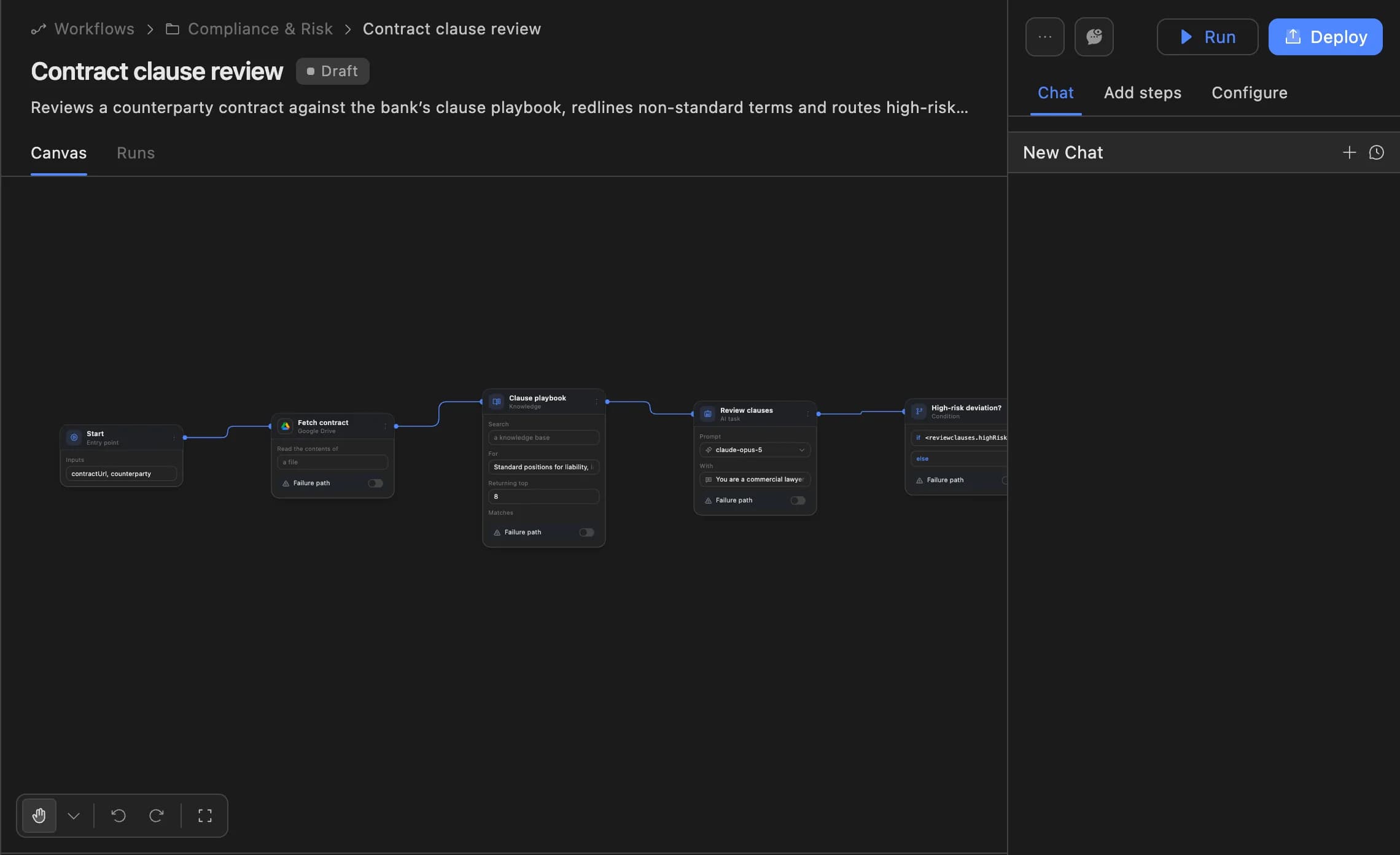
The Agent Serve workflow builder showing a contract clause review agent: start, fetch contract, clause playbook, review clauses and a high-risk deviation branch, with Run and Deploy buttons.
02 · Your cloud

Run models where your data lives

Agent Serve connects to self-hosted Ollama, vLLM and LiteLLM endpoints, and to models in Azure, AWS Bedrock and Vertex AI.

  • Self-hosted model lists load at runtime
  • AWS Bedrock accepts IAM role credentials
  • Operators can hide providers and models for the whole deployment
03 · Cost

Know what each run cost

Agent Serve run history has a Cost column, and each run’s trace lists the model, input and output tokens for every step.

  • Per-run cost breakdown
  • Tokens: in and out, per step
  • Admins can hide cost from members with an access policy

By the numbers

The model catalog, counted from code.

tracked models

155

tracked models

model providers

25

model providers

self-hosted runtimes: Ollama, vLLM, LiteLLM

3

self-hosted runtimes: Ollama, vLLM, LiteLLM

keys per provider, rotated in turn

10

keys per provider, rotated in turn

Counts are read from the Agent Serve model definitions when the site is built.

Voice & speech

Speech in, speech out.

Workflows can transcribe audio with speech-to-text blocks and turn text into natural speech with text-to-speech blocks. These are the providers and models available today.

Speech-to-text

Speech-to-Text block
  • OpenAI WhisperWhisper-1
  • DeepgramNova 3Nova 2NovaWhisper LargeEnhancedBase
  • ElevenLabsScribe v2
  • AssemblyAIBest
  • Google GeminiGemini 3.1 ProGemini 3 ProGemini 2.5 ProGemini 2.5 FlashGemini 2.5 Flash LiteGemini 2.0 Flash

Text-to-speech

Text-to-Speech block
  • OpenAI TTS10 voicesTTS-1TTS-1-HDGPT-4o Mini TTS
  • Deepgram Aura12 voices
  • ElevenLabsTurbo v2.5Flash v2.5Multilingual v2Turbo v2Monolingual v1Multilingual v1
  • Cartesia SonicSonicSonic 2Sonic TurboSonic 3Sonic Multilingual
  • Google Cloud TTS
  • Azure TTS
  • PlayHT
  • More models

Speech blocks process audio inside workflows. Agent Serve does not offer live voice conversations with agents or Relays today; in Chat you can dictate a message.

Governance

Decide which models each team may use.

Agent Serve puts model choice under the same access policies, keys and logs as the rest of the workspace.

Security and governance
  • Model allow and deny lists

    Agent Serve access policies set the allowed model providers and the denied models for each group of people.

  • Keys you control

    Agent Serve stores your provider keys encrypted. Organization keys apply to every team space unless a team space adds its own.

  • Roles and permission groups

    Admin, write and read roles per workspace, plus permission groups that limit which models, blocks and integrations a team can use.

  • Bring your own keys

    Use your organisation’s own model provider keys at organisation or workspace level.

  • Zero data retention

    Zero data retention with supported model providers, backed by your own provider keys and agreements or self-hosted models. Some provider features keep data by design, such as Gemini Deep Research, so they are outside zero data retention.

  • Self-hosting

    Run Agent Serve in your own cloud or data centre, next to the systems it reads.

  • Run logs

    Every workflow run records each block’s inputs, outputs and errors, so a reviewer can trace how a result was reached.

Before and after

One place to choose and govern models.

One place to choose and govern models.
WorkBeforeWith Agent Serve
Choosing a modelBeforeOne model hard-coded for every task, strong or simple.With Agent ServeA model per Agent block, or Auto to match each task by difficulty.
Provider keysBeforeKeys pasted into scripts and shared in chat threads.With Agent ServeKeys stored encrypted in Agent Serve, at team space or organization level.
Sensitive promptsBeforeEvery prompt leaves for a public endpoint.With Agent ServeSelf-hosted models or your own cloud account keep inference inside your network.
CostBeforeA monthly invoice nobody can trace back to a task.With Agent ServeTokens and cost on every run, step by step.

Works with

Where models do the work.

Questions

Frequently asked questions

Which AI models are best for building agents and automated workflows?

The most important factors for agent tasks are reliable tool use (function calling), a large enough context window to track conversation history and tool outputs, and consistent instruction following. In Agent Serve, OpenAI GPT-4.1, Anthropic Claude Sonnet, and Google Gemini 2.5 Pro are popular choices, and each supports tool use, structured outputs, and context windows of 128K tokens or more. For cost-sensitive or high-throughput agents, Groq and Cerebras offer significantly faster inference at lower cost.

What does context window size mean when running an AI agent?

The context window is the total number of tokens a model can process in a single call, including your system prompt, conversation history, tool call results, and any documents you pass in. For agents running multi-step tasks, context fills up quickly, and each tool result and each retrieved document adds tokens. A 128K-token context window fits roughly 300 pages of text; models like Gemini 2.5 Pro support up to 1M tokens, enough to hold an entire codebase in a single pass.

Are model prices shown per million tokens?

Yes. Input, cached input, and output prices are all listed per one million tokens, matching how providers bill through their APIs. For agents that chain multiple calls, costs compound quickly: an agent completing 100 turns at 10K tokens each consumes roughly 1M tokens per session. Cached input pricing applies when a provider supports prompt caching, where a repeated prefix like a system prompt is billed at a reduced rate.

Which AI models support tool use and function calling?

Tool use, also called function calling, lets an agent invoke external APIs, query databases, run code, or take any action you define. In Agent Serve, all first-party models from OpenAI, Anthropic, Google, Mistral, Groq, Cerebras, and xAI support tool use. Look for the Tool Use capability tag on any model card in this directory to confirm support.

How do I add a model to an Agent Serve agent?

Open Agent Serve, add an Agent block, and select your provider and model from the model picker inside that block. Every model listed in this directory is available in the Agent block. Swapping models takes one click and does not affect the rest of your agent, making it straightforward to test different models on the same task without rebuilding anything.

Enterprise access

Put AI agents to work across your team

Agent Serve is available to teams by invitation. Tell us what you want to build and we will set up your workspace with you.