Use case · Cost control

Catch overspend before the invoice lands.

Spend is modelled by vendor and category, a monitor flags overruns, and a Relay drafts the renegotiation for a buyer to approve.

An illustrative procurement and cost control use case for Agent Serve, the AI workspace where teams build, deploy, and manage AI agents: the semantic model, Monitors, a Relay, Dashboards and Tables combine to track spend and prepare renegotiations.

At a glance

Who controls spend, and where it leaks.

Who it is for

Procurement leads, buyers and budget owners

The problem it removes

Spend sits in several systems with different vendor names. Overruns show up when the invoice arrives, and preparing a renegotiation means rebuilding the same spreadsheet every quarter.
What your team still controls

People decide

  • A buyer approves every email to a vendor
  • The budget thresholds each monitor checks
  • Which spend tables each team can see
Day one

What you can run first

  • Spend tables described in the semantic model by vendor and category
  • A spend dashboard by vendor and category
  • A monitor that alerts on budget overruns
Later

What you add once it is trusted

  • A Relay that drafts renegotiation briefs for a buyer
  • Rules that classify spend by category or risk
  • Scheduled reports to budget owners

Step by step

One overrun, start to finish.

  1. 01

    Spend joins up

    Vendors, contracts and cost centers relate the same way in every analysis.

  2. 02

    The overrun is caught

    A monitor on spend versus budget alerts when a category runs hot.

  3. 03

    The case is prepared

    A Relay compares rates and drafts the renegotiation for a buyer to approve.

How it fits together

From spend data to a better contract.

  1. 01Semantic model

    Model the spend

    Vendors, contracts, categories and cost centers, joined the same way everywhere.

  2. 02Monitors & alerts

    Watch the budget

    A monitor on spend versus budget alerts when a category runs hot.

  3. 03Relays

    Prepare the case

    A Relay compares rates across contracts and drafts the renegotiation email.

  4. 04Dashboards & BI

    Show the savings

    The spend dashboard tracks committed and realized savings by category.

How it runs

From hot category to a buyer-approved email.

Agent Serve reads spend through one model, so the alert, the dashboard and the Relay all count the same way.

  1. 1

    Spend is modelled

    Vendors, contracts, invoices and cost centers become entities in the semantic model, joined by checked relationships.

  2. 2

    The monitor fires

    A Metric threshold monitor on spend against budget raises a Warning when a category goes over.

  3. 3

    The Relay builds the case

    A Relay starts on When a monitor alerts, compares rates across contracts and drafts the renegotiation email.

  4. 4

    A buyer approves

    The email waits as an approval showing the exact message before it goes to the vendor.

What to measure

How a team might measure the change.

Example figures for a procurement team managing a few hundred vendors.

Illustrative

−7%

Addressable spend

Savings from renegotiated contracts.

Illustrative

3 wks

Earlier warning

Overspend flagged before month end.

Illustrative

85%

Spend under management

Spend mapped to a contract and owner.

Illustrative

0

Unreviewed vendor emails

Every message waits for a buyer.

Illustrative example. Figures show how the workflow is measured; they are not customer results.

In depth

How buyers work the renegotiation.

Agent Serve lets a buyer test terms, set the Relay’s limits, approve the email and ask follow-up questions in one place.

01 · Scenarios

Try the terms before you ask

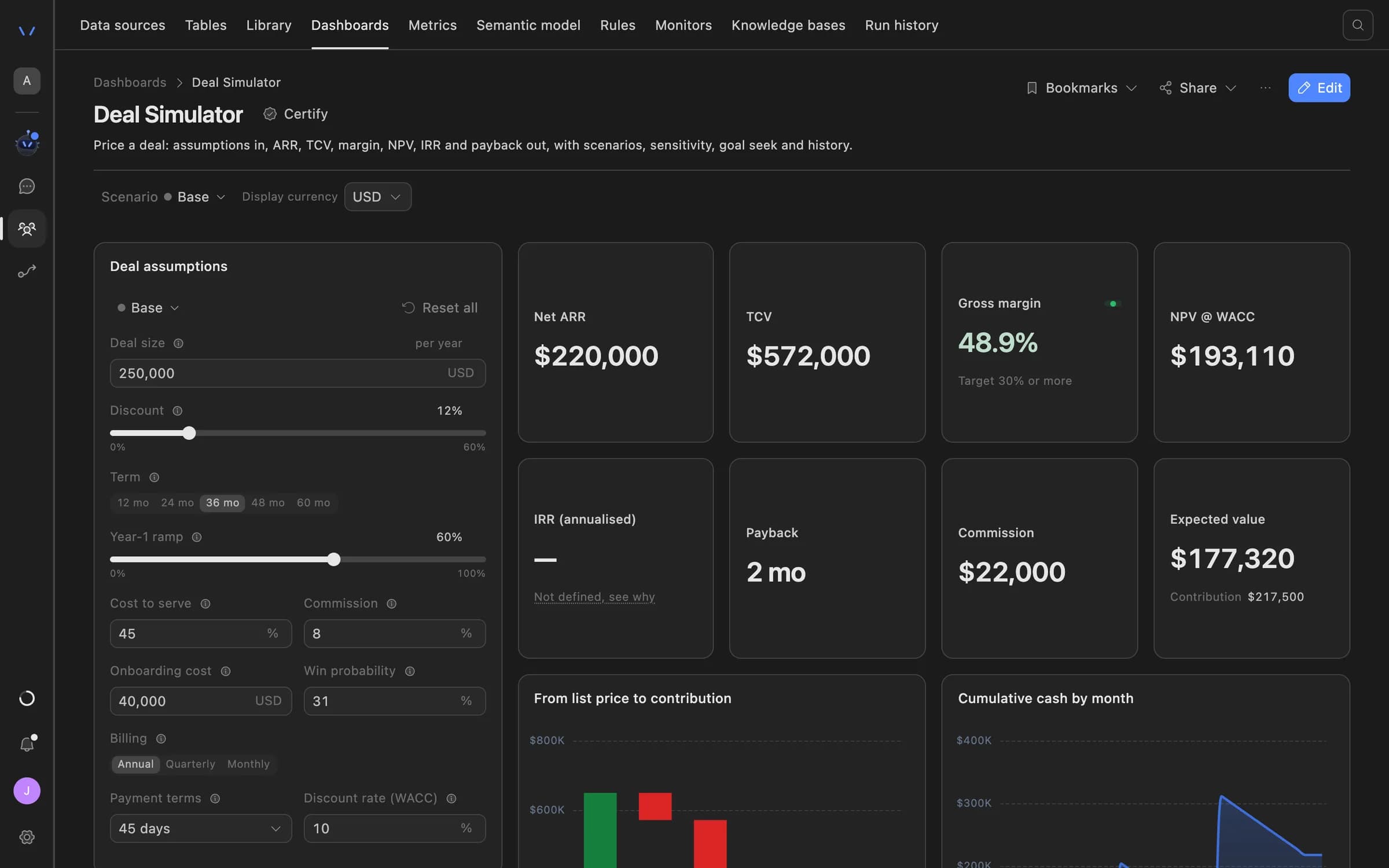
Agent Serve dashboard scenarios recalculate outcomes as a buyer changes price, term or volume, kept apart from recorded results.

Agent Serve Deal Simulator: deal assumptions such as size, discount, term and cost to serve on the left, with net ARR, TCV, gross margin, NPV, payback and commission recalculated on the right.
02 · Relays

Limits set before it starts

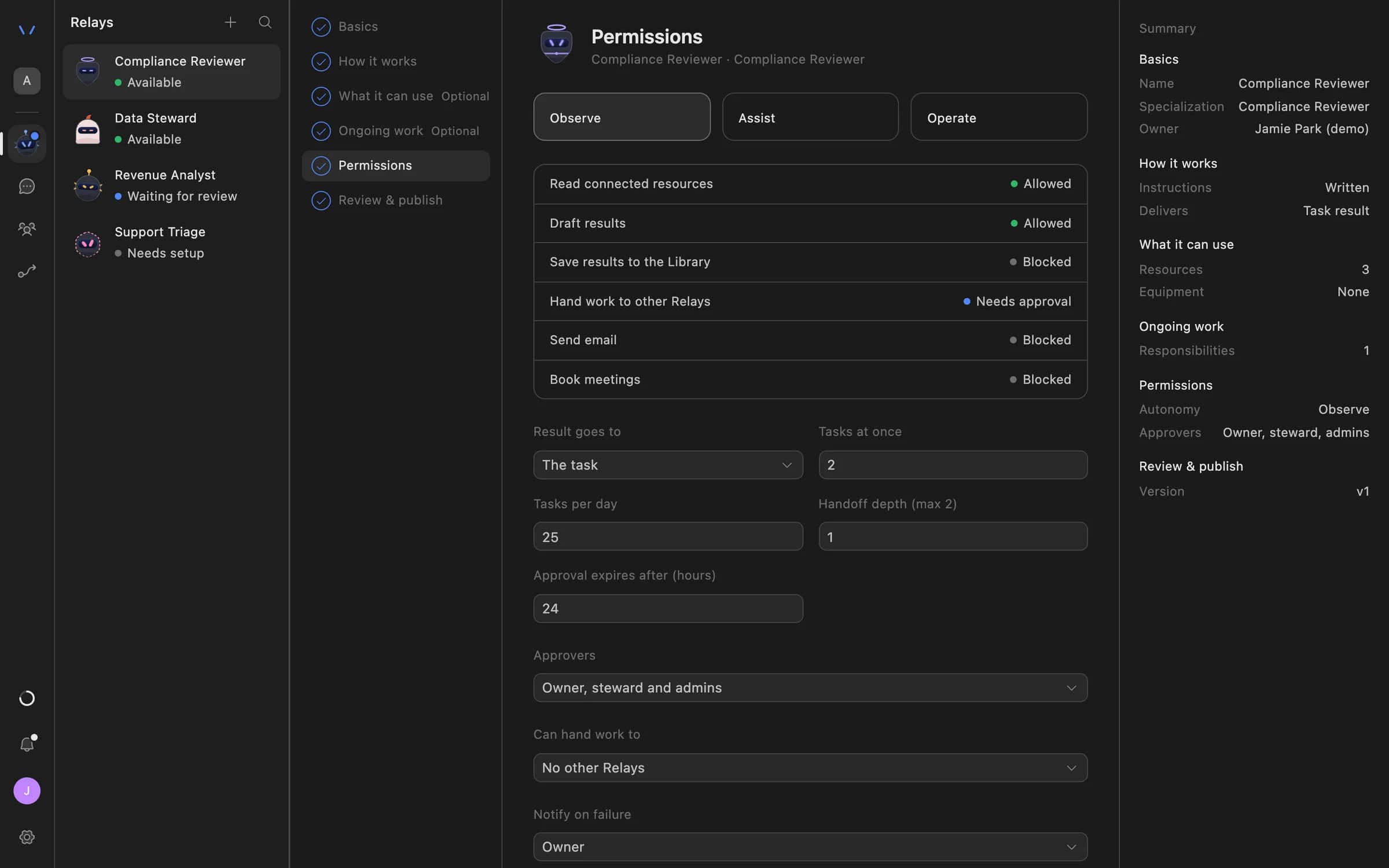
An Agent Serve Relay’s Permissions step decides what it may do alone, what needs approval and what is blocked.

  • Email recipients: internal only, an allowlist or anyone
  • Tasks per day capped
  • Who can approve, by name
Relay setup in Agent Serve on the Permissions step: Observe, Assist and Operate autonomy levels, each action marked Allowed, Needs approval or Blocked, daily task limits, approval expiry and who can approve.
03 · Approvals

The buyer signs off

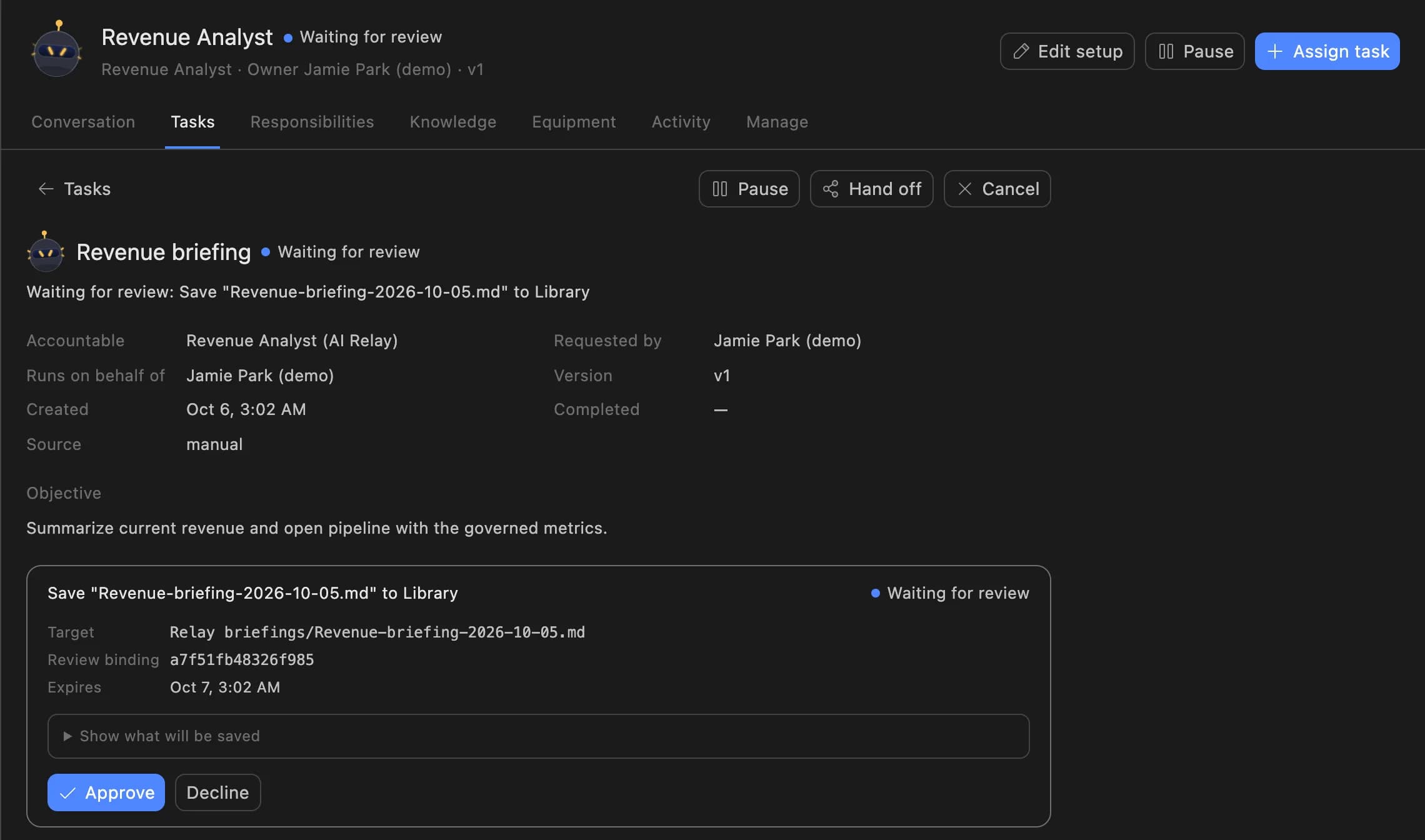
The Agent Serve Relay shows the buyer the exact email it wants to send to the vendor. Nothing goes out until it is approved.

A Relay task in Agent Serve waiting for review: the Revenue Analyst asks to save a revenue briefing to the Library, with Approve and Decline buttons.
04 · Chat

Ask about the spend table

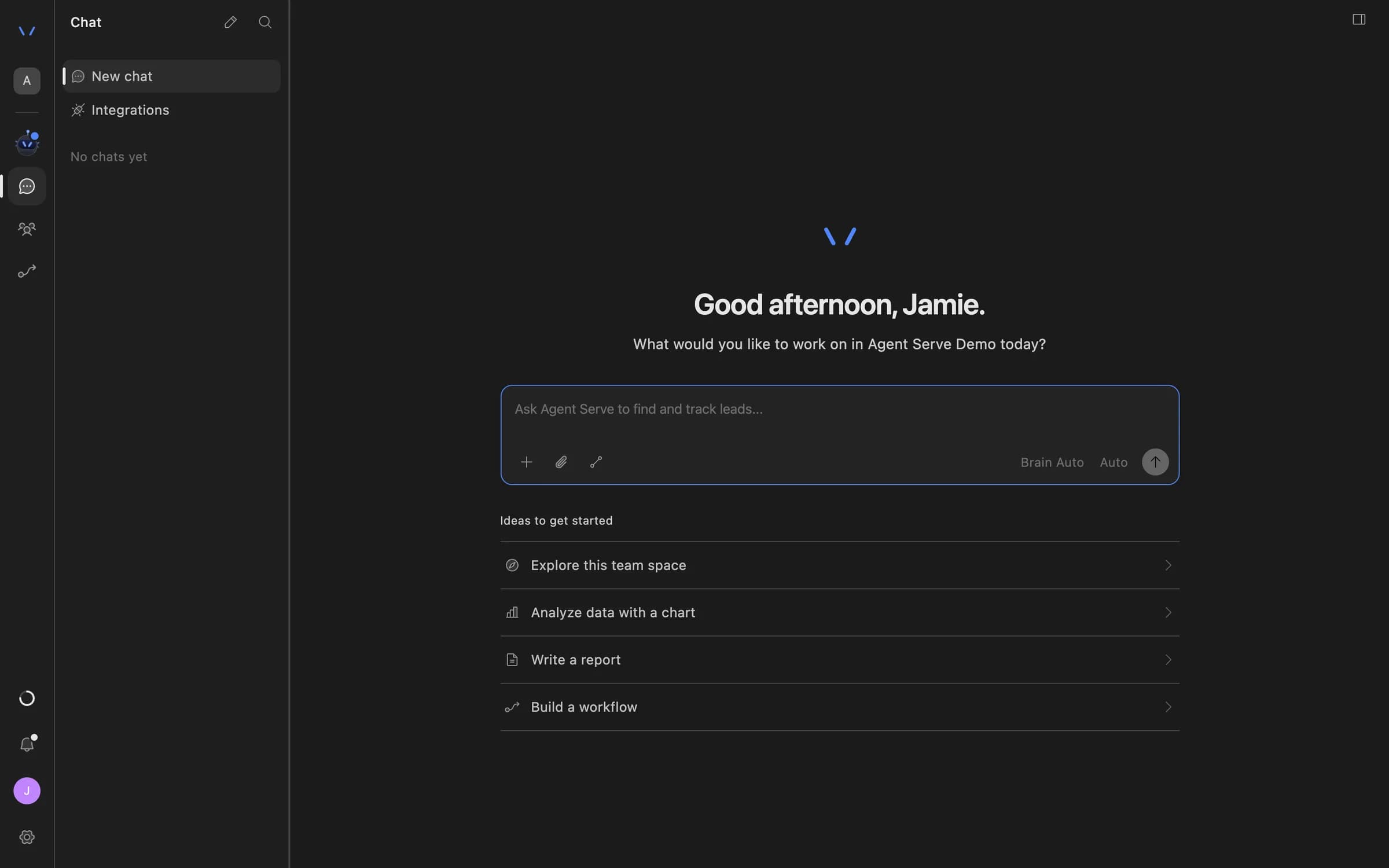
Buyers attach the spend table in Agent Serve Chat and ask which vendors grew fastest this quarter, with a chart.

Agent Serve Chat home with a message composer and suggestions to explore the team space, analyze data with a chart, write a report, or build a workflow.

Examples

Cost control at banks and insurers.

Three spend reviews financial services procurement teams run on Agent Serve, each ending with a person’s approval.

Banking · Technology spend

Market data and software renewals

An Agent Serve monitor tracks software and market data spend against budget, and a Relay lists renewals due in the next quarter.

  1. Spend over budget
  2. Renewals listed
  3. Options drafted
  4. Buyer approves
Insurance · Claims supply chain

Repairer and supplier rates

An Agent Serve rule scores each supplier invoice against the agreed rate card, and a monitor alerts on a run of outliers.

  1. Invoices loaded
  2. Rate rule scores
  3. Rule match alert
  4. Category lead reviews
Payments · Operations

Processing and scheme fees

An Agent Serve dashboard breaks fees down by scheme and region, with conformed dimensions lining up regions from billing and finance.

  1. Fees modelled
  2. Regions aligned
  3. Variance shown
  4. Finance reviews

Examples show what teams can build in Agent Serve. They describe patterns, not named customer deployments.

Before and after

From quarter-end surprises to early warnings.

From quarter-end surprises to early warnings.
WorkBeforeWith Agent Serve
Seeing overspendBeforeFound when the quarter’s invoices are reconciled.With Agent ServeA monitor raises an alert when a category passes its budget.
Joining spend dataBeforeVendor names matched by hand across billing and finance exports.With Agent ServeA semantic model joins vendors, contracts and cost centers once.
Building the caseBeforeAn analyst compares contracts in a spreadsheet for days.With Agent ServeA Relay compares rates and drafts the email for a buyer.
Talking to vendorsBeforeEmails sent from personal inboxes with no record.With Agent ServeEvery email approved first and kept in the audit log.

Governance

Spend data with clear owners and limits.

Agent Serve keeps vendor contact behind approvals and keeps cost data scoped to the people who own it.

Security and governance
  • Checked joins

    Agent Serve reports match rate, duplicate keys and orphan keys for each relationship before you mark it verified.

  • Who can change the model

    Saving the Agent Serve semantic model and verifying relationships needs write or admin access.

  • Approvals before action

    Relays never send email or book meetings without an approval, under any autonomy setting. An approval covers the exact payload the reviewer saw and expires if nobody decides.

  • Audit trail

    Proposals, approvals, declines and executed actions are written to the workspace audit log, which admins can export.

  • Row-level access

    Row-level policies narrow what each person sees in tables, dashboards, exports and scheduled reports.

  • Roles and permission groups

    Admin, write and read roles per workspace, plus permission groups that limit which models, blocks and integrations a team can use.

Further reading

Solutions built on the semantic model.

Questions

About this use case

Where does the spend data live?

In Agent Serve Tables. The semantic model maps each entity to a workspace table, so invoices and contracts are imported or synced into tables first.

Can the Relay email vendors on its own?

No. An Agent Serve Relay never sends email without a person approving the exact message, and you can limit recipients to an allowlist.

Can different teams see different spend?

Yes. Agent Serve row-level security narrows what each person sees in tables, dashboards, exports and scheduled reports.

Are the figures on this page real results?

No. The figures are illustrative examples of what a procurement team might measure with Agent Serve, not customer results.

Last updated

Enterprise access

Put AI agents to work across your team

Agent Serve is available to teams by invitation. Tell us what you want to build and we will set up your workspace with you.