
Use case · Collections and arrears

Fair follow-up for every account in arrears.

Agent Serve drafts each day’s arrears letters from approved templates, flags wording to avoid, routes vulnerable customers to specialists, and waits for approval.

A collections and arrears use case for Agent Serve, the AI workspace where teams build, deploy, and manage AI agents: a scheduled workflow reads accounts in arrears from a table, drafts letters from approved templates, checks wording with Guardrails, routes flagged customers to specialists with rules and waits for a collections lead to approve.

At a glance

For collections teams and their conduct leads.

Who it is for

Collections agents, team leads and conduct risk managers at lenders and card issuers

The problem it removes

Every morning the team exports the arrears list, picks a letter template for each account, and edits it by hand. Wording drifts, customers who need extra care are spotted late, and when a regulator asks how a customer was treated, the answer is spread across inboxes and notes.
What your team still controls

People decide

  • A collections lead approves every letter and email before it is sent
  • The approved templates, and the words and phrases to avoid
  • Which customers go to a specialist instead of standard follow-up
  • Who receives messages: internal people only, an allowlist or anyone
Day one

What you can run first

  • An arrears table with each account’s stage and last contact
  • A morning workflow that drafts letters from your approved templates
  • Guardrails that flag wording to avoid before review
Later

What you add once it is trusted

  • Rules that route vulnerable customers to a specialist queue
  • A Relay that drafts payment arrangement confirmations for approval
  • A dashboard of contacts, arrangements and broken promises by stage

How it runs

From the arrears list to approved letters.

Agent Serve drafts and checks every letter. A collections lead approves what customers receive.

  1. 1

    The day’s list is read

    A schedule starts the workflow every weekday morning, and the Table block reads accounts at each arrears stage.

  2. 2

    Specialist cases are set aside

    A rule flags accounts with a vulnerability marker or a recent hardship note, and those go to a specialist instead.

  3. 3

    Letters are drafted and checked

    An agent drafts each letter from the approved template for its stage, and Guardrails flag any wording on your avoid list.

  4. 4

    A lead approves

    A Human step sends the batch to the collections lead, who approves, edits or holds each letter before it goes out.

Before and after

Consistent contact, with a record to show.

Consistent contact, with a record to show.
WorkBeforeWith Agent Serve
LettersBeforeTemplates copied and edited by hand, account by account.With Agent ServeDrafted from the approved template for each arrears stage.
WordingBeforePhrases to avoid are caught only in sample checks.With Agent ServeGuardrails flag them in every draft before review.
Customers who need careBeforeHardship notes are found after standard letters went out.With Agent ServeA rule sends flagged customers to a specialist first.
Evidence of treatmentBeforeSpread across inboxes, call notes and spreadsheets.With Agent ServeEach contact and approval is recorded with the run.

In depth

Follow-up you can stand behind.

Agent Serve gives collections leads the drafts, the checks and the approvals in one place.

01 · Approvals

Every message approved as written

An Agent Serve Relay drafts a payment arrangement confirmation and stops. The lead sees the exact email and approves or declines it.

  • The approved version is the one sent
  • Reviews expire if nobody decides
  • Declined messages never go out
02 · Rules

Care before collection

An Agent Serve rule flags accounts with a vulnerability marker or a hardship note, and the workflow sends them to a specialist queue.

  • Conditions in all or any groups
  • The same rule filters the dashboard
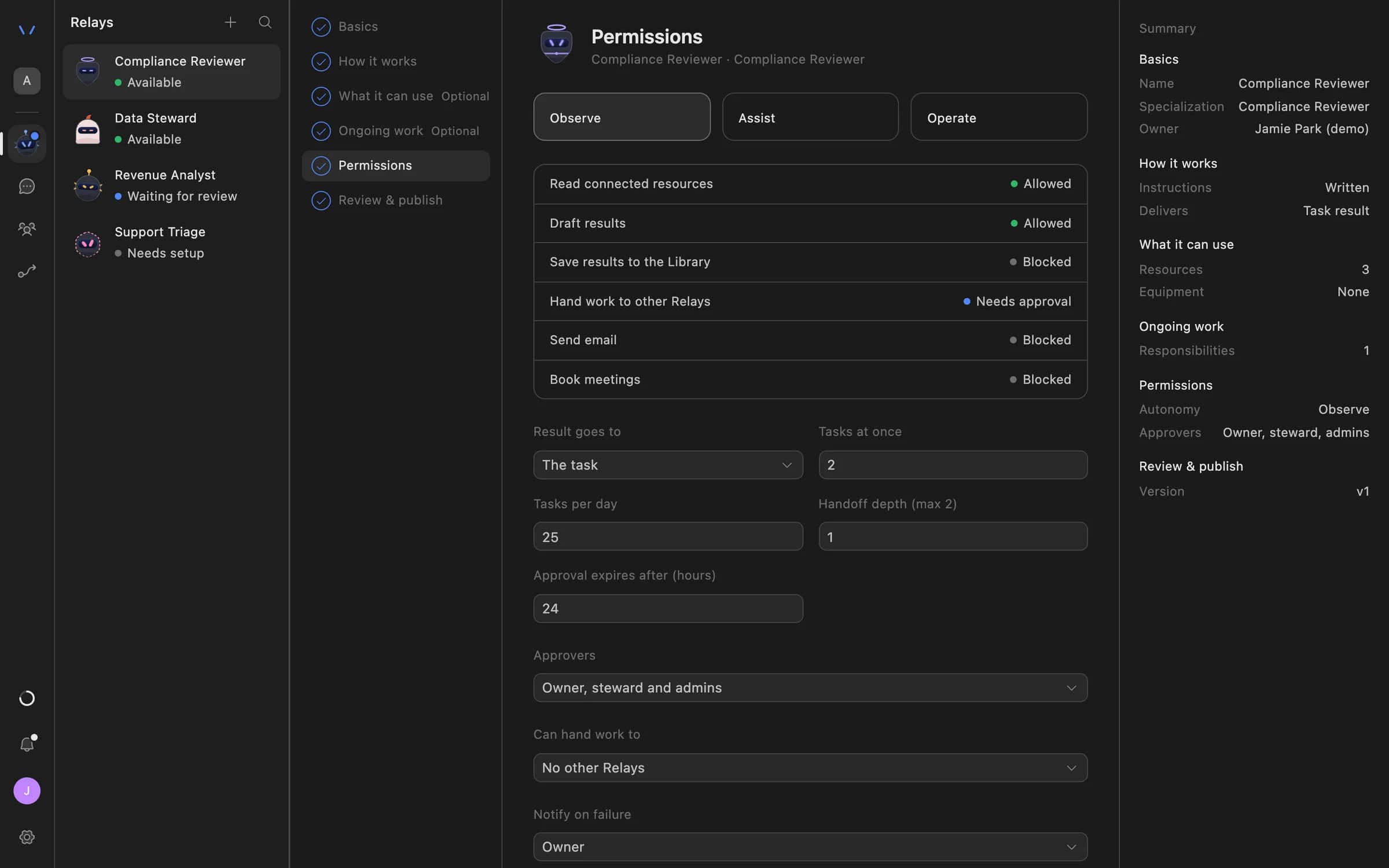
03 · Permissions

Who the Relay may write to

The Agent Serve Permissions step limits a Relay’s email to internal people, an allowlist or anyone you allow, and names who approves.

Relay setup in Agent Serve on the Permissions step: Observe, Assist and Operate autonomy levels, each action marked Allowed, Needs approval or Blocked, daily task limits, approval expiry and who can approve.
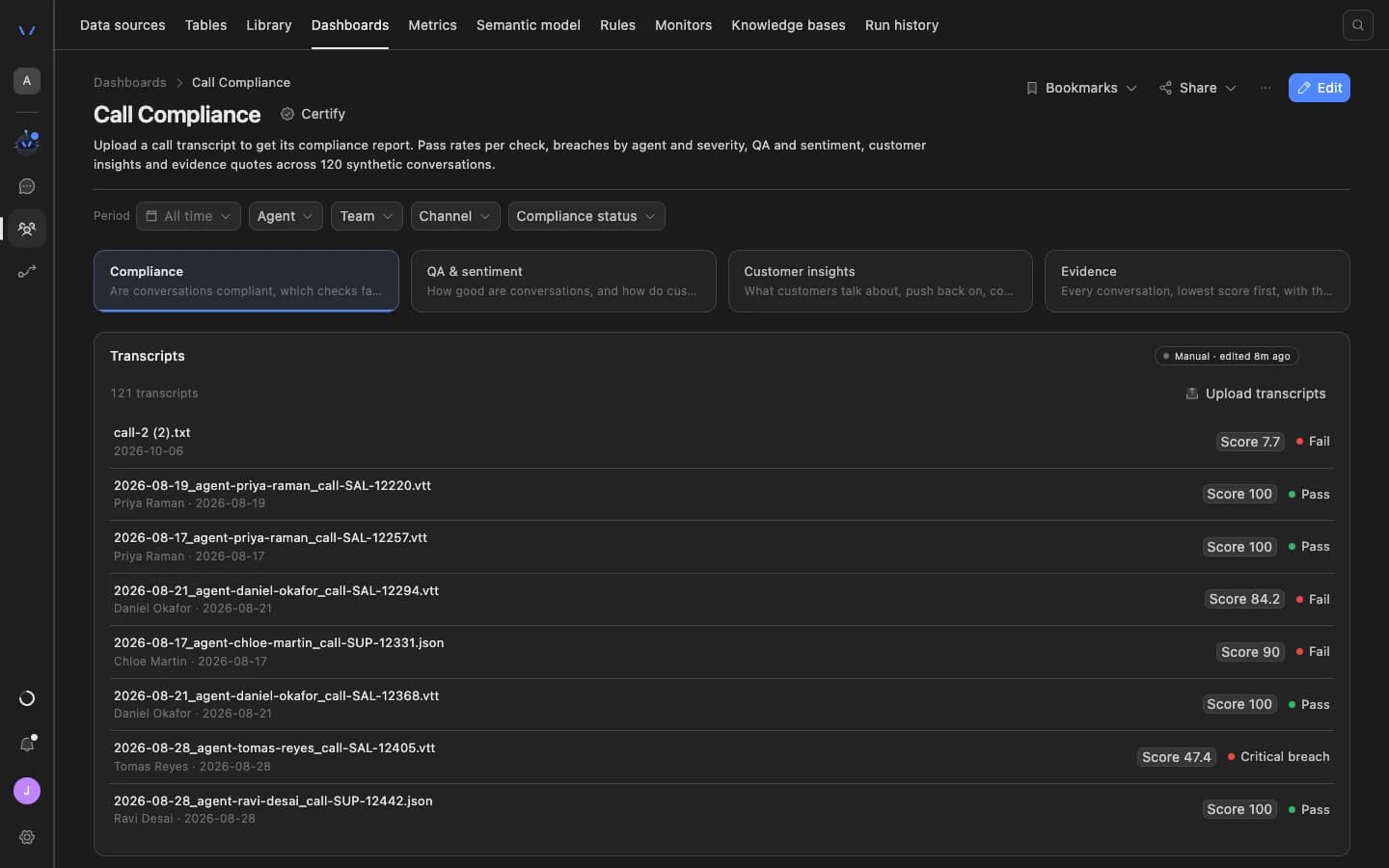
04 · Calls

Collections calls, checked too

One step of the process: the Agent Serve Call Compliance dashboard scores uploaded call transcripts against your checks, with a pass or fail per call.

The Agent Serve Call Compliance dashboard: filters for period, agent, team, channel and compliance status, tabs for compliance, QA and sentiment, customer insights and evidence, and a list of uploaded transcripts each with a score and a pass or fail result.

What does the work

The parts of Agent Serve behind each letter.

  1. 01Tables

    Hold the accounts

    An arrears table holds each account’s stage, last contact and notes.

  2. 02Workflows

    Draft and check

    A scheduled workflow drafts letters and checks their wording.

  3. 03Rules

    Route with care

    Rules send customers who need extra care to a specialist.

  4. 04Relays

    Confirm arrangements

    A Relay drafts arrangement confirmations and waits for approval.

  5. 05Dashboards & BI

    Show the book

    A dashboard shows contacts, arrangements and broken promises by stage.

Examples

Collections work in lending and cards.

Three collections processes teams run on Agent Serve, each with a person approving what customers receive.

Consumer lending

Daily arrears letters

An Agent Serve schedule drafts each morning’s letters from the approved templates, and a lead approves the batch.

  1. Schedule
  2. Accounts read
  3. Letters drafted
  4. Lead approves
Cards · Collections

Payment arrangement confirmations

An Agent Serve Relay watches the arrangements table and drafts a confirmation for each new row, sent after approval.

  1. Row added
  2. Email drafted
  3. Lead approves
  4. Sent once
Mortgages · Conduct

Vulnerable customer routing

An Agent Serve rule flags accounts with a hardship note, and the workflow moves them to a specialist queue before any letter.

  1. Note added
  2. Rule flags
  3. Specialist queue
  4. Specialist contacts

Examples show what teams can build in Agent Serve. They describe patterns, not named customer deployments.

Governance

Every contact approved, every step recorded.

Agent Serve keeps a person on every customer message and records what each run did.

Security and governance
  • Recipient policy

    An Agent Serve Relay can be limited to internal recipients, an allowlist or anyone, and never sends email without approval.

  • Wording checks

    The Agent Serve Guardrails block checks each draft against patterns you set, such as phrases to avoid, before it moves on.

  • Approvals before action

    Relays never send email or book meetings without an approval, under any autonomy setting. An approval covers the exact payload the reviewer saw and expires if nobody decides.

  • Audit trail

    Proposals, approvals, declines and executed actions are written to the workspace audit log, which admins can export.

  • Run logs

    Every workflow run records each block’s inputs, outputs and errors, so a reviewer can trace how a result was reached.

  • Roles and permission groups

    Admin, write and read roles per workspace, plus permission groups that limit which models, blocks and integrations a team can use.

  • SSO and SCIM

    Sign in through your identity provider with SAML 2.0 or OIDC, and provision people with SCIM.

  • Self-hosting

    Run Agent Serve in your own cloud or data centre, next to the systems it reads.

  • Zero data retention

    Zero data retention with supported model providers, backed by your own provider keys and agreements or self-hosted models. Some provider features keep data by design, such as Gemini Deep Research, so they are outside zero data retention.

  • PII detection

    A Guardrails block detects personal data and blocks or masks it before text reaches the next step.

Further reading

Collections and conduct, in detail.

Questions

About collections and arrears

Does Agent Serve contact customers on its own?

No. In this Agent Serve process a collections lead approves every letter, and a Relay never sends email without approval of the exact message.

Does Agent Serve decide who is vulnerable?

No. An Agent Serve rule only routes accounts that already carry a marker or a hardship note to a specialist, who decides what happens next.

Is call compliance part of this?

Only as one step. Call checks live in Agent Serve Dashboards, where the Call Compliance template scores uploaded collections call transcripts against your checks.

Where does arrears data come from?

Agent Serve data sources sync it into a workspace table, or a workflow can read it from your database or loan system through an integration or API block.

What can we run first?

A team can start with the Agent Serve arrears table and the morning letter workflow with wording checks, then add specialist routing and a Relay for confirmations.

Last updated

Enterprise access

Put AI agents to work across your team

Agent Serve is available to teams by invitation. Tell us what you want to build and we will set up your workspace with you.