
Teams · Engineering

Keep engineers on the work that needs them.

Agent Serve agents triage new errors, gather incident context, sort the backlog and draft release notes. Engineers review, merge and decide.

Agent Serve, the AI workspace where teams build, deploy, and manage AI agents, gives engineering teams agents for error triage, incident context, issue sorting, pull request summaries and release notes, connected to GitHub, GitLab, Linear, Jira, Sentry, Datadog and PagerDuty.

At a glance

Who builds the product, and what distracts them.

Who it is for

Software engineers, engineering managers, SREs and on-call rotations

The problem it removes

New errors land in a channel nobody owns. During an incident, someone gathers logs, deploys and the timeline by hand. Release notes are written from memory on release day.
What your team still controls

People decide

  • Engineers review and merge every code change
  • Which repositories, projects and services each agent may use
  • Which actions need approval, such as closing issues or paging people
Day one

What you can run first

  • Error triage that groups new Sentry issues and files them
  • Chat answers about runbooks and architecture docs
Later

What you add once it is trusted

  • Incident context gathered when a page fires
  • Release notes drafted from merged pull requests

Agents to build

Agents an engineering team runs every day.

Each agent is built in Agent Serve and works with the code host, issue tracker and observability tools the team already uses.

Product engineering

Error triage

When Sentry raises a new issue, an Agent Serve workflow reads the stack trace and recent deploys, and files a Linear or Jira issue with an owner.

  1. Issue created
  2. Trace read
  3. Owner found
  4. Issue filed
SRE

Incident context

When PagerDuty or incident.io opens an incident, an Agent Serve Relay gathers recent Datadog monitors, logs and deploys and posts a summary to the incident channel.

  1. Incident opened
  2. Signals read
  3. Summary posted
  4. Timeline kept
Engineering managers

Weekly backlog sort

An Agent Serve Relay reads open issues, groups duplicates and proposes labels and priorities for the team to accept.

  1. Weekly schedule
  2. Issues read
  3. Changes proposed
  4. Lead accepts
Release managers

Release notes

An Agent Serve workflow reads the pull requests merged since the last release on GitHub or GitLab and drafts release notes for review.

  1. Release tagged
  2. Merged PRs read
  3. Notes drafted
  4. Editor reviews
Product engineering

Work items in Plane

An Agent Serve agent creates Plane work items from triaged errors and adds them to the current cycle.

  1. Error triaged
  2. Work item created
  3. Added to cycle
  4. Owner notified

Examples show what teams can build in Agent Serve. They describe patterns, not named customer deployments.

How it runs

From a page to a briefed responder.

Agent Serve gathers the signals while the responder gets to a laptop. People run the incident.

  1. 1

    An incident opens

    A PagerDuty Incident Triggered event starts the Relay’s task.

  2. 2

    Signals are gathered

    The Relay reads Datadog monitors and logs for the affected service.

  3. 3

    Recent changes are found

    It lists the deploys and merged pull requests from the last hours.

  4. 4

    The responder is briefed

    A summary with links goes to the incident channel in Slack.

Integrations

Connected to code, issues and observability.

Agent Serve connects to code hosts, issue trackers, error tracking, monitoring, on-call and deployment tools.

Browse integrations

In each tool

What engineering agents can read and change.

GitHub and GitLab

Agent Serve reads pull requests, files and commits, comments on reviews, and starts when an issue or pull request opens.

PR opened → summary comment

Linear and Jira

Agent Serve creates, updates, labels and comments on issues, starting when an issue is created or changes.

Issue created → labelled

Sentry, PagerDuty and incident.io

Agent Serve reads issues, events and incidents, adds notes, and starts when an issue or incident is created.

Incident triggered → context posted

Datadog

Agent Serve queries metrics and logs, lists monitors and incidents, and can create a downtime when a person approves.

Deploy window → downtime

Plane

Agent Serve creates and updates Plane work items, cycles, modules and comments.

Triaged error → work item

In the workspace

The parts of Agent Serve engineering teams use.

  1. 01Workflows

    Triage

    Workflows start on Sentry, GitHub or PagerDuty events and file the work.

  2. 02Relays

    Gather context

    A Relay collects signals during an incident and keeps the timeline.

  3. 03Knowledge bases

    Know the system

    Knowledge bases sync runbooks and architecture docs from Confluence or GitHub.

  4. 04Run history

    Debug the agents

    Logs trace every agent run block by block.

In depth

Agents engineers can inspect.

01 · Workflow builder

See every step the agent takes

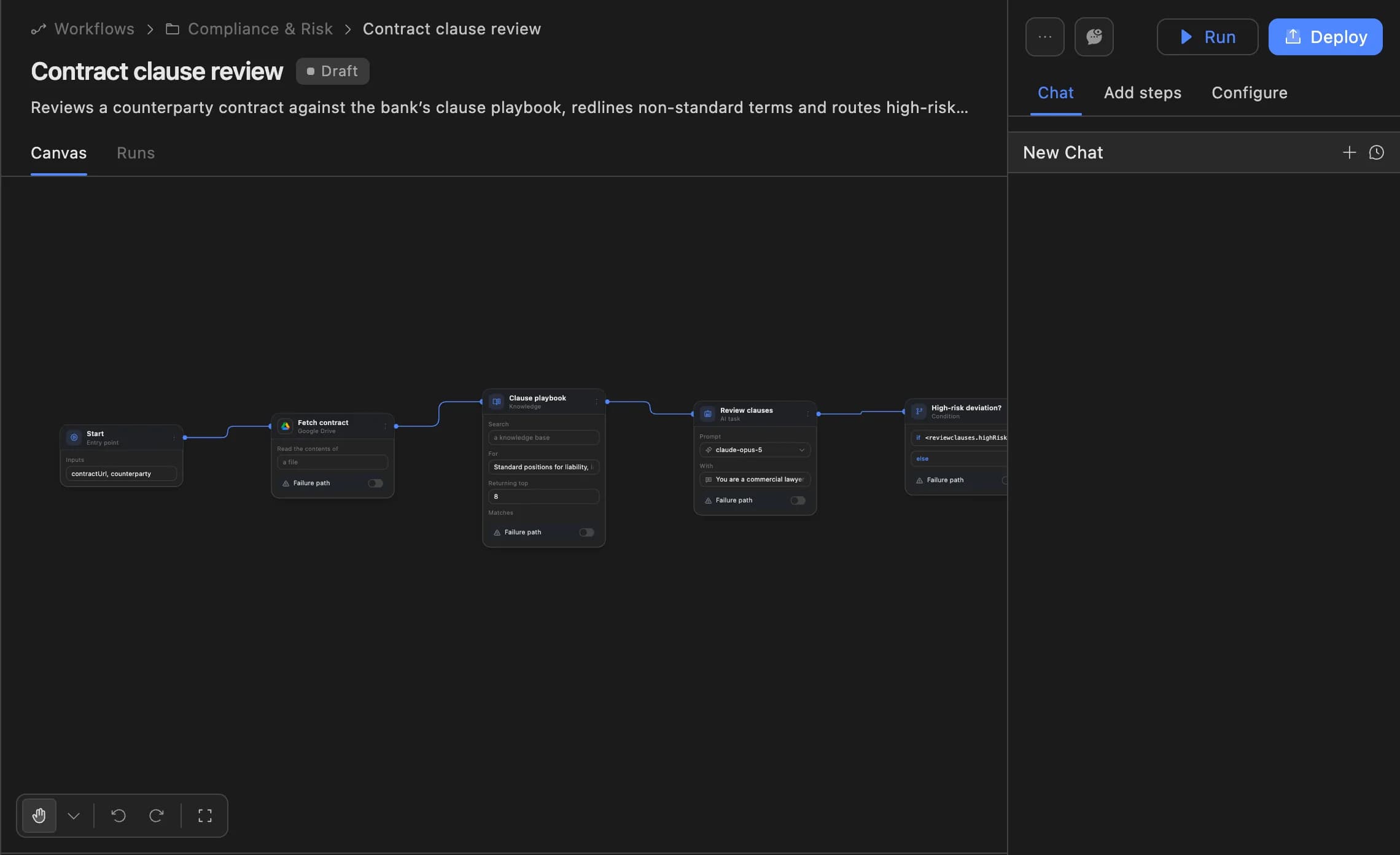
The Agent Serve workflow builder shows each block, its inputs and outputs, and lets you test a run before you deploy.

The Agent Serve workflow builder showing a contract clause review agent: start, fetch contract, clause playbook, review clauses and a high-risk deviation branch, with Run and Deploy buttons.
02 · Chat

Ask the runbook, not a teammate

Agent Serve Chat answers from synced runbooks and docs, and links the page it used.

03 · Audit

A record of what agents did

Agent Serve logs every run, and the Relay audit view lists permitted and refused actions with the rule behind each.

Before and after

Less admin, more shipping.

Less admin, more shipping.
WorkBeforeWith Agent Serve
New errorsBeforeA channel of alerts nobody owns.With Agent ServeAn issue filed with the trace and an owner.
IncidentsBeforeThe first ten minutes spent gathering links.With Agent ServeA briefing in the channel when the responder arrives.
Release notesBeforeWritten from memory on release day.With Agent ServeDrafted from merged pull requests and edited.

Governance

Engineers keep the merge button.

  • Only the tools it is given

    An Agent Serve Relay uses only the integrations and resources on its allowlist, and writes wait for approval unless you delegate them.

  • Approvals before action

    Relays never send email or book meetings without an approval, under any autonomy setting. An approval covers the exact payload the reviewer saw and expires if nobody decides.

  • Deployed versions

    Workflows run from a deployed version, so a change is reviewed before it reaches production runs.

  • Run logs

    Every workflow run records each block’s inputs, outputs and errors, so a reviewer can trace how a result was reached.

  • Self-hosting

    Run Agent Serve in your own cloud or data centre, next to the systems it reads.

Questions

About Agent Serve for engineering

Can Agent Serve merge pull requests?

The GitHub integration can merge a pull request if you build a workflow to do it. Most teams keep merging with engineers and use agents for summaries and triage.

Can we build agents in code?

Yes. Agent Serve agents can be built visually in the workflow builder, conversationally in Chat, or programmatically with the API.

Which tools does Agent Serve connect to?

Agent Serve has integrations for GitHub, GitLab, Bitbucket, Azure DevOps, Linear, Jira, Sentry, Datadog, PagerDuty and incident.io, among others in the integrations catalog.

Last updated

Enterprise access

Put AI agents to work across your team

Agent Serve is available to teams by invitation. Tell us what you want to build and we will set up your workspace with you.