Use case · Customer support

Faster answers, every one with a source.

A Support Triage Relay sorts new tickets, drafts sourced replies from the knowledge base, and waits for approval before sending.

An illustrative customer support use case for Agent Serve, the AI workspace where teams build, deploy, and manage AI agents: a Support Triage Relay, knowledge bases, Chat, a reply workflow with approval and a service dashboard.

At a glance

Who answers customers, and what slows them down.

Who it is for

Support leads and service agents at ecommerce brands, SaaS companies, and insurers or banks

The problem it removes

New tickets sit in one queue until someone sorts them. Agents search help articles, policies and old tickets in separate tabs, then type replies that drift from the current wording.
What your team still controls

People decide

  • A support agent approves every reply before it is sent
  • Which inboxes, tables and knowledge bases the Relay may use
  • Who may receive email: internal people only, an allowlist or anyone
Day one

What you can run first

  • A knowledge base synced from your help center and policies
  • Chat answers with links to the source document
  • A Support Triage Relay that tags new tickets
Later

What you add once it is trusted

  • Drafted replies checked against the knowledge base before review
  • A service dashboard by queue
  • Call transcripts scored on the Call Compliance dashboard

Step by step

One ticket, start to finish.

  1. 01

    The ticket is triaged

    The Support Triage Relay tags product, urgency and tier the moment a ticket arrives.

  2. 02

    The answer is sourced

    It finds the policy passage that answers the question and cites it.

  3. 03

    A person approves the reply

    The drafted reply waits for an agent to approve before it is sent.

How it fits together

From new ticket to reviewed reply.

  1. 01Relays

    Triage

    The Support Triage Relay tags each new ticket by product, urgency and customer tier.

  2. 02Knowledge bases

    Find the answer

    It searches the help center and policies for the passage that answers it.

  3. 03Workflows

    Draft and review

    A reply workflow drafts the response and waits for a support agent to approve.

  4. 04Chat

    Handle the edge cases

    Agents ask Chat about account history before replying to the hard ones.

  5. 05Dashboards & BI

    Watch service levels

    The service dashboard tracks first response time and CSAT by queue.

How it runs

From inbox to an approved, cited reply.

Agent Serve handles the sorting and the first draft, and a support agent still decides what the customer receives.

  1. 1

    A ticket arrives

    The Relay watches the support inbox or a ticket table and starts a task for each new message.

  2. 2

    It is triaged

    The Relay tags product, urgency and customer tier on the ticket record, so urgent cases stand out in the queue.

  3. 3

    The answer is found

    A knowledge base search returns the policy passage, and the reply workflow’s Hallucination Check tests the draft against it.

  4. 4

    A person approves

    The reply waits as an approval showing the exact message, then sends from the team’s mailbox.

What to measure

How a team might measure the change.

Example figures for a support team handling a few thousand tickets a month.

Illustrative

−60%

First response time

Drafts are ready when an agent opens the ticket.

Illustrative

70%

Tickets triaged on arrival

Tagged and routed without a person.

Illustrative

+6 pts

CSAT

Answers cite the policy they rely on.

Illustrative

100%

Replies reviewed

Every outgoing message is approved.

Illustrative example. Figures show how the workflow is measured; they are not customer results.

In depth

What the support team works with.

Agent Serve gives support leads the Relay, its permissions, the call quality view and Chat in one workspace.

01 · Relays

A triage coworker with a job title

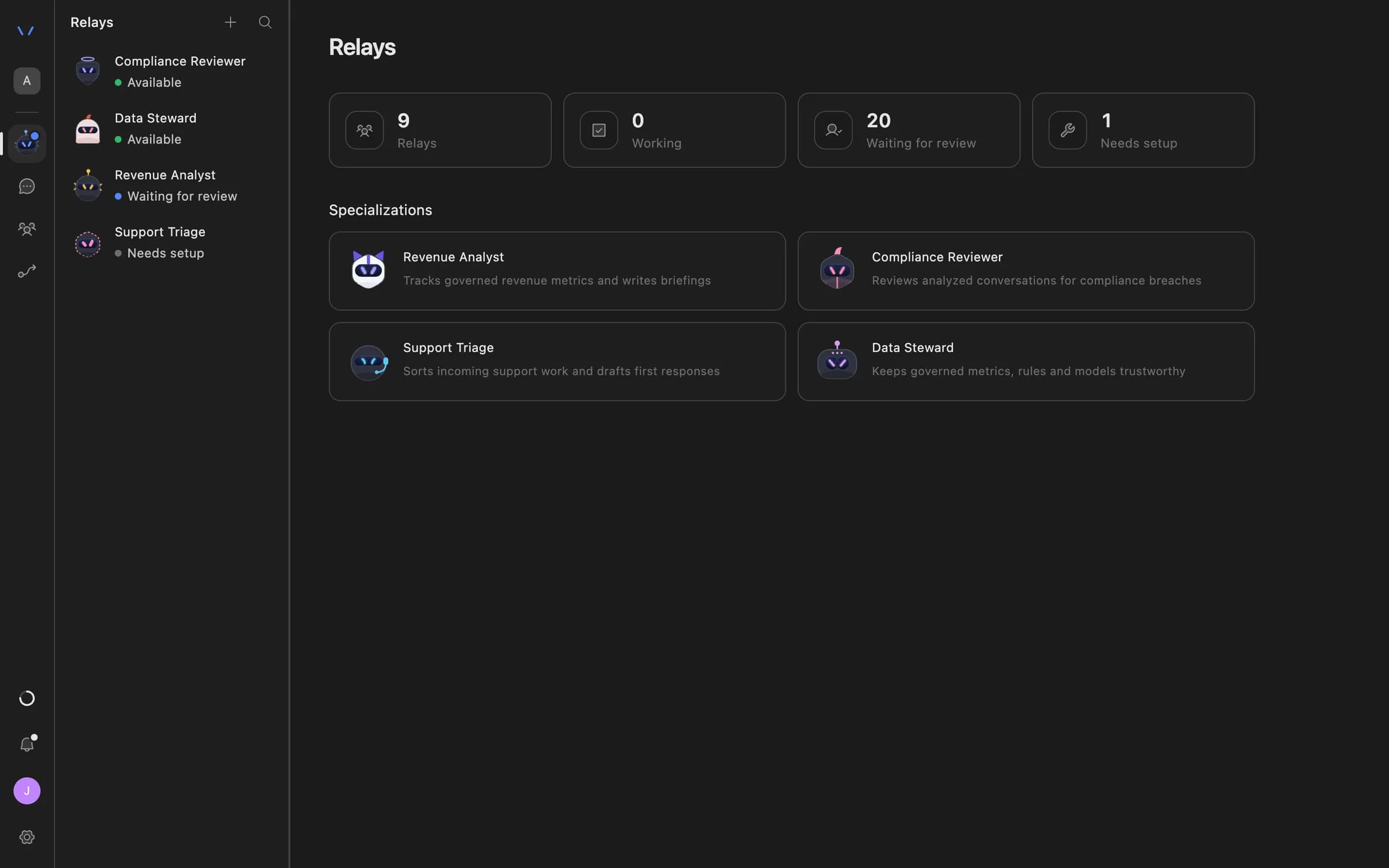
Start an Agent Serve Relay from the Support Triage specialization, give it the knowledge bases it may use and the inbox it watches.

  • Watches Gmail, Outlook or a workspace table
  • Up to 30 resources per Relay
  • Hands off to another Relay when needed
The Relays page in Agent Serve listing AI coworkers — Compliance Reviewer, Data Steward, Revenue Analyst and Support Triage — with their status and specializations.
02 · Permissions

Email always needs a yes

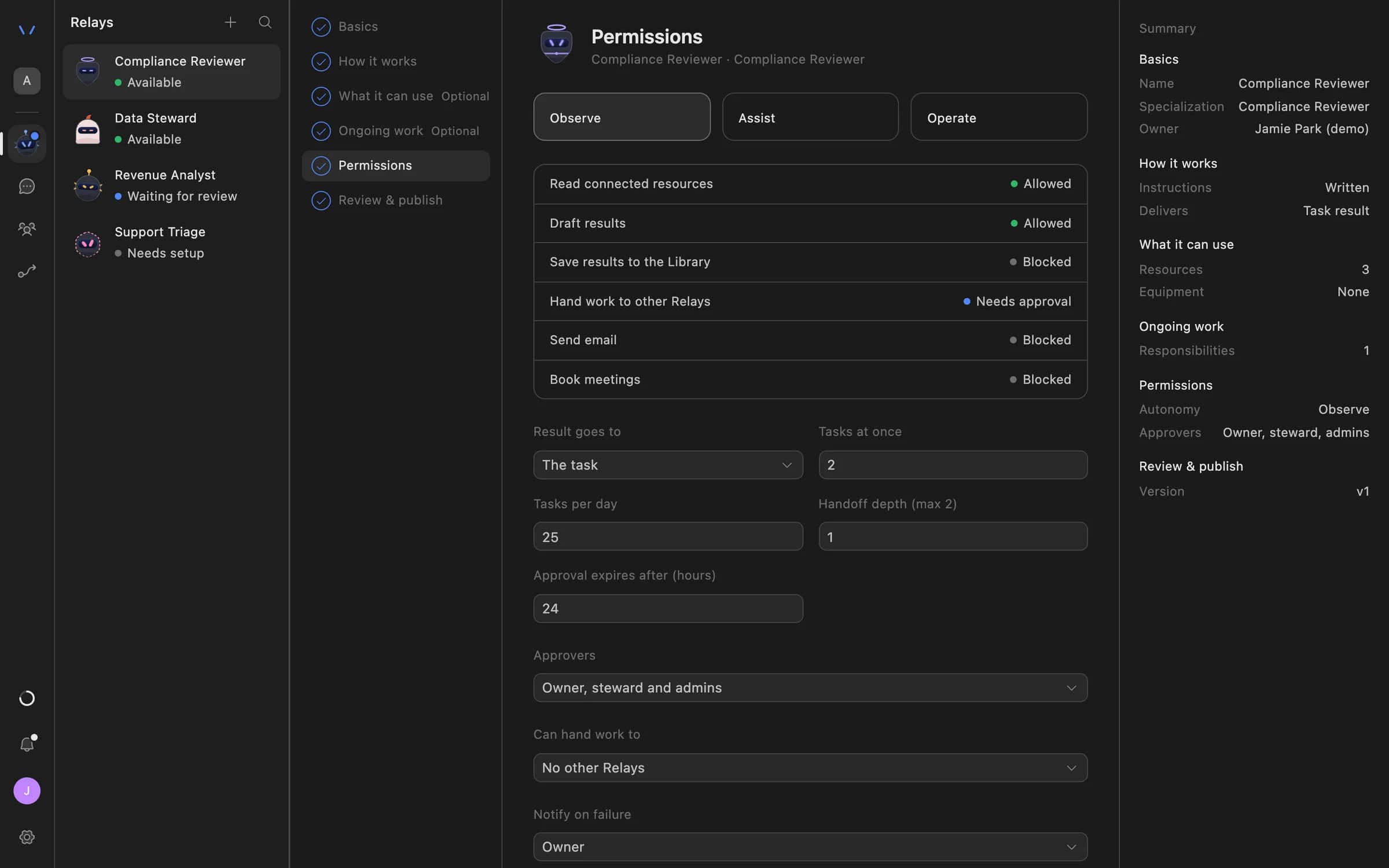
An Agent Serve Relay can never send email on its own. Under Assist and Operate it needs approval of the exact message.

  • Recipients: internal only, an allowlist or anyone
  • Reviews expire if nobody decides
Relay setup in Agent Serve on the Permissions step: Observe, Assist and Operate autonomy levels, each action marked Allowed, Needs approval or Blocked, daily task limits, approval expiry and who can approve.
03 · Call quality

Phone support, checked too

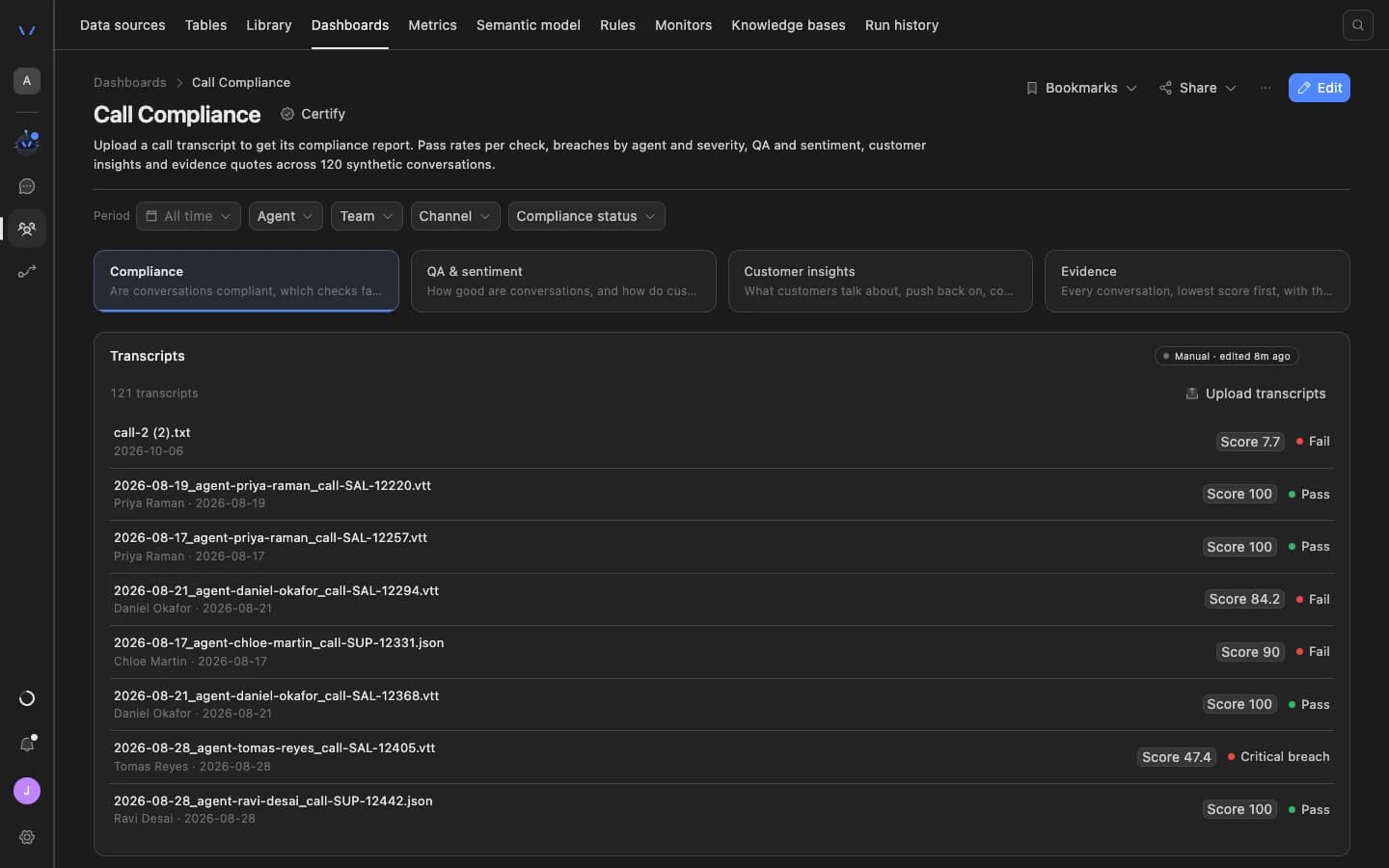
The Agent Serve Call Compliance dashboard template scores uploaded call transcripts against your checks, with a pass or fail per call.

The Agent Serve Call Compliance dashboard: filters for period, agent, team, channel and compliance status, tabs for compliance, QA and sentiment, customer insights and evidence, and a list of uploaded transcripts each with a score and a pass or fail result.
04 · Chat

Help with the hard tickets

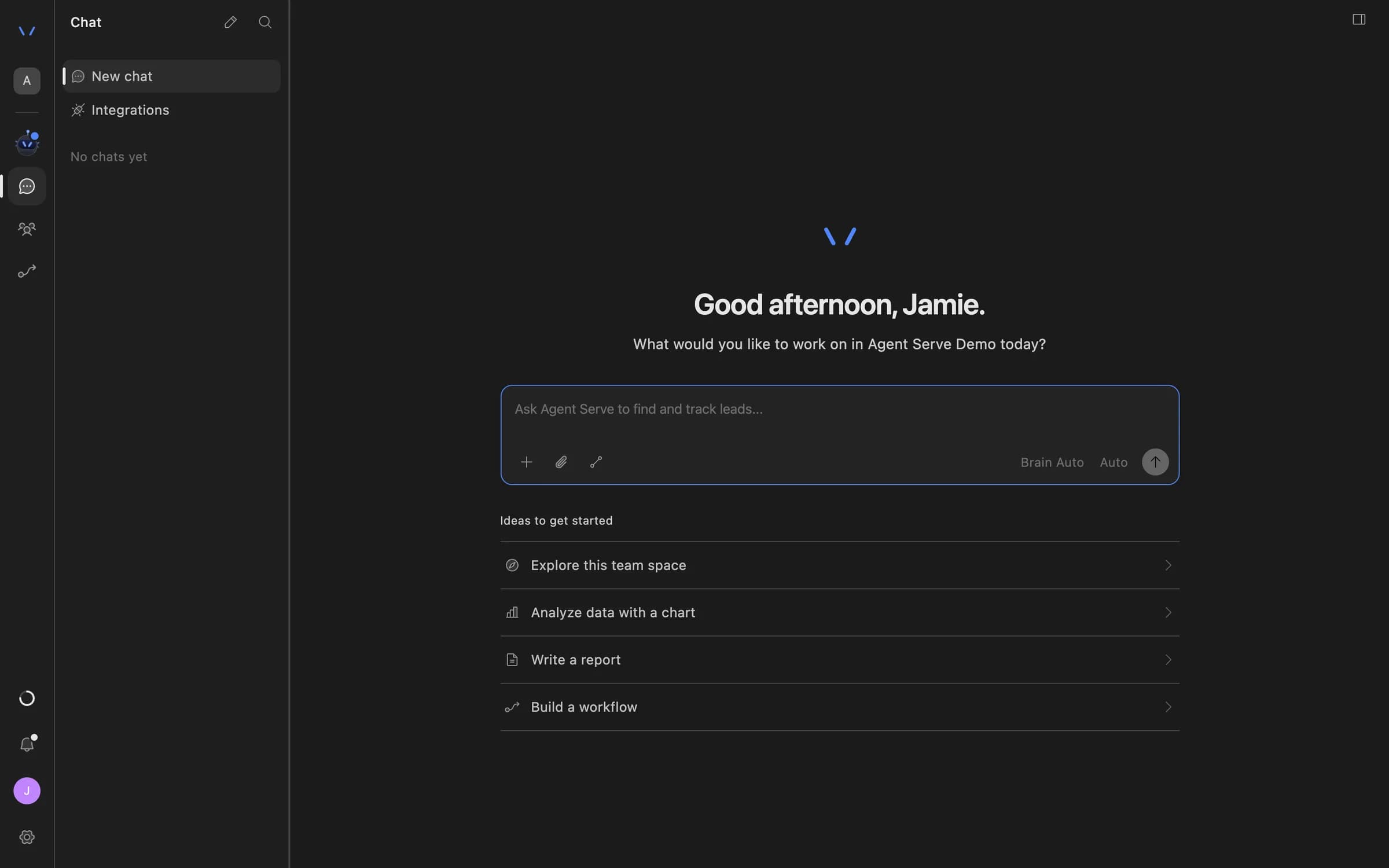
Support agents ask Agent Serve Chat about an account, attach the knowledge base with @, and get an answer with its sources.

Agent Serve Chat home with a message composer and suggestions to explore the team space, analyze data with a chart, write a report, or build a workflow.

Examples

Support desks across commerce, software and insurance.

Three support queues teams run on Agent Serve, at an ecommerce brand, a SaaS company and an insurer, each with a person approving every reply.

Ecommerce brand · Customer care

Order and returns inbox

An Agent Serve Relay triages order, delivery and return queries by urgency, and drafts replies from the returns policy with the clause cited.

  1. Email in
  2. Tagged and routed
  3. Reply drafted
  4. Agent approves
SaaS company · Product support

How-to questions with sources

An Agent Serve workflow answers product questions from the help center and docs, and links the article each answer relies on.

  1. Ticket in
  2. Docs searched
  3. Answer drafted
  4. Agent reviews
Insurance · Policy servicing

Policy change requests

An Agent Serve workflow reads each request, checks the policy wording in the knowledge base, and prepares the reply for a handler.

  1. Request logged
  2. Wording checked
  3. Reply prepared
  4. Handler sends

Examples show what teams can build in Agent Serve. They describe patterns, not named customer deployments.

Before and after

Less searching, more answering.

Less searching, more answering.
WorkBeforeWith Agent Serve
TriageBeforeA team lead sorts the queue by hand each morning.With Agent ServeA Relay tags and routes each ticket as it arrives.
Finding the answerBeforeAgents search the help center and old tickets in separate tabs.With Agent ServeA knowledge base search returns the passage, with its source.
Writing the replyBeforeTyped from scratch, or pasted from a template that drifts.With Agent ServeDrafted from the current policy and approved before sending.
Keeping sources currentBeforeHelp articles copied into a tool and forgotten.With Agent ServeConnectors resync the help center on a schedule.

Governance

Every reply has a reviewer and a source.

Agent Serve keeps a person on every outgoing message and keeps personal data out of places it does not belong.

Security and governance
  • Answers checked against sources

    The Agent Serve Hallucination Check guardrail tests a drafted answer against the knowledge base before it moves on.

  • Recipient policy

    An Agent Serve Relay can be limited to internal recipients, an allowlist or anyone.

  • Approvals before action

    Relays never send email or book meetings without an approval, under any autonomy setting. An approval covers the exact payload the reviewer saw and expires if nobody decides.

  • PII detection

    A Guardrails block detects personal data and blocks or masks it before text reaches the next step.

  • Audit trail

    Proposals, approvals, declines and executed actions are written to the workspace audit log, which admins can export.

  • Run logs

    Every workflow run records each block’s inputs, outputs and errors, so a reviewer can trace how a result was reached.

  • Roles and permission groups

    Admin, write and read roles per workspace, plus permission groups that limit which models, blocks and integrations a team can use.

Further reading

Solutions built on knowledge bases.

Questions

About this use case

Where do tickets come from?

An Agent Serve Relay can watch a Gmail or Outlook inbox or a workspace table. A workflow can also take tickets from a webhook or from one of the integration triggers.

Can the Relay reply to customers on its own?

No. An Agent Serve Relay never sends email without a person approving the exact message, under every autonomy setting.

How does the knowledge base stay current?

Agent Serve knowledge bases sync from sources such as Zendesk, Confluence, SharePoint or Google Drive, hourly, every 6 hours, daily, weekly or on demand.

Are the figures on this page real results?

No. The figures are illustrative examples of what a support team might measure with Agent Serve, not customer results.

Last updated

Enterprise access

Put AI agents to work across your team

Agent Serve is available to teams by invitation. Tell us what you want to build and we will set up your workspace with you.