Use case · Clinic front desk

Fewer missed calls, fewer empty appointment slots.

Agent Inbound & Outbound answers appointment calls, workflows send WhatsApp reminders, and staff approve anything clinical before a patient hears it.

An illustrative clinic front desk use case for Agent Serve, the AI workspace where teams build, deploy, and manage AI agents: appointment calls with Agent Inbound & Outbound, WhatsApp reminders, a front-desk knowledge base and a complaints Relay.

At a glance

Who runs the desk, and what fills it.

Who it is for

Front-desk teams, practice managers and patient experience leads at clinics and outpatient practices

The problem it removes

The phone rings while the desk is checking a patient in. Calls go unanswered, reminders are sent by hand if at all, and the same questions about hours, parking and preparation take up the time staff need for patients in the room.
What your team still controls

People decide

  • Staff approve anything clinical before a patient receives it
  • The answers in the front-desk knowledge base
  • Which inboxes, tables and integrations each Relay may use
Day one

What you can run first

  • A front-desk knowledge base of hours, locations and visit preparation
  • WhatsApp reminders the day before each appointment
  • Appointment calls answered by Agent Inbound & Outbound
Later

What you add once it is trusted

  • A complaints Relay that drafts replies for a manager
  • A front-desk dashboard of calls, reminders and no-shows
  • Call transcripts checked on the Call Compliance dashboard

Step by step

One appointment, from call to visit.

  1. 01

    The call is answered

    Agent Inbound & Outbound answers, hears what the caller needs and passes the request to the front desk.

  2. 02

    Routine questions are answered

    Questions about hours, parking and preparation are answered from the front-desk knowledge base.

  3. 03

    Staff approve the clinical ones

    Anything about symptoms, results or treatment goes to staff, who approve every reply.

How it fits together

From the first call to a kept appointment.

  1. 01Knowledge bases

    Know the clinic

    A knowledge base holds the front-desk answers staff have written and approved.

  2. 02Tables

    Track appointments

    An appointments table holds each booking, its reminder and the patient’s reply.

  3. 03Workflows

    Send reminders

    A workflow sends a WhatsApp reminder with Confirm and Reschedule buttons the day before.

  4. 04Relays

    Handle complaints

    A front-desk Relay sorts complaints and drafts replies a manager approves.

  5. 05Dashboards & BI

    Watch the desk

    A front-desk dashboard shows calls, confirmations and no-shows by day.

How it runs

From booking to a confirmed visit.

Agent Serve sends the reminders and answers routine questions, and clinic staff handle anything clinical.

  1. 1

    The booking is recorded

    Staff confirm the slot, and the booking is written to the appointments table.

  2. 2

    The reminder goes out

    A scheduled workflow sends an approved WhatsApp template with Confirm and Reschedule buttons.

  3. 3

    The reply is recorded

    The WhatsApp webhook trigger receives the reply, and the workflow updates the appointments table.

  4. 4

    Clinical questions go to staff

    A message about symptoms or treatment is flagged for staff, who write or approve the reply.

What to measure

How a clinic might measure the change.

Example figures for a multi-chair clinic handling a few hundred appointments a week.

Illustrative

−30%

No-shows

Patients confirm or reschedule the day before.

Illustrative

−40%

Missed calls

Calls are answered while the desk is busy.

Illustrative

−50%

Routine questions to staff

Hours, parking and preparation answered from the knowledge base.

Illustrative

100%

Clinical replies by staff

Every clinical answer comes from a person.

Illustrative example. Figures show how the workflow is measured; they are not customer results.

In depth

What the front desk works with.

Agent Serve gives the practice manager the Relay, its permissions, call quality checks and Chat in one workspace.

01 · Relays

A front-desk coworker

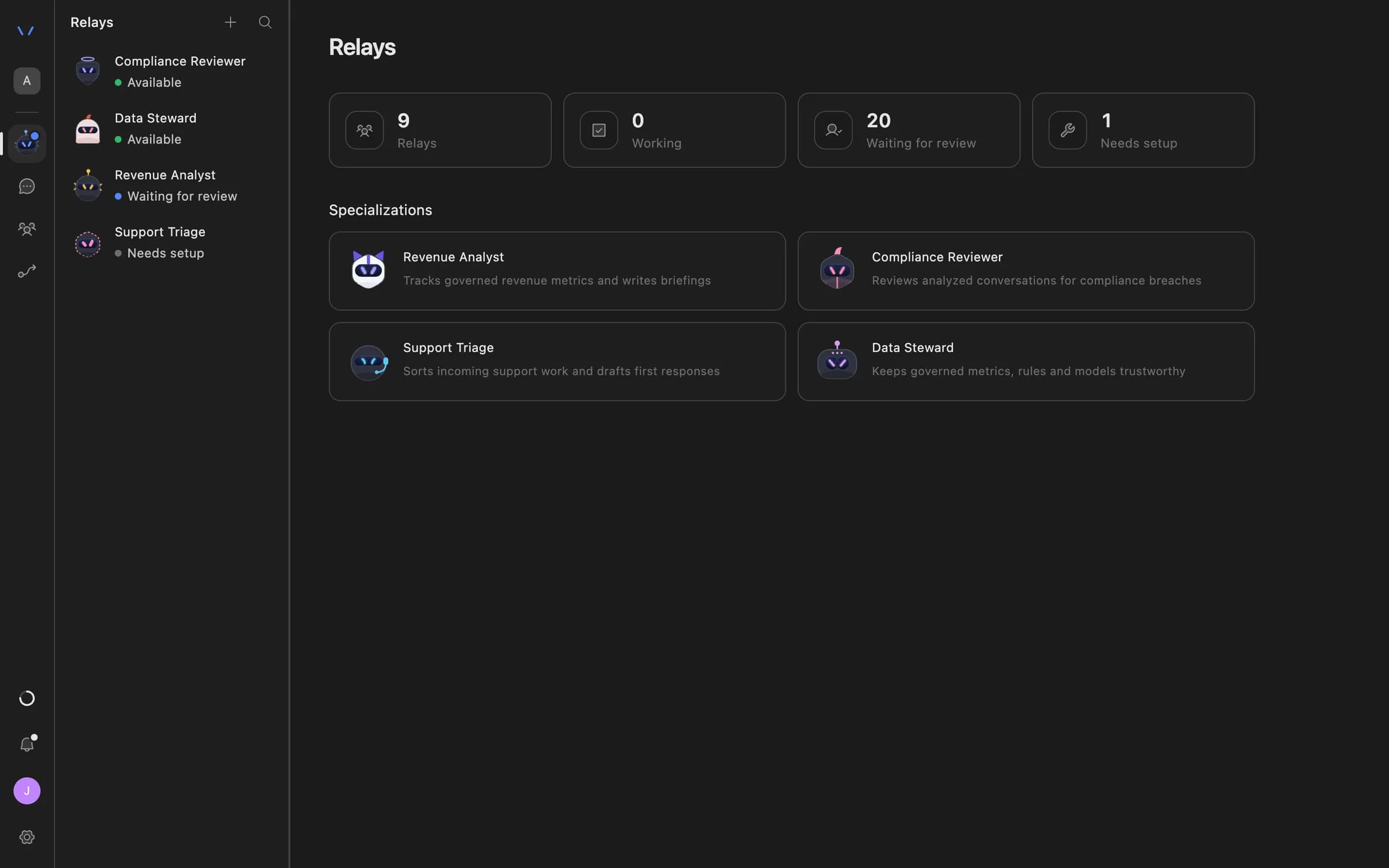
Start an Agent Serve Relay from a clinic front-desk specialization, give it the complaints inbox and the knowledge base it may use.

  • Watches Gmail, Outlook or a workspace table
  • Works in a Relay team with hand-off rules
The Relays page in Agent Serve listing AI coworkers — Compliance Reviewer, Data Steward, Revenue Analyst and Support Triage — with their status and specializations.
02 · Permissions

Every patient email needs a yes

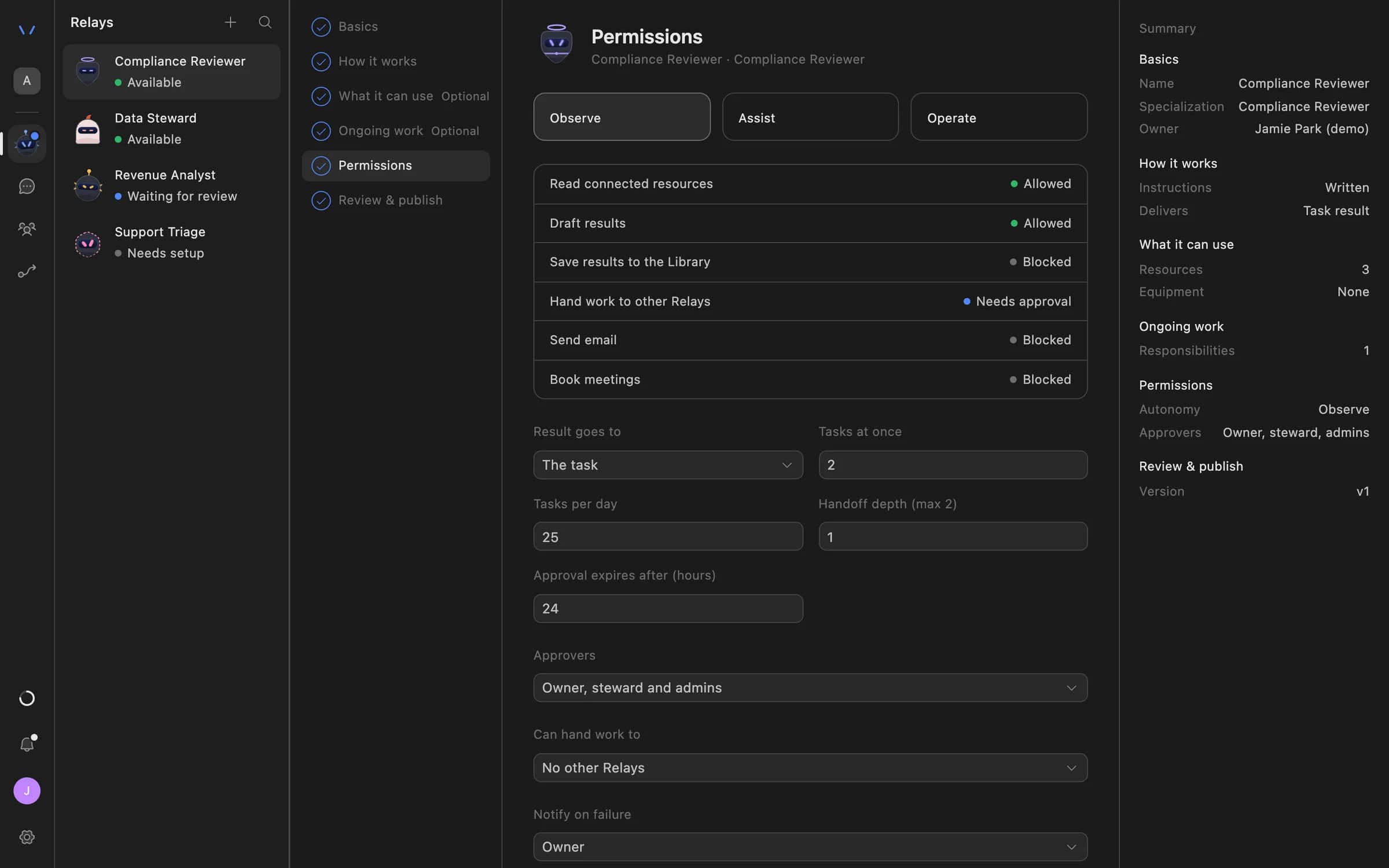
An Agent Serve Relay never sends email on its own. A manager approves the exact message before it reaches a patient.

  • Recipients: internal only, an allowlist or anyone
  • Approvals expire if nobody decides
Relay setup in Agent Serve on the Permissions step: Observe, Assist and Operate autonomy levels, each action marked Allowed, Needs approval or Blocked, daily task limits, approval expiry and who can approve.
03 · Call quality

Front-desk calls, checked

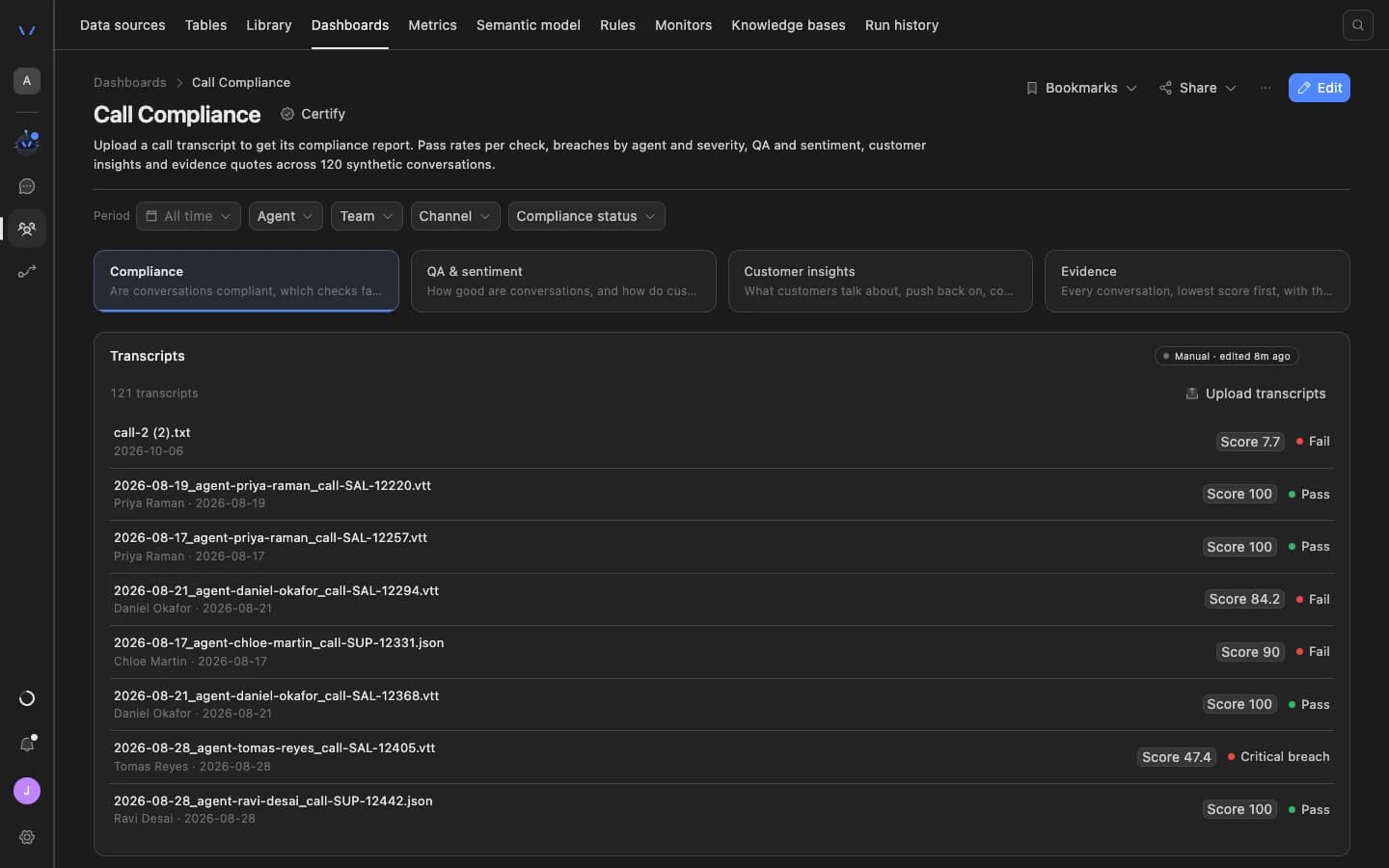
The Agent Serve Call Compliance dashboard scores call transcripts against the clinic’s own checks, such as never giving clinical advice.

The Agent Serve Call Compliance dashboard: filters for period, agent, team, channel and compliance status, tabs for compliance, QA and sentiment, customer insights and evidence, and a list of uploaded transcripts each with a score and a pass or fail result.
04 · Chat

Answers for the desk

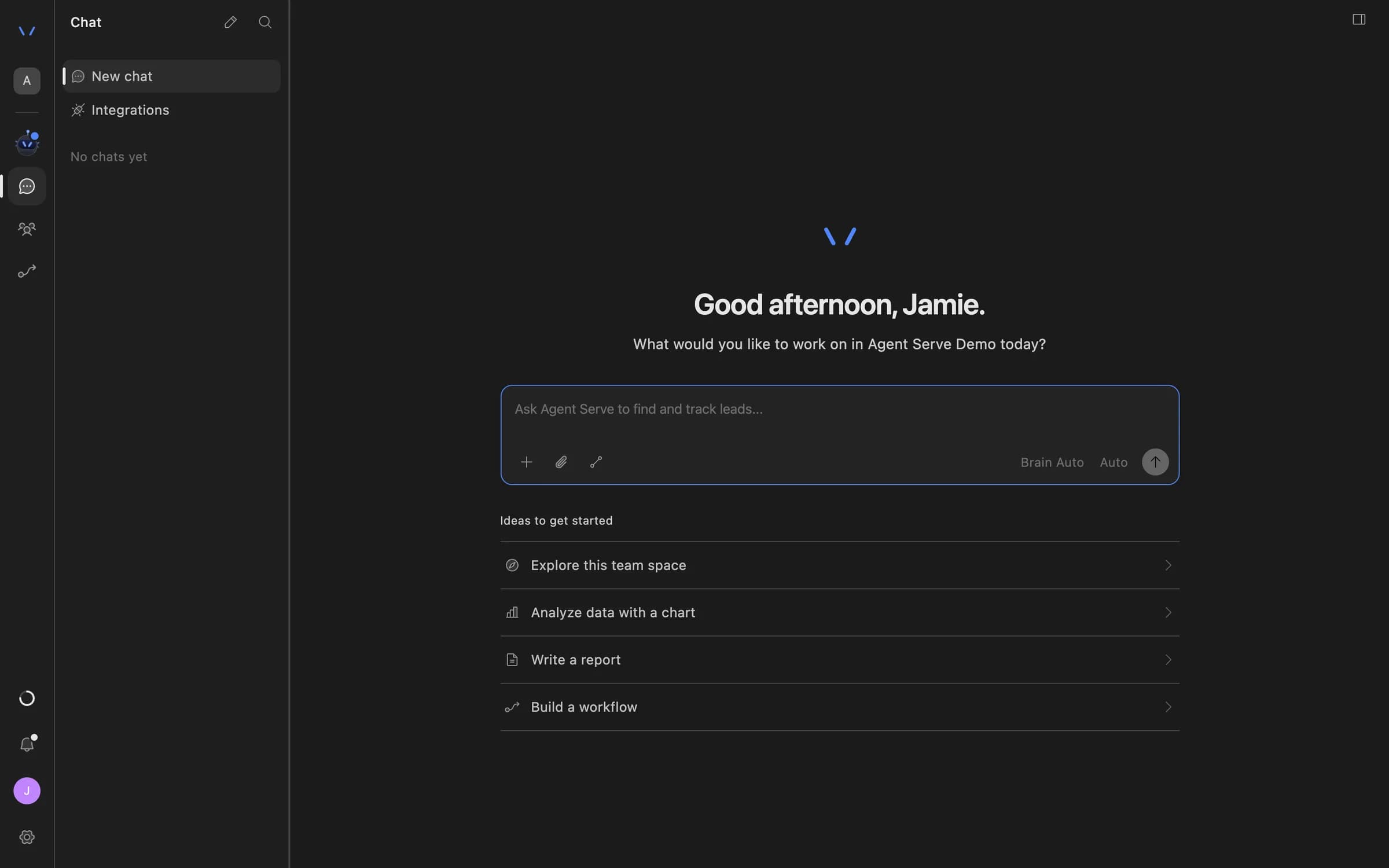
Front-desk staff ask Agent Serve Chat about clinic procedures, attach the knowledge base with @, and get an answer with its source.

Agent Serve Chat home with a message composer and suggestions to explore the team space, analyze data with a chart, write a report, or build a workflow.

Examples

Front desks across three kinds of clinic.

Three clinics running front-desk work on Agent Serve, each with staff approving anything clinical.

Dental clinic · Reception

Reminders that cut no-shows

An Agent Serve workflow sends a WhatsApp reminder the day before each visit and records whether the patient confirms.

  1. Booking in table
  2. Reminder sent
  3. Reply recorded
  4. Desk follows up
Physiotherapy practice · Phones

Appointment calls answered

Agent Inbound & Outbound answers calls when the desk is busy and passes each appointment request to staff.

  1. Call answered
  2. Need captured
  3. Request logged
  4. Staff confirm
Multi-site clinic · Patient experience

Complaints with a reviewer

An Agent Serve Relay sorts patient complaints by site and topic and drafts a reply for the practice manager.

  1. Complaint in
  2. Sorted
  3. Reply drafted
  4. Manager approves

Examples show what teams can build in Agent Serve. They describe patterns, not named customer deployments.

Before and after

Less phone time, more time with patients.

Less phone time, more time with patients.
WorkBeforeWith Agent Serve
Appointment callsBeforeMissed while the desk checks a patient in.With Agent ServeAnswered by Agent Inbound & Outbound and passed to staff.
RemindersBeforeSent by hand, when someone has time.With Agent ServeSent on WhatsApp the day before, with the reply recorded.
Routine questionsBeforeAnswered by staff, the same way, many times a day.With Agent ServeAnswered from the knowledge base staff approved.
ComplaintsBeforeRead late from a shared inbox.With Agent ServeSorted on arrival and replied to after a manager approves.

Governance

Clinical decisions stay with clinical staff.

Agent Serve handles front-desk work only, gives no medical advice, and keeps patient details out of places they do not belong.

Security and governance
  • Staff approve anything clinical

    Messages about symptoms, results or treatment are flagged for clinic staff, and every Agent Serve Relay email waits for approval.

  • Answers only from approved content

    The Agent Serve front-desk knowledge base holds only content clinic staff have written and approved.

  • Approvals before action

    Relays never send email or book meetings without an approval, under any autonomy setting. An approval covers the exact payload the reviewer saw and expires if nobody decides.

  • PII detection

    A Guardrails block detects personal data and blocks or masks it before text reaches the next step.

  • Audit trail

    Proposals, approvals, declines and executed actions are written to the workspace audit log, which admins can export.

  • Roles and permission groups

    Admin, write and read roles per workspace, plus permission groups that limit which models, blocks and integrations a team can use.

  • Self-hosting

    Run Agent Serve in your own cloud or data centre, next to the systems it reads.

Further reading

Solutions built for clinics.

Questions

About this use case

Does Agent Serve give patients medical advice?

No. In this use case Agent Serve answers front-desk questions only, from content staff approved. Anything about symptoms, results or treatment goes to clinic staff.

Who answers the phone calls?

Agent Inbound & Outbound, a separate Valnora & Elric product available by invitation. Agent Serve Relays do not place or answer phone calls.

Does Agent Serve connect to our patient record system?

Agent Serve does not ship a patient record integration. If your system has an API, a workflow can reach it through the API block, with the key stored as a workspace secret.

Is Agent Serve certified for healthcare data?

Agent Serve does not claim a healthcare certification. Teams can redact personal data in logs, mask it with a Guardrails step, and self-host Agent Serve.

Are the figures on this page real results?

No. The figures are illustrative examples of what a clinic might measure with Agent Serve, not customer results.

Last updated

Enterprise access

Put AI agents to work across your team

Agent Serve is available to teams by invitation. Tell us what you want to build and we will set up your workspace with you.