
Use case · IT and security operations

Access reviews and questionnaires, without the chase.

Agent Serve pulls accounts from your identity provider, flags what needs a decision, and drafts questionnaire answers from policy, with people deciding each step.

An IT and security operations use case for Agent Serve, the AI workspace where teams build, deploy, and manage AI agents: workflows pull accounts from Okta or Microsoft Entra ID for access reviews, answer security questionnaires from a policy knowledge base, and prepare change approvals from ServiceNow or Jira Service Management, with a person deciding at each step.

At a glance

For IT and security teams and busy managers.

Who it is for

IT operations, identity and access, and security compliance teams in banks, insurers and other regulated firms

The problem it removes

Every quarter someone exports accounts from the identity provider, splits a spreadsheet by manager and chases sign-offs for weeks. Security questionnaires with hundreds of questions land on the same few people, and change requests reach the approval board without the evidence attached.
What your team still controls

People decide

  • Managers confirm or revoke access; Agent Serve never removes an account on its own
  • The policies questionnaire answers are drawn from, and who signs them off
  • Who approves each change, at a Human step in the workflow
  • Which systems each workflow can read, through the integrations you connect
Day one

What you can run first

  • A quarterly access review that pulls accounts and groups them by manager
  • Your security policies in a knowledge base, with cited answers in Chat
  • A reviews table that records each manager’s decision
Later

What you add once it is trusted

  • Rules that flag leavers, dormant accounts and privileged groups
  • Questionnaire batches drafted from policy for a security lead to approve
  • Change requests from ServiceNow or Jira Service Management checked for evidence

Before and after

Less chasing, clearer evidence.

Less chasing, clearer evidence.
WorkBeforeWith Agent Serve
Access reviewsBeforeA spreadsheet export split by manager and chased by email.With Agent ServeAccounts pulled, flagged and grouped by manager in a table.
QuestionnairesBeforeOld answers searched by hand, questions emailed one at a time.With Agent ServeAnswers drafted from current policy, each with its source.
Change approvalsBeforeRequests reach the board with evidence missing.With Agent ServeEach request is checked for its evidence before approval.
Proving it happenedBeforeScreenshots and email threads gathered for the auditor.With Agent ServeDecisions sit in a table, and every run keeps a trace.

How it runs

A quarterly access review, step by step.

Agent Serve gathers and flags the accounts. Each manager decides who keeps access.

  1. 1

    The review starts

    A schedule starts the review on the first Monday of each quarter, and the Okta block lists users and their group memberships.

  2. 2

    Accounts are flagged

    The accounts land in a reviews table, and rules flag leavers from the HR list, dormant accounts and privileged groups.

  3. 3

    Managers get their list

    An agent groups the accounts by manager and writes a short note on why each flagged account needs a decision.

  4. 4

    Each manager decides

    A Human step asks each manager to confirm or revoke, and the decisions are written back to the reviews table.

In depth

Three jobs, one workspace.

Agent Serve runs access reviews, questionnaires and change approvals from the same tables, policies and audit trail.

01 · Questionnaires

Answers drawn from your own policies

Agent Serve Chat answers a questionnaire question from the security policy knowledge base and links the passage it used, for a security lead to check.

  • Sync policies from Confluence, SharePoint or Google Drive
  • Hallucination Check flags unsupported answers in workflows
02 · Tables

A review table, filled row by row

A workflow column in an Agent Serve table runs on each account, adds the manager and the reason it was flagged, and leaves the decision column to people.

  • Import a CSV export or pull from the identity provider
  • Export the decisions as CSV
03 · Change approvals

Change requests with the evidence attached

An Agent Serve workflow starts from a new change request in ServiceNow or Jira Service Management, checks the evidence is attached and waits for an approver.

  • Each step readable in the builder
  • Deployed versions you can roll back
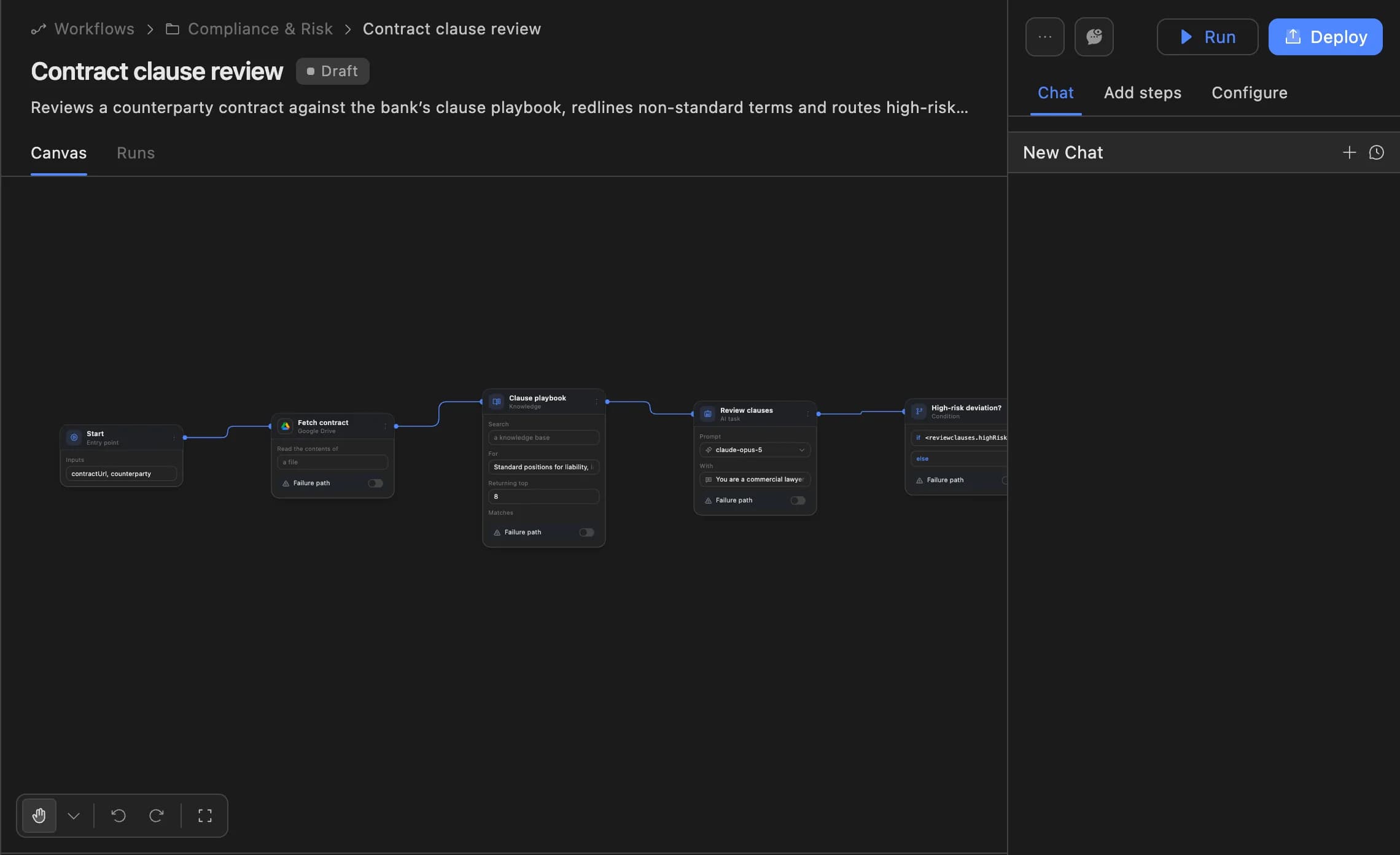
The Agent Serve workflow builder showing a contract clause review agent: start, fetch contract, clause playbook, review clauses and a high-risk deviation branch, with Run and Deploy buttons.
04 · Audit

Evidence for the auditor

The Agent Serve Activity audit lists workspace activity and exports as CSV, and log destinations can send audit logs to your own storage or monitoring tools.

What does the work

The parts of Agent Serve behind each review.

  1. 01Integrations

    Reach your systems

    Okta, Microsoft Entra ID, SailPoint, ServiceNow and Jira Service Management blocks.

  2. 02Workflows

    Run the review

    Scheduled and triggered workflows gather, flag and wait for decisions.

  3. 03Tables

    Record decisions

    A reviews table holds every account, its flag and the manager’s decision.

  4. 04Rules

    Flag what matters

    Rules mark leavers, dormant accounts and privileged groups.

  5. 05Knowledge bases

    Answer from policy

    Security policies sit in a knowledge base for questionnaire answers.

Examples

IT and security work in regulated firms.

Three recurring jobs IT and security teams run on Agent Serve, each with a person making the call.

Identity and access

Quarterly user access review

An Agent Serve schedule lists accounts from Okta, flags leavers and privileged groups, and asks each manager to confirm or revoke.

  1. Schedule
  2. Accounts pulled
  3. Flags set
  4. Managers decide
Security compliance

Security questionnaires

An Agent Serve workflow drafts each answer from the policy knowledge base, checks it is supported, and a security lead approves the batch.

  1. Questions imported
  2. Answers drafted
  3. Sources checked
  4. Lead approves
IT operations

Change approvals

A new change request in ServiceNow starts an Agent Serve workflow that checks the evidence and pauses for the approver.

  1. Request raised
  2. Evidence checked
  3. Approver decides
  4. Ticket updated

Examples show what teams can build in Agent Serve. They describe patterns, not named customer deployments.

Governance

Controls that hold up in your own audit.

Agent Serve keeps decisions with named people and leaves a record your auditors can follow.

Security and governance
  • Permission groups

    Agent Serve access policies limit which blocks, models and integrations each permission group can use, on top of admin, write and read roles.

  • Logs to your systems

    Agent Serve log destinations send workflow logs, audit logs and Chat history to Amazon S3, Azure Blob Storage, Datadog or an HTTPS webhook.

  • SSO and SCIM

    Sign in through your identity provider with SAML 2.0 or OIDC, and provision people with SCIM.

  • Roles and permission groups

    Admin, write and read roles per workspace, plus permission groups that limit which models, blocks and integrations a team can use.

  • Audit trail

    Proposals, approvals, declines and executed actions are written to the workspace audit log, which admins can export.

  • Run logs

    Every workflow run records each block’s inputs, outputs and errors, so a reviewer can trace how a result was reached.

  • Self-hosting

    Run Agent Serve in your own cloud or data centre, next to the systems it reads.

  • Zero data retention

    Zero data retention with supported model providers, backed by your own provider keys and agreements or self-hosted models. Some provider features keep data by design, such as Gemini Deep Research, so they are outside zero data retention.

  • Bring your own keys

    Use your organisation’s own model provider keys at organisation or workspace level.

  • Deployed versions

    Workflows run from a deployed version, so a change is reviewed before it reaches production runs.

Further reading

Access, questionnaires and change, in depth.

The deep dive models the time a security questionnaire takes and what changes, with every figure labelled.

Read the blog

Questions

About IT and security operations

Does Agent Serve remove access on its own?

Not in this process. Agent Serve flags accounts and asks each manager to decide. A workflow only changes an account after a person approves, if you build that step.

Which identity and service tools does Agent Serve connect to?

Agent Serve has blocks for Okta, Microsoft Entra ID, SailPoint and AWS IAM Identity Center, and triggers for ServiceNow and Jira Service Management, among its integrations.

Where do questionnaire answers come from?

From your own policies in an Agent Serve knowledge base. Each answer links to the passage it used, and a security lead approves the batch.

How does Agent Serve itself handle sign-in and audit?

Agent Serve supports SAML and OIDC single sign-on with SCIM provisioning, roles and permission groups, and an Activity audit that exports as CSV.

What can we run first?

A team can start with the Agent Serve access review workflow and a reviews table, then add questionnaire drafting and change approvals.

Last updated

Enterprise access

Put AI agents to work across your team

Agent Serve is available to teams by invitation. Tell us what you want to build and we will set up your workspace with you.