Use case · Revenue operations

A pipeline review that prepares itself.

A monitor spots slipping coverage, a Relay finds why, the dashboard shows the deals, and the CRM updates after a manager approves.

An illustrative revenue operations use case for Agent Serve, the AI workspace where teams build, deploy, and manage AI agents: Monitors, a Revenue Analyst Relay, Dashboards, Chat and Workflows combine to prepare a weekly pipeline review.

At a glance

Who runs the review, and what it removes.

Who it is for

Revenue operations leads and sales managers

The problem it removes

Each week someone exports the pipeline, checks coverage by hand and chases reps for updates before the forecast call. Deals that are slipping are found late, and the review deck is out of date by the time it is shown.
What your team still controls

People decide

  • A manager approves every email a Relay wants to send
  • The monitor thresholds and what counts as an at-risk deal
  • Which dashboards, metrics and tables the Relay may read
Day one

What you can run first

  • A pipeline dashboard built on governed metrics
  • A monitor that raises an alert when coverage drops
  • A Revenue Analyst Relay that drafts the weekly briefing
Later

What you add once it is trusted

  • Rules that flag at-risk deals in the review table
  • A scheduled PDF of the dashboard before each forecast call
  • Workflows that update CRM records after a manager approves

Step by step

One review, start to finish.

  1. 01

    Coverage drops

    The pipeline monitor flags EMEA coverage below 3× on Monday morning.

  2. 02

    The Relay investigates

    The Revenue Analyst reads the deals, finds the slipped ones and drafts the review.

  3. 03

    A manager approves

    The CRM update and the email to sales leads go out only after approval.

How it fits together

Five parts of Agent Serve, one weekly review.

  1. 01Monitors & alerts

    Catch the change

    A monitor on pipeline coverage raises an alert when a region drops below 3×.

  2. 02Relays

    Investigate

    The Revenue Analyst Relay picks up the alert, reads the deals and drafts a briefing.

  3. 03Dashboards & BI

    Show the detail

    The pipeline dashboard drills from the region to the slipping opportunities.

  4. 04Chat

    Ask the follow-up

    Managers ask Chat which deals moved stage and why, with sources.

  5. 05Workflows

    Update the CRM

    A workflow writes next steps back to the CRM after a manager approves.

How it runs

From Monday alert to approved CRM update.

The whole review runs in Agent Serve, and nothing leaves for the CRM or an inbox until a manager says yes.

  1. 1

    The monitor fires

    A Metric threshold monitor checks pipeline coverage every hour and raises a Warning when a region falls below target.

  2. 2

    The Relay picks it up

    The Revenue Analyst Relay starts on When a monitor alerts and reads the pipeline table and dashboard it was given.

  3. 3

    The review is drafted

    It lists the deals that slipped a stage or a close date, with the reason it found for each.

  4. 4

    A manager decides

    The briefing email and the CRM update wait as approvals showing the exact message and fields.

What to measure

How a team might measure the change.

Example figures for a mid-size sales team, to show what is worth tracking.

Illustrative

−70%

Review prep time

From about 6 hours to under 2 each week.

Illustrative

+18

Deals flagged early

At-risk deals surfaced before the forecast call.

Illustrative

+4 pts

Forecast accuracy

Committed versus closed, quarter on quarter.

Illustrative

0

Unapproved CRM writes

Every update waits for a manager.

Illustrative example. Figures show how the workflow is measured; they are not customer results.

In depth

What each manager actually sees.

Agent Serve puts the dashboard, the scenario, the approval and the follow-up question in one workspace.

01 · Dashboards

From the alert to the deals behind it

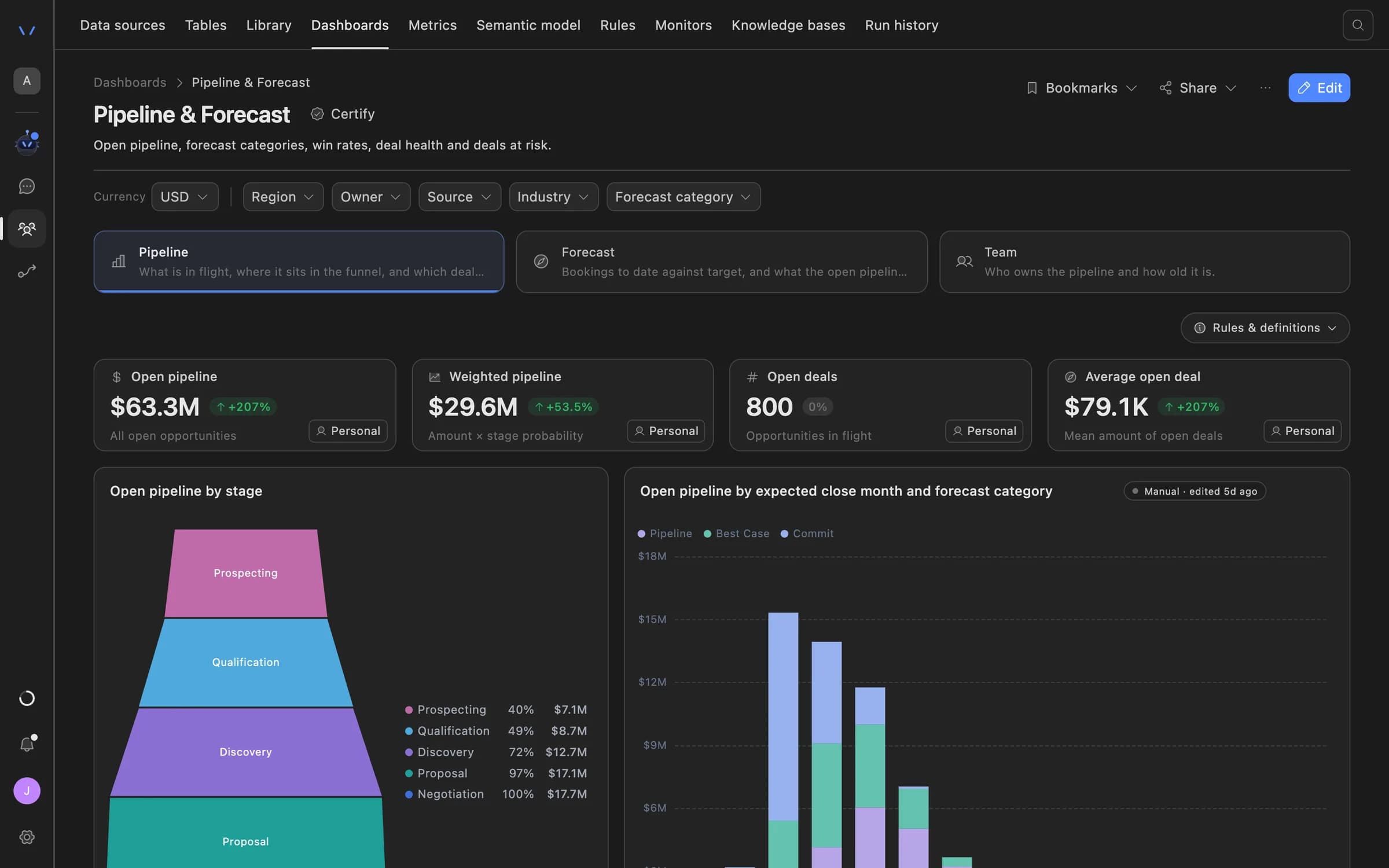
The Agent Serve pipeline dashboard drills from region to stage to the opportunities, with breadcrumbs back up.

  • Start from the Pipeline tracking template
  • See rows behind any chart
  • Compare with the previous period or last year
Agent Serve Pipeline and Forecast dashboard with open and weighted pipeline tiles, a funnel by stage, and pipeline by expected close month and forecast category.
02 · Scenarios

Test a deal before you commit it

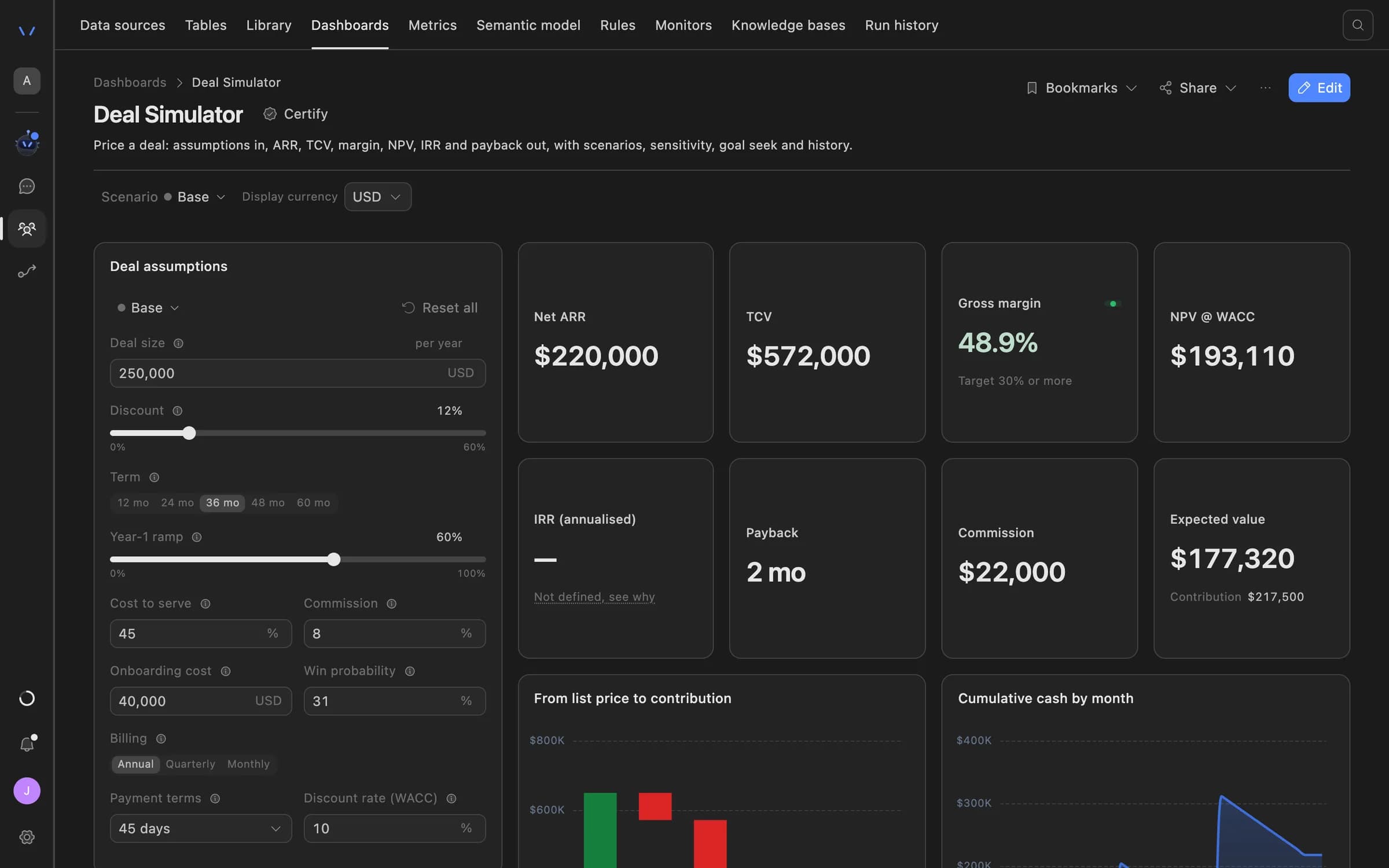
Agent Serve dashboard scenarios recalculate outcomes as a manager changes discount, term or deal size, kept apart from recorded results.

Agent Serve Deal Simulator: deal assumptions such as size, discount, term and cost to serve on the left, with net ARR, TCV, gross margin, NPV, payback and commission recalculated on the right.
03 · Approvals

Nothing sent without a yes

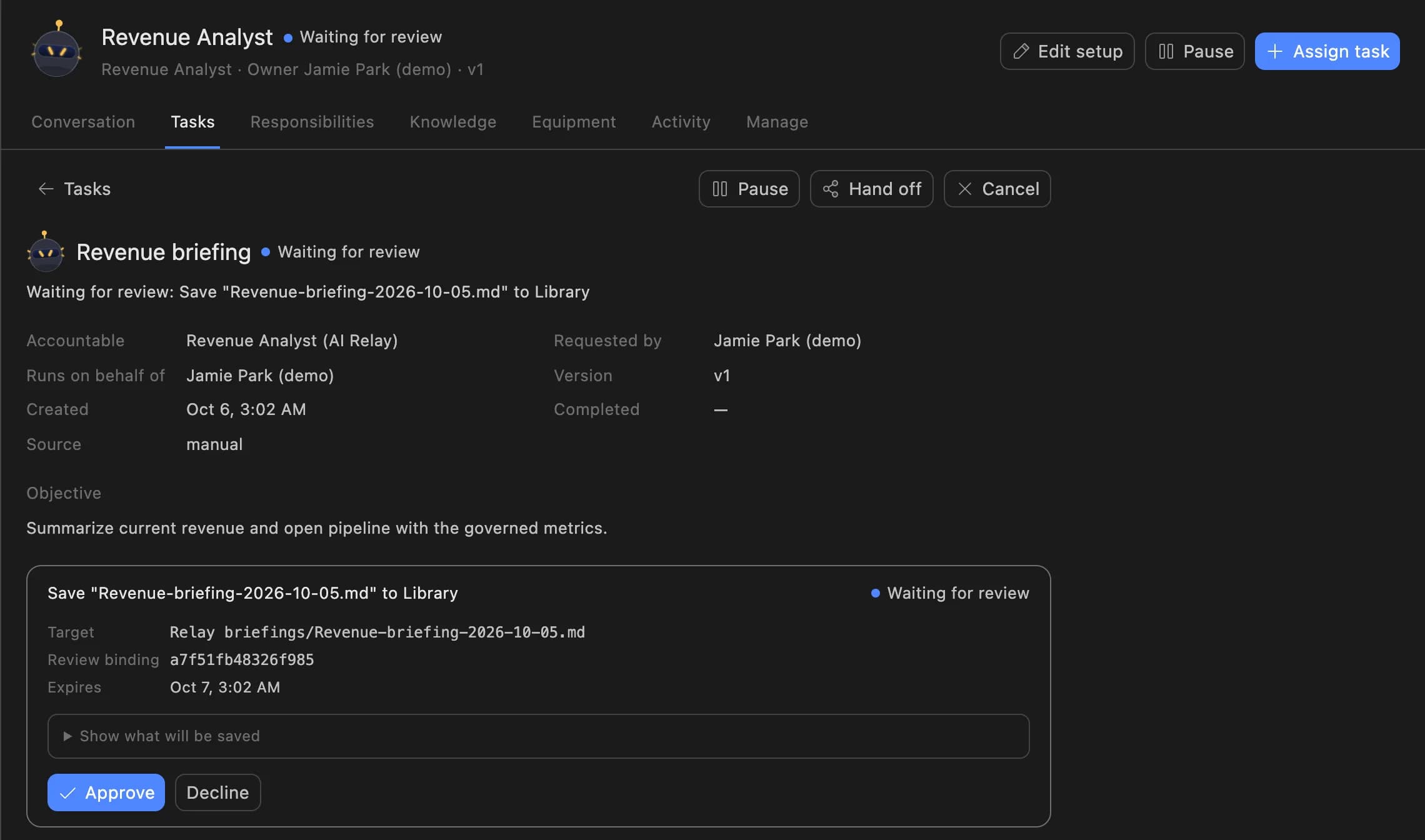
An Agent Serve Relay always asks before it sends email. The manager sees the exact message, then approves or declines.

  • Up to 20 named approvers
  • Reviews expire after 1 to 168 hours
  • The decision stays on the task
A Relay task in Agent Serve waiting for review: the Revenue Analyst asks to save a revenue briefing to the Library, with Approve and Decline buttons.
04 · Chat

The follow-up question

Managers attach the pipeline table in Agent Serve Chat and ask which deals moved and why, then get a chart back.

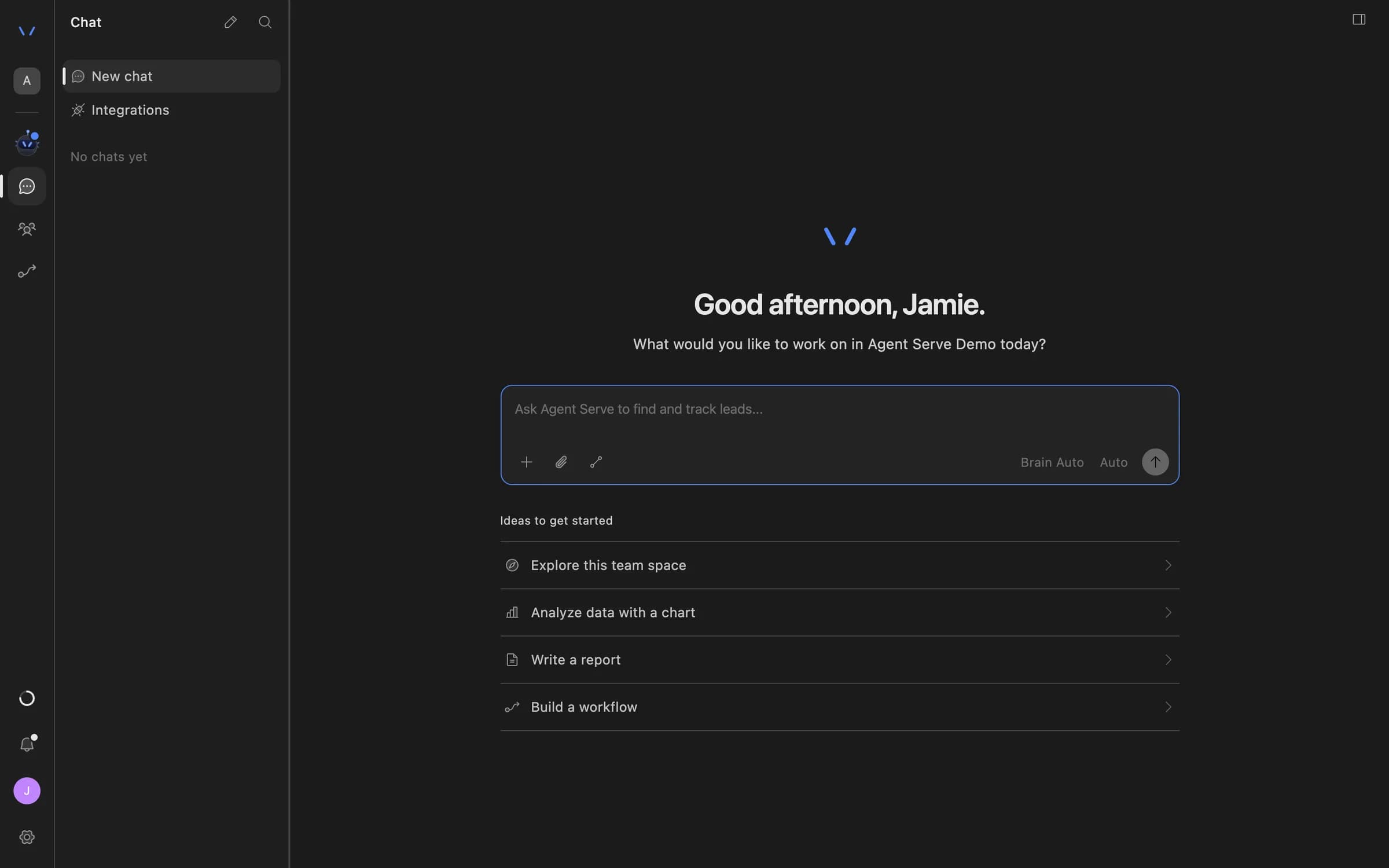
Agent Serve Chat home with a message composer and suggestions to explore the team space, analyze data with a chart, write a report, or build a workflow.

Examples

Pipeline reviews across financial services.

The same pattern, adapted by three revenue teams in banking, insurance and payments on Agent Serve.

Commercial banking

Lending pipeline review

An Agent Serve monitor watches committed lending pipeline by region, and a Relay drafts the Monday note for relationship managers.

  1. Coverage alert
  2. Relay reads deals
  3. Note drafted
  4. Head of lending approves
Insurance · Broker channel

Renewal book at risk

An Agent Serve dashboard tracks renewals due in 90 days, and a Relay lists the brokers whose books are slipping.

  1. Weekly schedule
  2. Renewals checked
  3. Brokers listed
  4. Channel lead reviews
Payments · Merchant sales

Merchant onboarding funnel

An Agent Serve workflow updates merchant deal stages in the CRM after a sales manager approves each change.

  1. Stage change proposed
  2. Human step
  3. Manager approves
  4. CRM updated

Examples show what teams can build in Agent Serve. They describe patterns, not named customer deployments.

Before and after

Less spreadsheet prep, more time on deals.

Less spreadsheet prep, more time on deals.
WorkBeforeWith Agent Serve
Spotting riskBeforeSomeone notices thin coverage during the forecast call.With Agent ServeA monitor raises an alert as soon as coverage crosses the line.
Preparing the reviewBeforeAn analyst exports the CRM and builds slides every Monday.With Agent ServeA Relay drafts the review from the same pipeline data the dashboard uses.
Updating the CRMBeforeNext steps typed in by hand after the meeting, if at all.With Agent ServeA workflow writes them back once a manager approves.
Who sees whatBeforeOne export emailed to everyone, every region included.With Agent ServeRow-level security shows each manager their own territory.

Governance

Every CRM change has an owner.

Agent Serve keeps revenue data scoped by territory, and every outbound action waits for a named person.

Security and governance
  • Relay limits

    Agent Serve caps how many tasks a Relay runs at once and per day, so a burst of alerts never floods the team.

  • A person in the workflow

    The Agent Serve Human block pauses the CRM update until a manager responds.

  • Approvals before action

    Relays never send email or book meetings without an approval, under any autonomy setting. An approval covers the exact payload the reviewer saw and expires if nobody decides.

  • Audit trail

    Proposals, approvals, declines and executed actions are written to the workspace audit log, which admins can export.

  • Row-level access

    Row-level policies narrow what each person sees in tables, dashboards, exports and scheduled reports.

  • Deployed versions

    Workflows run from a deployed version, so a change is reviewed before it reaches production runs.

  • Roles and permission groups

    Admin, write and read roles per workspace, plus permission groups that limit which models, blocks and integrations a team can use.

Further reading

Solutions built on monitors and alerts.

Questions

About this use case

Which parts of Agent Serve does this use case need?

Agent Serve Monitors, Relays, Dashboards, Chat and Workflows, plus a connection to your CRM. The pipeline data sits in an Agent Serve table the monitor and dashboard read.

Can the Relay change the CRM on its own?

Only if you allow it. In this use case the Agent Serve workflow pauses at a Human step, so every CRM update waits for a manager to approve it.

How often does the monitor check pipeline coverage?

You choose. Agent Serve monitors run from every 5 minutes to every 7 days, and a workspace can hold up to 200 monitors.

Are the figures on this page real results?

No. The figures are illustrative examples of what a revenue team might measure with Agent Serve, not customer results.

Last updated

Enterprise access

Put AI agents to work across your team

Agent Serve is available to teams by invitation. Tell us what you want to build and we will set up your workspace with you.