
Agent Serve · Semantic model

Your data, in business terms.

Describe your entities, how they relate, and what “revenue” means. Dashboards, metrics and Relays then join and measure data the same way.

The semantic model in Agent Serve, the AI workspace where teams build, deploy, and manage AI agents, describes business entities with dimensions, attributes, measures and synonyms, the relationships between them, and conformed dimensions shared across sources.

How it works

From tables to one shared definition.

Agent Serve builds the semantic model over your workspace tables, then every dashboard and metric reads the same definitions.

  1. 1

    Map entities to tables

    Choose New entity, point it at a table, and add attributes, dimensions and synonyms.

  2. 2

    Relate and check

    Add a relationship with its cardinality, then Check relationship to see how well the keys match.

  3. 3

    Define measures

    Add measures as an aggregate on a column, a governed metric, or a formula built from other measures.

  4. 4

    Reuse everywhere

    Save model, and dashboards and metrics use the same joins and measures.

In depth

Joins you can trust, measures you can reuse.

Agent Serve checks each relationship against the data, lines up values from different sources, and lets measures build on each other.

01 · Relationships

Checked against the data

Check relationship in Agent Serve reports the match rate, duplicate keys and orphan keys, and what the data says the cardinality really is.

  • 1:1, 1:N, N:1 or N:N, marked Verified once checked
  • Keep unmatched or Matches only joins
  • Exact match, Trim spaces, or Trim + ignore case
02 · Conformed dimensions

One region, every source

An Agent Serve conformed dimension gives tables from different systems one shared field, with value maps that turn “EMEA” into “Europe”.

  • Text or Date dimensions
  • Date grain from Day to Year
  • Dashboards blend sources across the shared field
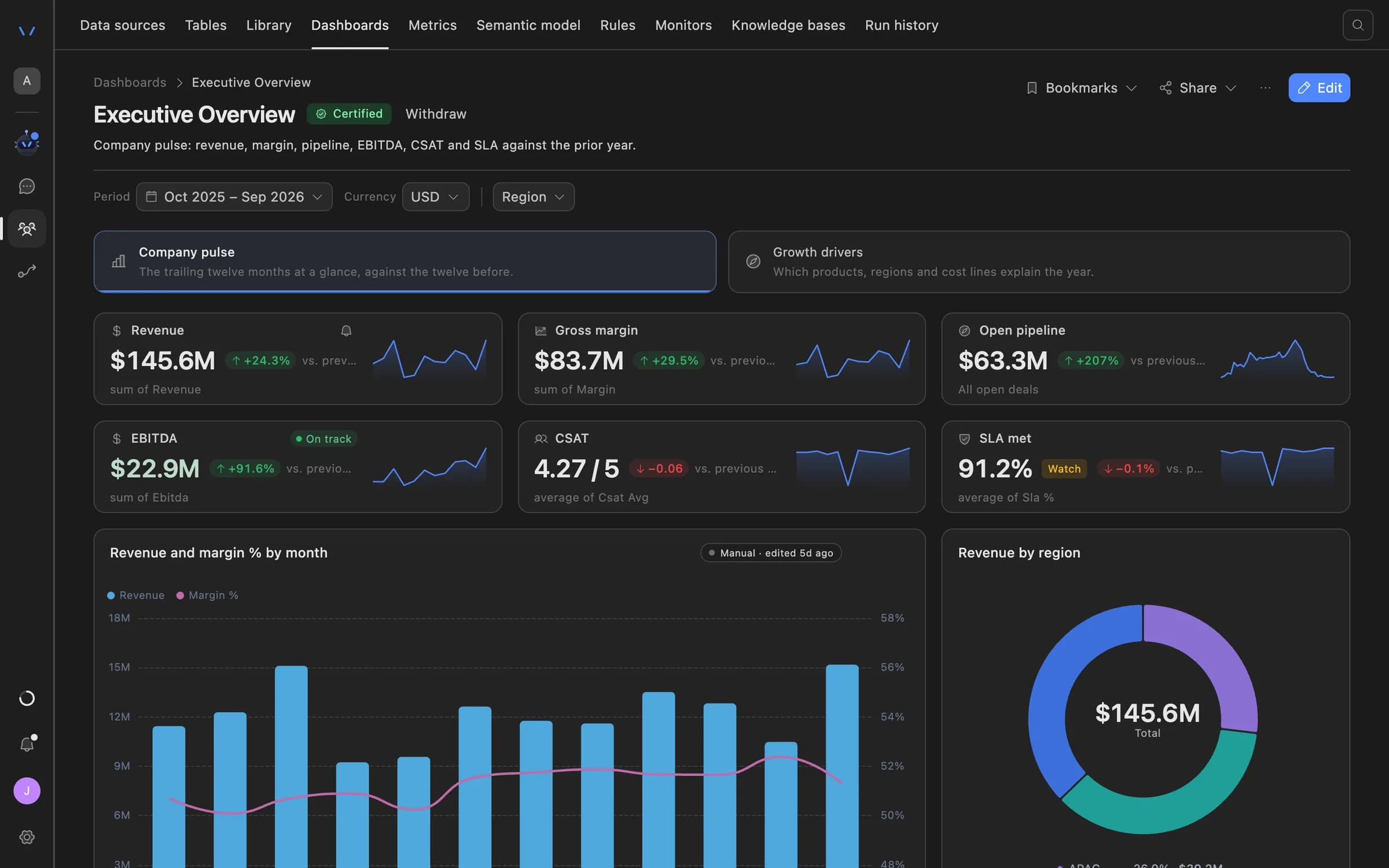
Agent Serve dashboard showing an executive overview: revenue, gross margin, open pipeline, EBITDA, CSAT and SLA tiles with trend lines, a monthly revenue and margin chart, and revenue by region.
03 · Formula measures

Measures built from measures

A formula measure in Agent Serve combines other measures with MEASURE("…") and shows as a number, currency or percent.

  • Synonyms make a measure easy to find
  • Formula metrics and monitors resolve MEASURE() too
  • Up to 4,000 characters per formula

The editor

A shared vocabulary for people and agents.

Entities on tables

Each Agent Serve entity maps to one workspace table and carries its attributes, dimensions, measures and relationships.

Policy → policies table

Synonyms

Agent Serve synonyms record the words your teams use, so “client” and “customer” point to the same entity.

Customer · client, account holder

Suggested relationships

Agent Serve suggests relationships between entities with a score, and one click on Add puts them in the model.

Loans.customer_id → Customers.id

Three kinds of measure

An Agent Serve measure is an aggregate on a column, a governed metric, or a formula over other measures.

sum · avg · min · max · count · count_distinct

Data model diagram

The Agent Serve Data model diagram draws every entity and relationship, so reviewers see how the data fits together.

Accounts 1:N Transactions

Composite keys

An Agent Serve relationship can join on up to four key pairs when one column is not enough.

branch_id + account_no

Examples

Definitions finance teams stop arguing about.

Three ways financial services teams use the Agent Serve semantic model to fix a number once.

Retail banking

One definition of deposits

Agent Serve maps accounts, customers and branches to their tables, so every deposits dashboard sums the same balance column the same way.

  1. Map entities
  2. Check relationships
  3. Total deposits measure
  4. Branch dashboards
Insurance · Underwriting

Loss ratio as a formula

An Agent Serve formula measure divides claims paid by earned premium. A formula metric reuses it, and a Metric threshold monitor flags drift.

  1. Claims paid
  2. Earned premium
  3. Loss ratio formula
  4. Monitor alerts
Payments

Chargebacks by one region

A conformed region in Agent Serve lines up the processing and CRM tables, with a value map so both use the same region names.

  1. Two source tables
  2. Conformed region
  3. Value map
  4. Chargeback rate by region

Examples show what teams can build in Agent Serve. They describe patterns, not named customer deployments.

Under the hood

The semantic model, in detail.

The semantic model, in detail.
ScopeOne semantic model per team space, with up to 200 entities.
DataWorkspace tables. Data sources reach the model once they sync into a table.
Relationships1:1, 1:N, N:1 and N:N, with up to 4 key pairs and three key-matching modes.
Relationship checkMatch rate, duplicate keys, orphan keys and the cardinality the data suggests.
MeasuresColumn aggregates (sum, avg, min, max, count, count_distinct), governed metrics and formulas.
FormulasUp to 4,000 characters, formatted as Number, Currency (USD) or Percent.
Conformed dimensionsUp to 50, Text or Date, with 20 members each and 500 value-map entries.
Used byDashboards, metrics, monitors and Relays.

Before and after

One number, not three versions of it.

One number, not three versions of it.
WorkBeforeWith Agent Serve
What revenue meansBeforeEach dashboard carries its own formula, and they disagree.With Agent ServeOne measure in Agent Serve, reused by every dashboard and metric.
Joining tablesBeforeJoins rebuilt by hand in every report, with silent duplicates.With Agent ServeRelationships checked for match rate, duplicate and orphan keys.
Regions from two systemsBeforeManual mapping in spreadsheets before every board pack.With Agent ServeA conformed dimension with a value map, applied every time.
Business wordsBeforeAnalysts translate “client” into the right table name.With Agent ServeSynonyms on entities and measures record the words teams use.

Governance

Control who changes a definition.

Anyone in the team space can read the Agent Serve semantic model; only people with write access can change it.

Security and governance
  • Write access to save

    Saving the Agent Serve semantic model and verifying relationships needs write or admin access to the team space.

  • Changes are audited

    Each update to the Agent Serve semantic model writes an event to the workspace audit log.

  • Roles and permission groups

    Admin, write and read roles per workspace, plus permission groups that limit which models, blocks and integrations a team can use.

  • SSO and SCIM

    Sign in through your identity provider with SAML 2.0 or OIDC, and provision people with SCIM.

  • Self-hosting

    Run Agent Serve in your own cloud or data centre, next to the systems it reads.

Works with

Where the model shows up.

Further reading

Solutions built on the semantic model.

Questions

About the semantic model

What is a semantic model?

A semantic model is a shared description of business data: what an entity represents, how entities relate, and which dimensions and measures are meaningful. In Agent Serve it sits over your workspace tables.

What data can the semantic model describe?

The Agent Serve semantic model maps each entity to a workspace table. Data from connected sources reaches the model once it syncs into a table.

How does Agent Serve check a relationship?

Check relationship in Agent Serve compares the keys in both tables and reports the match rate, duplicate keys, orphan keys and the cardinality the data suggests.

Can one measure build on another?

Yes. A formula measure in Agent Serve combines other measures with MEASURE("…"), such as claims paid divided by earned premium, and formats the result.

Who can change the semantic model?

Anyone in an Agent Serve team space can read the model. Saving it and verifying relationships needs write or admin access, and each update is audited.

How many semantic models can a team space have?

One. Each Agent Serve team space has a single semantic model, with up to 200 entities, so every dashboard and metric reads the same definitions.

Last updated

Enterprise access

Put AI agents to work across your team

Agent Serve is available to teams by invitation. Tell us what you want to build and we will set up your workspace with you.