Use case · Finance close

Close the books with fewer late nights.

Workflows pull transactions into tables, rules flag what does not match, a Relay drafts the variance commentary, and the close dashboard shows what is left.

An illustrative finance close use case for Agent Serve, the AI workspace where teams build, deploy, and manage AI agents: Tables, Rules, Workflows, a Relay and Dashboards combine to reconcile transactions and explain variances at month end.

At a glance

Who closes the books, and what gets easier.

Who it is for

Financial controllers and month-end close teams

The problem it removes

At month end the team matches bank lines to the ledger in spreadsheets, chases owners for explanations and writes variance notes late at night. Exceptions are found in the final days, when there is least time to fix them.
What your team still controls

People decide

  • Each owner approves the variance commentary before it is filed
  • The rules that decide what counts as an exception
  • Who can see and change each table
Day one

What you can run first

  • Transactions imported into a table, with a workflow column that suggests matches
  • Rules that flag differing amounts and missing references
  • A close dashboard of open items
Later

What you add once it is trusted

  • A Relay that drafts variance commentary for each owner
  • Monitors that alert when exceptions build up
  • A scheduled PDF of the close dashboard for the controller

Step by step

One close, start to finish.

  1. 01

    Lines match themselves

    A workflow column suggests the matching ledger entry for each bank line.

  2. 02

    Exceptions explain themselves

    Rules flag amounts that differ, missing references and late postings, with the reason.

  3. 03

    Owners approve the commentary

    A Relay drafts variance notes; each owner approves before they are filed.

How it fits together

From ledger to signed-off close.

  1. 01Workflows

    Pull the data

    A scheduled workflow loads bank and ledger lines into a reconciliation table.

  2. 02Tables

    Match and enrich

    A workflow column suggests the matching entry and a reason on every row.

  3. 03Rules

    Flag exceptions

    Rules flag amounts that differ, missing references and late postings.

  4. 04Relays

    Explain variances

    A Relay drafts the variance commentary for each account owner to approve.

  5. 05Dashboards & BI

    Track the close

    The close dashboard shows open items by entity and owner.

How it runs

From period end to filed commentary.

Agent Serve runs the matching overnight, so the team starts the day on exceptions instead of on raw lines.

  1. 1

    Load the lines

    A workflow on a Daily schedule reads bank and ledger exports and writes them into one reconciliation table.

  2. 2

    Suggest a match

    A workflow column runs on each unmatched row and fills in the likely ledger entry and why.

  3. 3

    Classify the exceptions

    A Classification rule labels each open line as amount differs, missing reference or late posting.

  4. 4

    Draft the commentary

    A Relay set to Assist drafts variance notes and asks the account owner before saving them.

What to measure

How a team might measure the change.

Example figures for a finance team closing three entities.

Illustrative

8→5

Days to close

Business days from period end to sign-off.

Illustrative

92%

Lines matched automatically

Before anyone opens the table.

Illustrative

−60%

Time on commentary

Owners edit a draft instead of writing one.

Illustrative

1

Place to see status

Open items by entity and owner.

Illustrative example. Figures show how the workflow is measured; they are not customer results.

In depth

Where the close actually gets done.

Agent Serve keeps the matching logic, the approvals and the status view in one workspace the controller can inspect.

01 · Workflows

Matching logic you can read

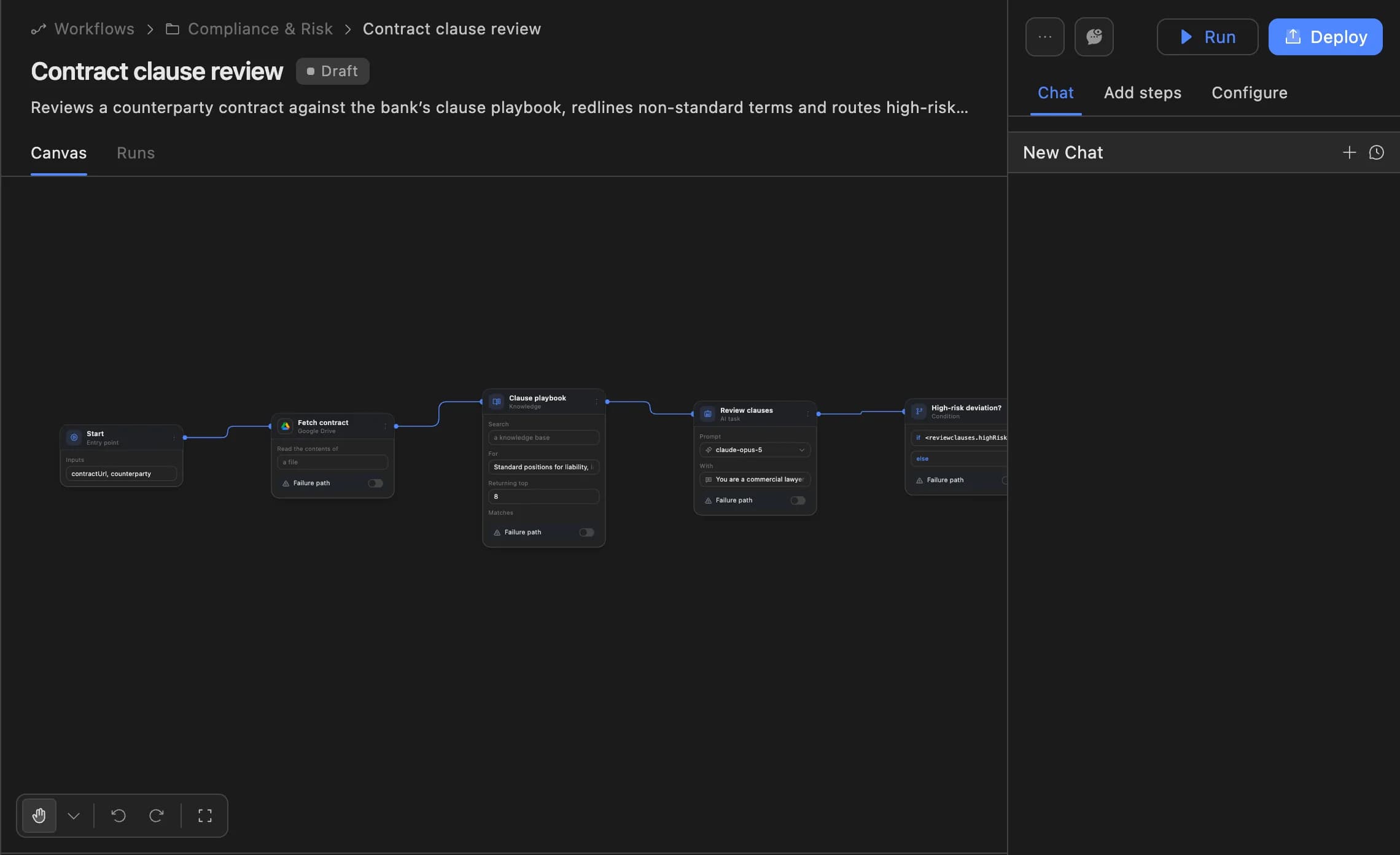
The Agent Serve workflow builder shows each step of the load and match, from the Schedule trigger to the Table block.

  • Function blocks in JavaScript or Python
  • Runs from a deployed version
  • Every run traced block by block
The Agent Serve workflow builder showing a contract clause review agent: start, fetch contract, clause playbook, review clauses and a high-risk deviation branch, with Run and Deploy buttons.
02 · Relays

A Relay that asks first

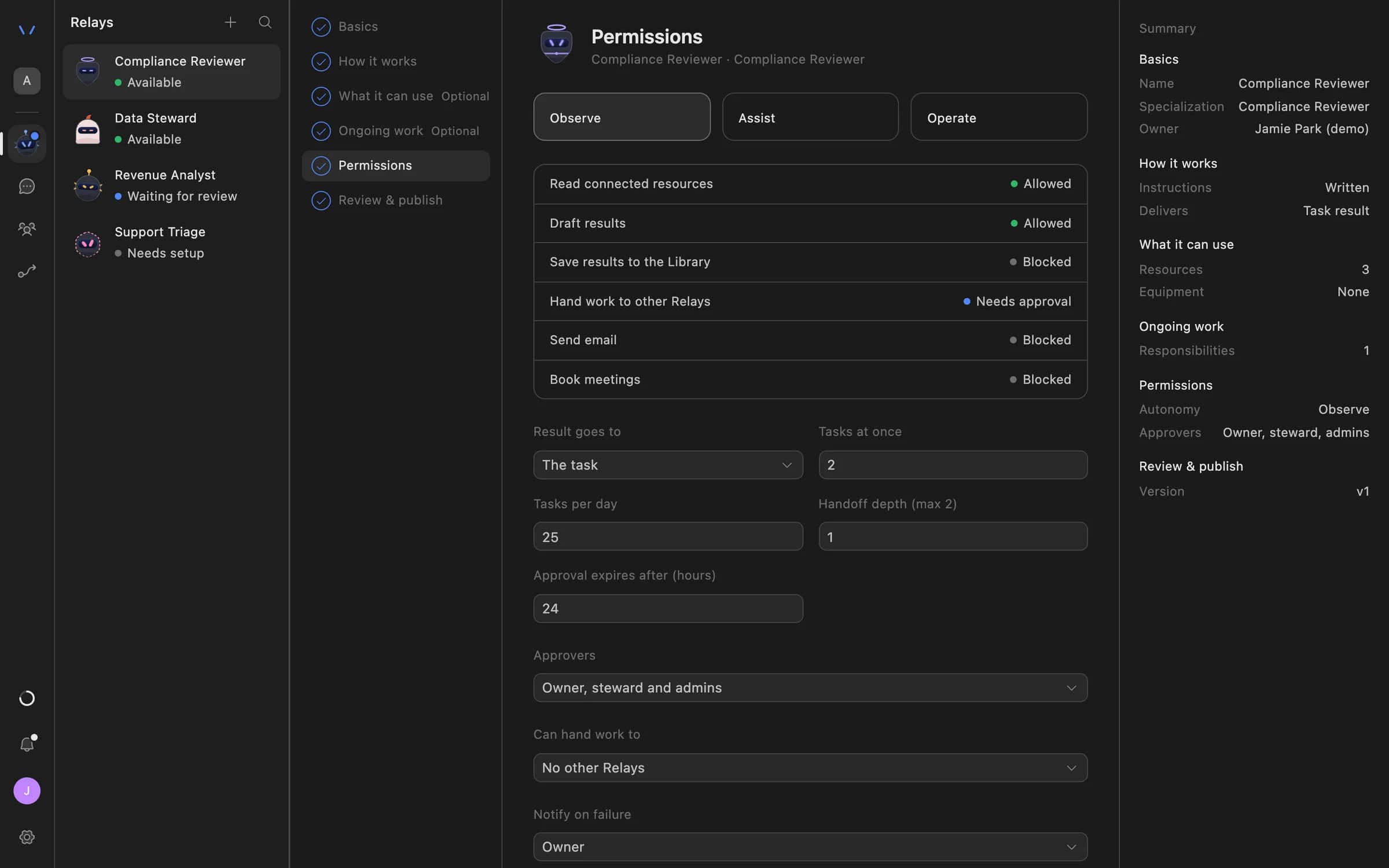
An Agent Serve Relay set to Assist reads and drafts freely, but needs approval before it saves commentary to the Library.

  • Observe, Assist or Operate
  • Daily task limits
  • Named approvers, or the owner
Relay setup in Agent Serve on the Permissions step: Observe, Assist and Operate autonomy levels, each action marked Allowed, Needs approval or Blocked, daily task limits, approval expiry and who can approve.
03 · Approvals

The owner sees the exact note

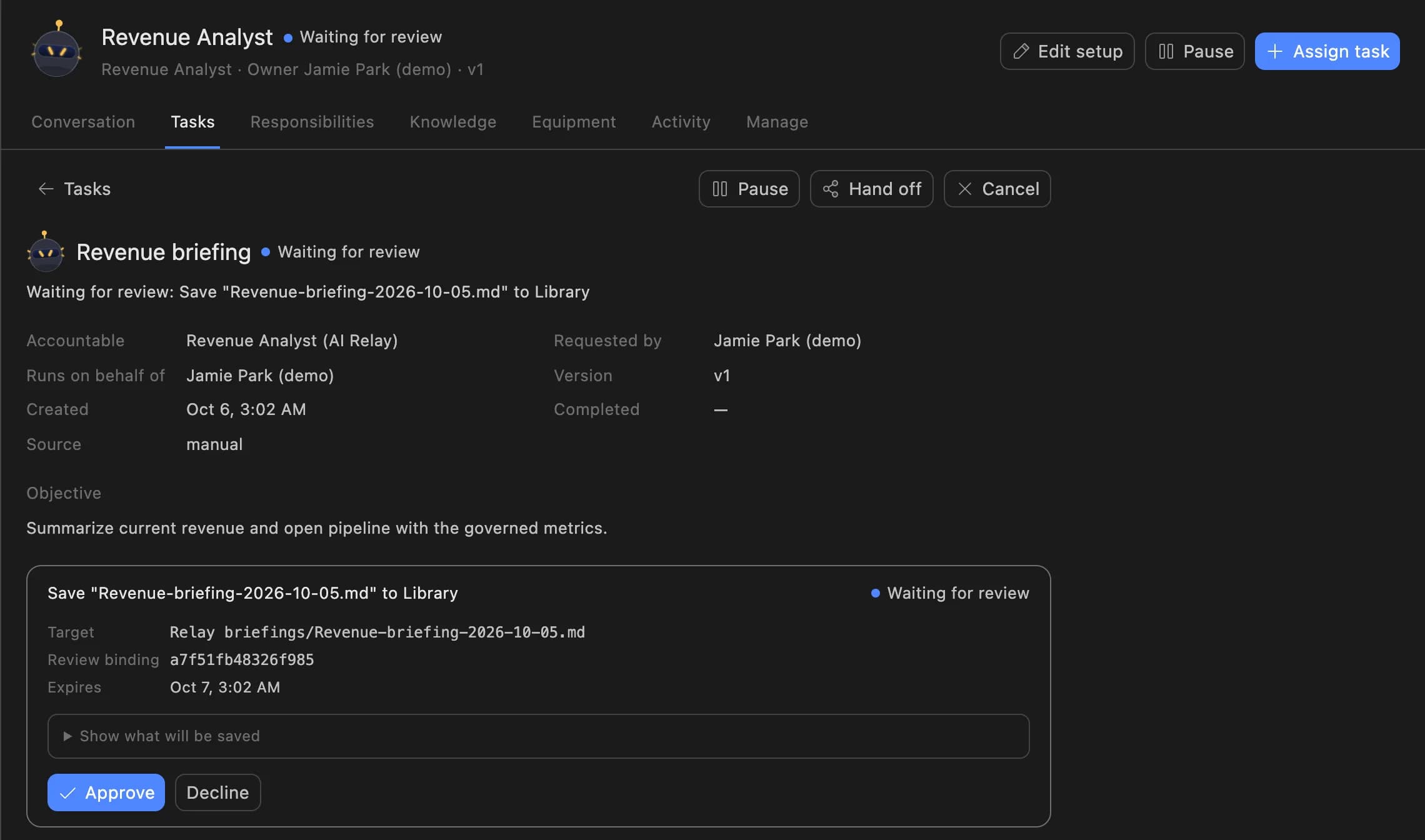
Each account owner reviews the variance note the Agent Serve Relay wants to save, then approves or declines it.

A Relay task in Agent Serve waiting for review: the Revenue Analyst asks to save a revenue briefing to the Library, with Approve and Decline buttons.
04 · Dashboards

Results leadership can trust

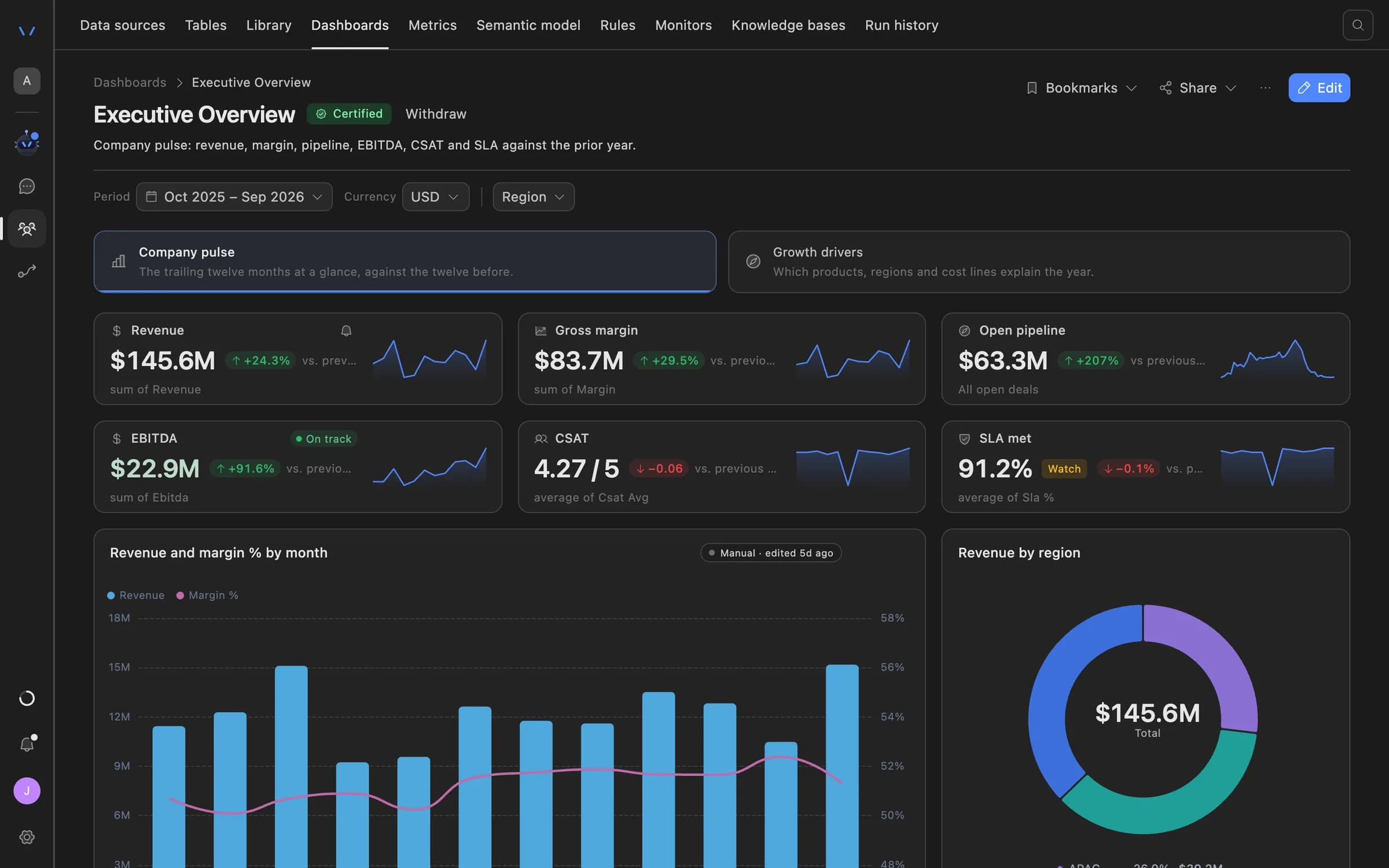
Once the books close, Agent Serve dashboards show margin and EBITDA from governed metrics, with row-level security by entity.

Agent Serve dashboard showing an executive overview: revenue, gross margin, open pipeline, EBITDA, CSAT and SLA tiles with trend lines, a monthly revenue and margin chart, and revenue by region.

Examples

Close work banks and insurers hand over.

Three month-end jobs financial services finance teams run on Agent Serve, each one a spreadsheet nobody misses.

Retail banking · Finance

Suspense account clearing

An Agent Serve workflow column proposes where each suspense item belongs, and a rule flags items older than the policy allows.

  1. Suspense lines loaded
  2. Match proposed
  3. Aged items flagged
  4. Controller clears
Insurance · Finance

Premium and claims accruals

An Agent Serve Relay compares booked accruals with the claims and premium tables and drafts the gap commentary for review.

  1. Accruals loaded
  2. Gaps classified
  3. Commentary drafted
  4. Owner approves
Payments · Treasury

Settlement reconciliation

An Agent Serve workflow matches scheme settlement files to the ledger every day, and a monitor alerts when unmatched items pile up.

  1. Settlement file in
  2. Lines matched
  3. Rule match alert
  4. Ops investigates

Examples show what teams can build in Agent Serve. They describe patterns, not named customer deployments.

Before and after

Fewer tick marks, clearer exceptions.

Fewer tick marks, clearer exceptions.
WorkBeforeWith Agent Serve
MatchingBeforeVLOOKUPs across exports, rebuilt every month.With Agent ServeA workflow column suggests the match on every row of one table.
ExceptionsBeforeHighlighted cells and comments only the preparer understands.With Agent ServeA rule labels each exception with a reason anyone can read.
Variance commentaryBeforeWritten from scratch by each owner on the last day.With Agent ServeDrafted by a Relay and approved by the owner.
Close statusBeforeA tracker spreadsheet updated by email.With Agent ServeA dashboard of open items by entity and owner.

Governance

A close your auditors can retrace.

Agent Serve records how each number was matched, who approved each note and who can see each entity.

Security and governance
  • Rules written once

    An Agent Serve rule defines an exception the same way in the table, the dashboard and the monitor.

  • Entity-level access

    Agent Serve row limits show each entity’s finance team only their own reconciliation rows.

  • Run logs

    Every workflow run records each block’s inputs, outputs and errors, so a reviewer can trace how a result was reached.

  • Audit trail

    Proposals, approvals, declines and executed actions are written to the workspace audit log, which admins can export.

  • Approvals before action

    Relays never send email or book meetings without an approval, under any autonomy setting. An approval covers the exact payload the reviewer saw and expires if nobody decides.

  • Row-level access

    Row-level policies narrow what each person sees in tables, dashboards, exports and scheduled reports.

  • Deployed versions

    Workflows run from a deployed version, so a change is reviewed before it reaches production runs.

Further reading

Solutions built on rules.

Questions

About this use case

Which parts of Agent Serve does the finance close use?

Agent Serve Tables, Rules, Workflows, a Relay and Dashboards. Bank and ledger data reach the table through a workflow, an import or the Tables API.

Does the AI post journal entries?

Not in this use case. Agent Serve suggests matches and drafts commentary; people decide. A Relay set to Assist needs approval before it saves anything to the Library.

Can we see how a match was suggested?

Yes. Every Agent Serve workflow run keeps a trace with each block’s inputs and outputs, so a reviewer can follow how a row was matched.

Are the figures on this page real results?

No. The figures are illustrative examples of what a finance team might measure with Agent Serve, not customer results.

Last updated

Enterprise access

Put AI agents to work across your team

Agent Serve is available to teams by invitation. Tell us what you want to build and we will set up your workspace with you.