
Use case · AML alert triage

Start each alert with the evidence ready.

Agent Serve gathers the account history behind every alert, drafts a masked case summary, and hands it to an investigator who decides.

An AML alert triage use case for Agent Serve, the AI workspace where teams build, deploy, and manage AI agents: a workflow receives each alert, reads account activity from tables, drafts a case summary with Guardrails masking personal data, and waits for an investigator; rules and monitors watch alert volumes.

At a glance

For investigators and financial crime leads.

Who it is for

AML investigators, alert analysts and financial crime operations leads

The problem it removes

The monitoring system raises more alerts than the team can work. For each one, an analyst opens four systems, exports the last few months of activity, and writes the same background paragraph before judging anything. Alerts age, and narratives vary from one investigator to the next.
What your team still controls

People decide

  • An investigator closes or escalates every alert; Agent Serve drafts, people decide
  • The thresholds and rules that decide which alerts need attention
  • Which tables and systems the workflow may read
  • Which personal data is masked before text moves on
Day one

What you can run first

  • A workflow that receives each alert and drafts a case summary with its evidence
  • An alerts table with status, owner and age
  • A Guardrails step that masks account numbers and personal data
Later

What you add once it is trusted

  • Rules that classify alerts by typology and a Rule match monitor on volumes
  • A Compliance Reviewer Relay that reviews alerts when the monitor fires
  • A dashboard of open alerts by age, typology and investigator

Before and after

Less gathering, more judging.

Less gathering, more judging.
WorkBeforeWith Agent Serve
Gathering evidenceBeforeExports from core banking, cards and the CRM, pasted into a case.With Agent ServeAgent Serve reads the activity tables and attaches the evidence.
Writing the narrativeBeforeEach investigator writes background from scratch, in their own style.With Agent ServeA draft follows the same structure every time, for the investigator to edit.
Personal dataBeforeFull account numbers copied into notes and emails.With Agent ServeGuardrails mask personal data before the draft moves on.
Seeing the backlogBeforeAlert age is checked by filtering a spreadsheet.With Agent ServeA monitor alerts when matching alerts build up past your limit.

How it runs

From a raised alert to an investigator’s call.

Agent Serve does the gathering and the first draft. The investigator reads, edits and decides.

  1. 1

    An alert arrives

    The monitoring system sends the alert to an Agent Serve webhook, and the workflow adds it to the alerts table.

  2. 2

    The evidence is gathered

    The workflow reads the customer’s recent transactions, counterparties and past alerts from workspace tables.

  3. 3

    A summary is drafted

    An agent writes the case summary in your template: who the customer is, what happened, and which facts point each way.

  4. 4

    The investigator decides

    Guardrails mask personal data, then a Human step pauses the run until the investigator records a decision and a note.

In depth

What the financial crime team works with.

Agent Serve gives investigators the evidence, a reviewer for the backlog and a record of every decision.

01 · Relays

A reviewer that starts when alerts build up

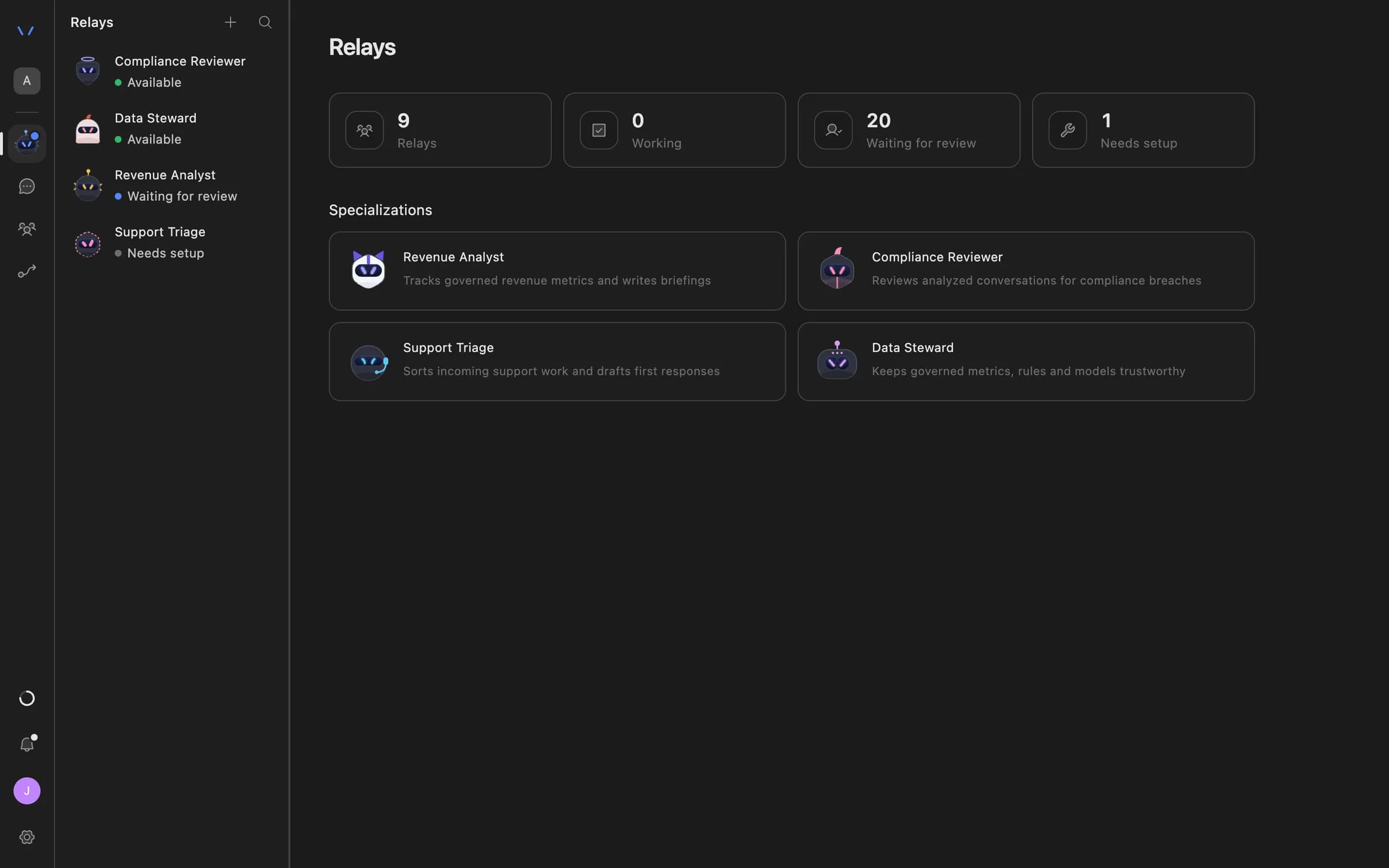
An Agent Serve Compliance Reviewer Relay runs when a monitor alerts, reads the alerts table and drafts a finding for a person to approve.

  • Starts from the Compliance Reviewer specialization
  • Up to 30 resources, such as tables, rules and knowledge bases
  • Hands complex cases to another Relay
The Relays page in Agent Serve listing AI coworkers — Compliance Reviewer, Data Steward, Revenue Analyst and Support Triage — with their status and specializations.
02 · Rules

One definition for each typology

Agent Serve rules flag or classify transactions, and a Rule match monitor alerts once enough rows match, so the alert and the dashboard agree.

  • Flag, classification or score
  • Checked every 5 minutes up to daily
03 · Permissions

Set what the Relay may do alone

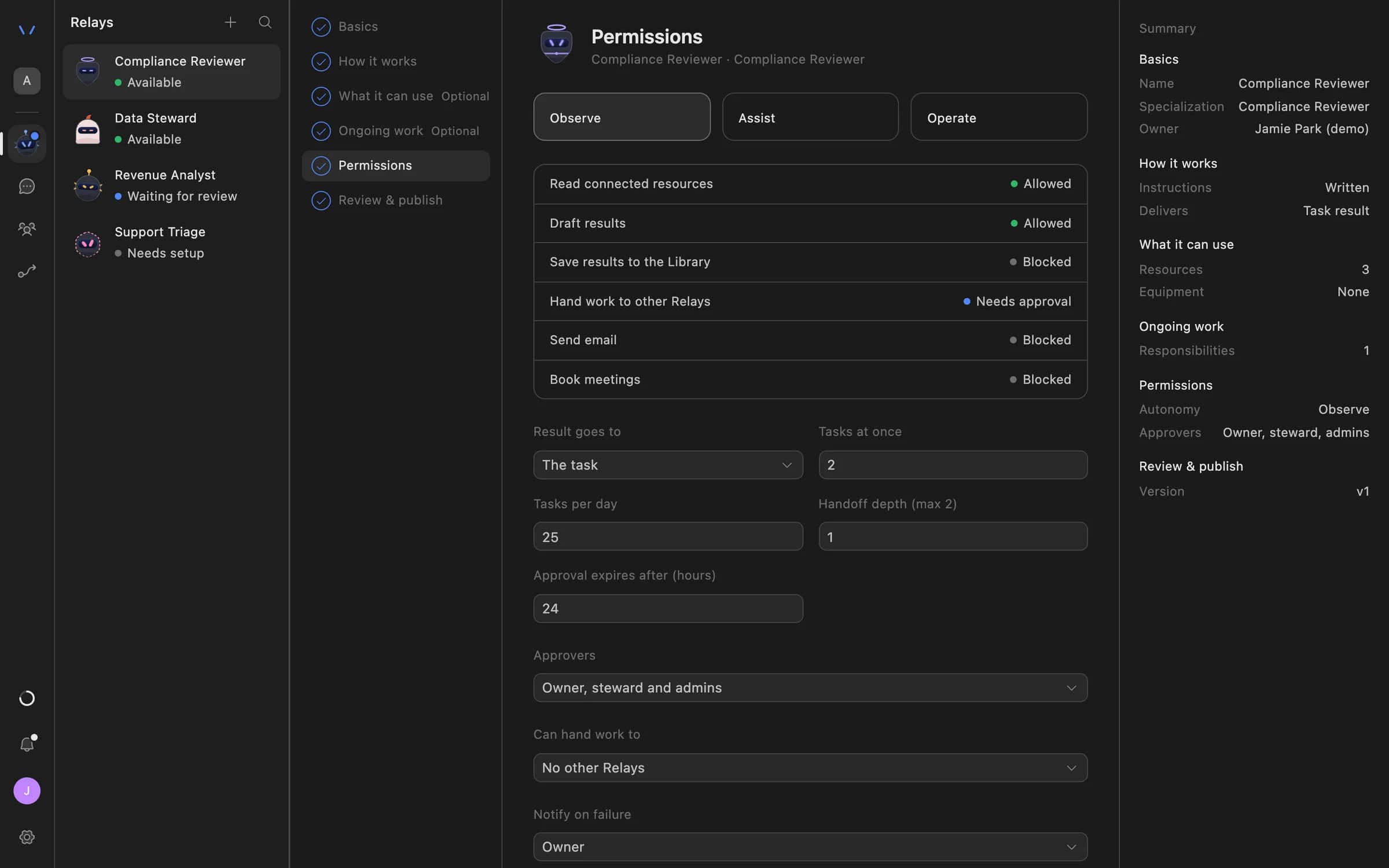
The Agent Serve Permissions step sets Observe, Assist or Operate, which actions need approval, and who approves, before a Relay touches a case.

  • Up to 20 named approvers
  • Reviews expire after 1 to 168 hours
Relay setup in Agent Serve on the Permissions step: Observe, Assist and Operate autonomy levels, each action marked Allowed, Needs approval or Blocked, daily task limits, approval expiry and who can approve.
04 · Audit

Every decision on the record

Agent Serve writes Relay proposals, approvals and declines to the workspace audit log, and each workflow run keeps a block-by-block trace.

What does the work

The parts of Agent Serve behind each alert.

  1. 01Workflows

    Receive and draft

    A workflow takes each alert by webhook, gathers evidence and drafts the summary.

  2. 02Tables

    Hold activity and alerts

    Tables hold transactions, counterparties and the alert queue, with row limits by team.

  3. 03Rules

    Define typologies

    Rules flag the transactions that match each typology or threshold.

  4. 04Monitors & alerts

    Watch volumes

    A Rule match monitor alerts when matching rows pass the limit you set.

  5. 05Relays

    Review the backlog

    A Compliance Reviewer Relay drafts findings when the monitor alerts.

Examples

Alert queues in banks and payment firms.

Three financial crime queues teams run on Agent Serve, each with an investigator making the decision.

Retail banking · AML

Transaction monitoring alerts

Each alert reaches an Agent Serve workflow by webhook, the customer’s history is summarized from tables, and an investigator decides.

  1. Alert in
  2. History read
  3. Summary drafted
  4. Investigator decides
Payments · Financial crime

Threshold watch on merchants

An Agent Serve rule flags merchant transactions at or above the reporting threshold, and a Rule match monitor alerts the team.

  1. Rows match
  2. Monitor fires
  3. Relay reviews
  4. Lead approves
Banking · Investigations

Case narratives

An Agent Serve workflow drafts the case narrative from the evidence table in a fixed structure, and the investigator edits and signs it off.

  1. Case opened
  2. Evidence listed
  3. Narrative drafted
  4. Investigator signs

Examples show what teams can build in Agent Serve. They describe patterns, not named customer deployments.

Governance

Investigators decide, and every step is traced.

Agent Serve keeps the decision with a person, masks personal data and records what each run did.

Security and governance
  • Personal data masked

    The Agent Serve Guardrails block detects personal data such as account numbers and masks it before the draft reaches the next step.

  • Rows by team

    Agent Serve row limits keep each investigation team to its own alerts in tables, dashboards and exports.

  • Approvals before action

    Relays never send email or book meetings without an approval, under any autonomy setting. An approval covers the exact payload the reviewer saw and expires if nobody decides.

  • Audit trail

    Proposals, approvals, declines and executed actions are written to the workspace audit log, which admins can export.

  • Run logs

    Every workflow run records each block’s inputs, outputs and errors, so a reviewer can trace how a result was reached.

  • Roles and permission groups

    Admin, write and read roles per workspace, plus permission groups that limit which models, blocks and integrations a team can use.

  • SSO and SCIM

    Sign in through your identity provider with SAML 2.0 or OIDC, and provision people with SCIM.

  • Self-hosting

    Run Agent Serve in your own cloud or data centre, next to the systems it reads.

  • Zero data retention

    Zero data retention with supported model providers, backed by your own provider keys and agreements or self-hosted models. Some provider features keep data by design, such as Gemini Deep Research, so they are outside zero data retention.

  • Bring your own keys

    Use your organisation’s own model provider keys at organisation or workspace level.

Further reading

Alert triage and narratives, in depth.

Questions

About AML alert triage

Does Agent Serve close or file alerts on its own?

No. In this Agent Serve workflow a Human step pauses every alert until an investigator records the decision. Agent Serve gathers evidence and drafts; people decide.

How do alerts reach Agent Serve?

Your monitoring system can send each alert to an Agent Serve webhook, or alerts can arrive as new rows in a workspace table, which starts the workflow.

Is personal data sent to the model?

You choose. Agent Serve can mask personal data with a Guardrails step, use zero data retention with supported model providers, or run self-hosted models inside your network.

Can we see how a summary was produced?

Yes. Agent Serve Logs keep each block’s inputs and outputs for every run, so a reviewer can trace which records the summary used.

What can we run first?

A team can start with the Agent Serve triage workflow, the alerts table and a Guardrails step, then add typology rules, a Rule match monitor and a Compliance Reviewer Relay.

Last updated

Enterprise access

Put AI agents to work across your team

Agent Serve is available to teams by invitation. Tell us what you want to build and we will set up your workspace with you.