Agent Serve · Integrations

Connect the tools your team already runs on.

Agent Serve agents read and act across your CRM, messaging, warehouse and documents. Connect a tool once; every agent can use it.

Agent Serve integrations connect business applications to Agent Serve, the AI workspace where teams build, deploy, and manage AI agents, as blocks with actions and real-time triggers that agents and workflows use.

integrations

262

integrations

actions agents can take

5,000+

actions agents can take

with real-time triggers

62

with real-time triggers

connect with one-click OAuth

56

connect with one-click OAuth

How it works

From sign-in to an approved action.

Agent Serve turns a connected tool into actions an agent can call and events that can start a run.

  1. 1

    Connect the tool

    Sign in with OAuth or add an API key. Agent Serve stores the credential encrypted.

  2. 2

    Share the credential

    Add members to the credential, so the right people in the team space can use it in their agents.

  3. 3

    Let the agent pick tools

    Give an Agent block the tools it needs and a goal in plain language. It decides which actions to call, and in what order.

  4. 4

    Trigger and approve

    A real-time trigger starts the run from an event, and outbound messages can wait for a person to approve them.

Categories

Browse by category.

Agent Serve integrations cover 16 categories, from sales and support to data, security, and developer tools.

Catalog

Every integration.

Search by tool, action, or trigger — each page lists exactly what Agent Serve agents can do with it.

Agent Live

Connect once. Use it in every call.

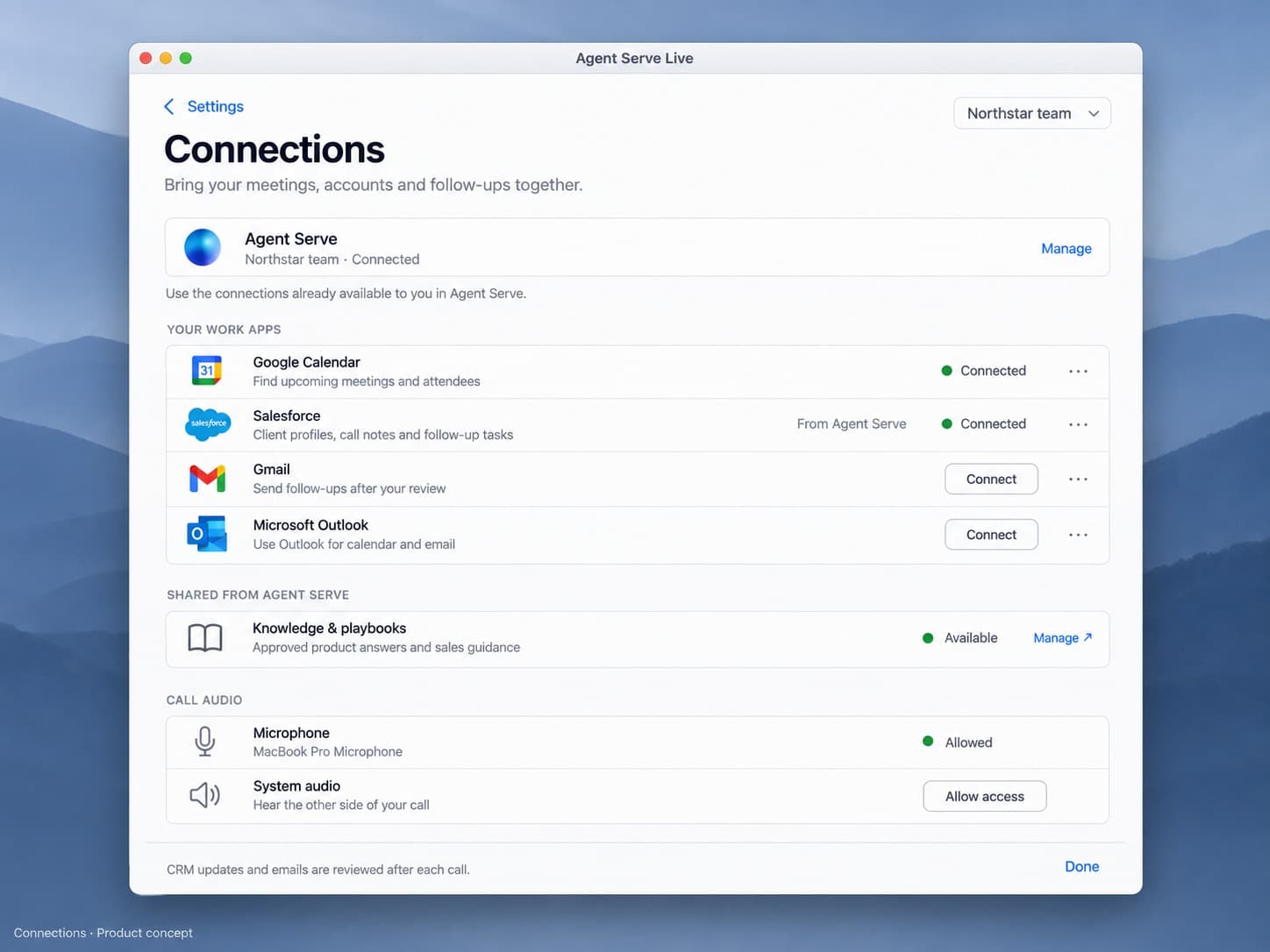
Agent Live, our real-time assistant for sales and support calls, reuses the connections your team sets up in Agent Serve.

About Agent Live
  • Google CalendarFinds upcoming meetings and who is attending
  • SalesforceAccount history, call notes and follow-up tasks
  • GmailSends follow-ups after you review them
  • OutlookCalendar and email for Microsoft 365 teams
Agent Live connections: Google Calendar, Salesforce, Gmail and Outlook, plus knowledge and playbooks shared from Agent Serve.

In depth

Events in, checked actions out.

How Agent Serve starts runs from your tools, lets agents act in them, and keeps a person in the loop.

01 · Triggers

Start a run from an event

Agent Serve integration triggers start a workflow when something happens in the tool, such as a new message, ticket or deal update.

  • Copy the trigger’s webhook URL into the tool
  • Webhook Trigger receives events from any service
  • Duplicate events are skipped by a field you choose
02 · Agents

Agents choose the action

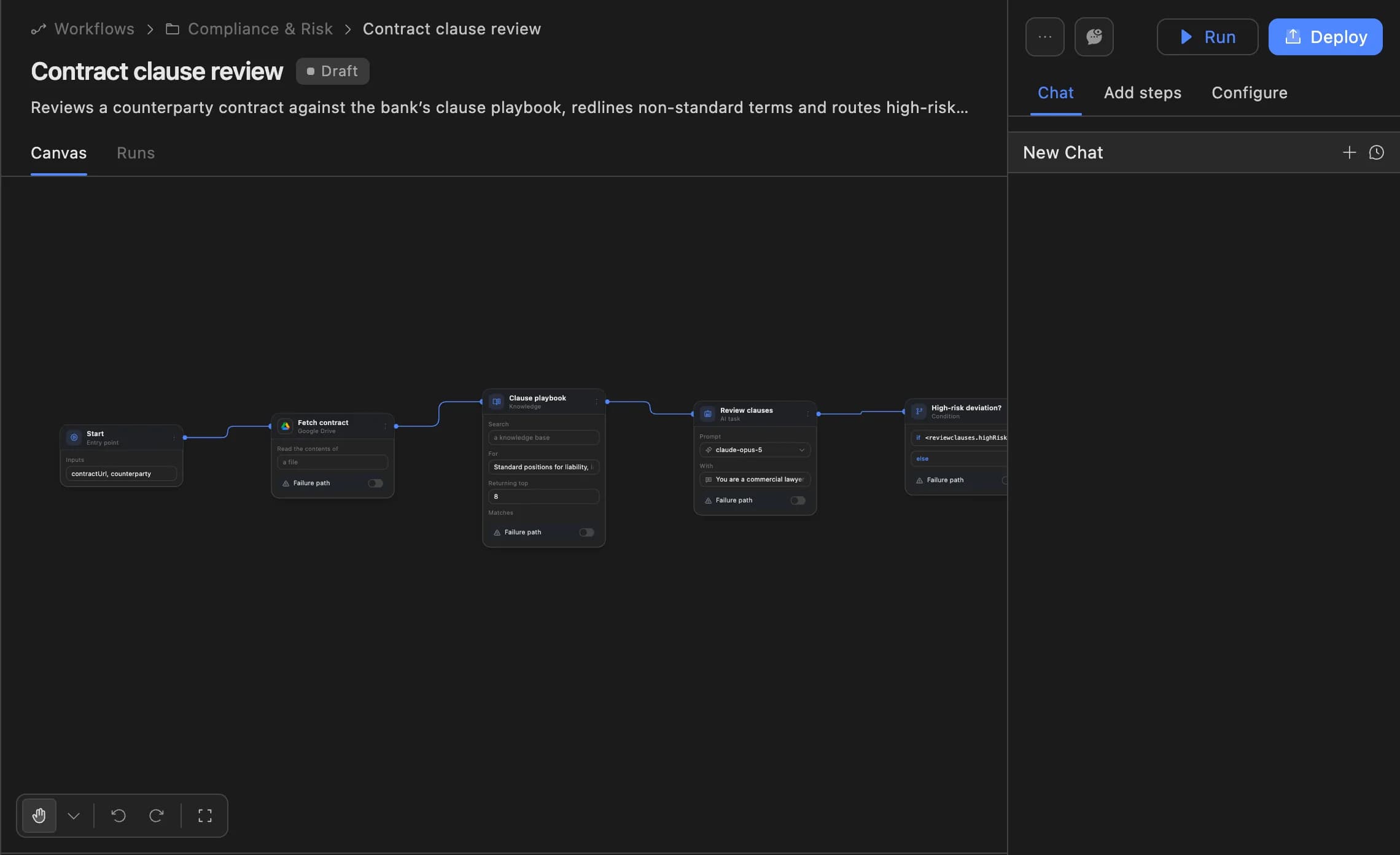
An Agent Serve Agent block receives the integration tools you allow and decides which to call, in order, from the goal you describe.

  • Each integration page lists every action and trigger
  • Mix integrations in one workflow
  • Run history shows every call an agent made
The Agent Serve workflow builder showing a contract clause review agent: start, fetch contract, clause playbook, review clauses and a high-risk deviation branch, with Run and Deploy buttons.
03 · Approvals

A person checks the message

When an Agent Serve Relay sends email from Gmail or Outlook, a reviewer approves the exact message first, under every autonomy setting.

  • Approve or decline the exact message
  • Reviews expire if nobody decides
  • Recipient policy: internal only, allowlist or anyone

Beyond the catalog

Reach any system, listed or not.

When a tool is not in the catalog, Agent Serve still reaches it through its API, webhooks, your own code or a shared tool standard.

Use any API

The Agent Serve API block calls any REST endpoint with GET, POST, PUT, DELETE or PATCH, query parameters and headers.

POST https://core.example.com/v2/cases

Send and receive webhooks

The Agent Serve Webhook block sends signed payloads, and Webhook Trigger receives events from any service, with an optional authentication token.

Webhook URL · Payload · Signing Secret

Custom tools

Write your own tool for Agent Serve agents in Settings → Custom tools: a title, a JSON schema and the code it runs.

lookup_policy_holder(policy_id)

Connect MCP servers

MCP is a standard way for AI apps to share tools. Agent Serve connects to MCP servers in Settings → Tool connections, so agents can use their tools.

Streamable HTTP · headers or OAuth

Share workflows as tools

Agent Serve can expose a team space’s workflows as tools on its own MCP server, for other AI apps to call.

Settings → MCP servers

Credentials with members

Each Agent Serve credential has members with an admin or member role. Team space admins manage every credential.

Settings → Secrets · Members (3)

Under the hood

Agent Serve integrations, in detail.

Agent Serve integrations, in detail.
AuthenticationOAuth sign-in, API key, or no authentication, depending on the tool.
CredentialsEncrypted at rest, shared at team space level with named members, or kept personal.
TriggersReal-time triggers on many integrations, plus Webhook Trigger for events from any service.
Duplicate eventsWebhook Trigger skips repeats of a chosen deduplication field for 7 days.
Any REST APIThe API block, with GET, POST, PUT, DELETE and PATCH, query parameters and headers.
MCP serversConnect over Streamable HTTP with no auth, headers or OAuth; expose workflows as tools.
Custom toolsA title, JSON schema and code, defined per team space.
CatalogOne page per integration, listing its actions, triggers and authentication.

Governance

Decide which tools each team may touch.

Agent Serve access policies narrow integrations and tools per group, and credentials stay with the people they are shared with.

Security and governance
  • Allowed integrations and tools

    Agent Serve access policies list the integrations a group may use, deny single tools, and can switch off MCP tools, custom tools and webhook triggers.

  • Personal credentials

    An Agent Serve access policy can hide personal credentials, so a group works only with credentials shared in the team space.

  • Allowed MCP domains

    Whoever runs an Agent Serve deployment can limit MCP server connections to an allowlist of domains.

  • Approvals before action

    Relays never send email or book meetings without an approval, under any autonomy setting. An approval covers the exact payload the reviewer saw and expires if nobody decides.

  • Roles and permission groups

    Admin, write and read roles per workspace, plus permission groups that limit which models, blocks and integrations a team can use.

  • Run logs

    Every workflow run records each block’s inputs, outputs and errors, so a reviewer can trace how a result was reached.

  • Self-hosting

    Run Agent Serve in your own cloud or data centre, next to the systems it reads.

Before and after

Fewer scripts, more governed actions.

Fewer scripts, more governed actions.
WorkBeforeWith Agent Serve
Connecting a toolBeforeA script per tool, each with its own copy of the key.With Agent ServeOne credential in Agent Serve, shared with named members.
Deciding what to callBeforeHard-coded steps that break when the case changes.With Agent ServeAn agent picks the actions it needs from the tools you allow.
Reacting to eventsBeforePolling jobs that run late or twice.With Agent ServeReal-time triggers, with duplicate events skipped.
Messages to clientsBeforeSent by a script with no one checking.With Agent ServeRelays wait for a person to approve the exact email.

Works with

Connected tools, used across the workspace.

Further reading

Workflows that use connected tools.

Questions

Frequently asked questions

How do integrations work in Agent Serve?

Each integration is a block you drag onto Agent Serve's workflow builder. Together, Agent Serve's 262 integrations expose 5013+ tools that AI agents can call. 56 connect with one-click OAuth, and the rest use an API key or no authentication at all. Wire blocks together, add an AI agent block for reasoning, and run.

How do I choose integrations for my team?

Start with the systems your process already depends on. Request access to review supported actions, authentication requirements, and deployment options with our team. Third-party service charges may apply.

Can an AI agent decide when to use an integration?

Yes. This is the core of Agent Serve. You give an agent access to integration tools and describe the goal in plain language; the agent decides which tools to call, in what order, and how to handle the results. You choose which tools are available and define the instructions for the task.

Can external events trigger my agents automatically?

Yes. 62 Agent Serve integrations include real-time webhook triggers. Add a trigger block to your agent, copy its webhook URL into the external service, and matching events can start the configured workflow. Trigger support varies by integration.

How many integrations does Agent Serve support?

Agent Serve supports 262 integrations across messaging, CRMs, databases, developer tools, AI providers, and more, and the catalog grows continually. If a tool you need is missing, request it below and we can discuss your requirements.

Missing a tool?

Don’t see the tool you need?

Tell us what your team uses and we’ll prioritise it. Agent Serve can also call any REST API directly while an integration is on the way.

Enterprise access

Put AI agents to work across your team

Agent Serve is available to teams by invitation. Tell us what you want to build and we will set up your workspace with you.